





+18 - Check if the casino you want to register with is eligible in your country.
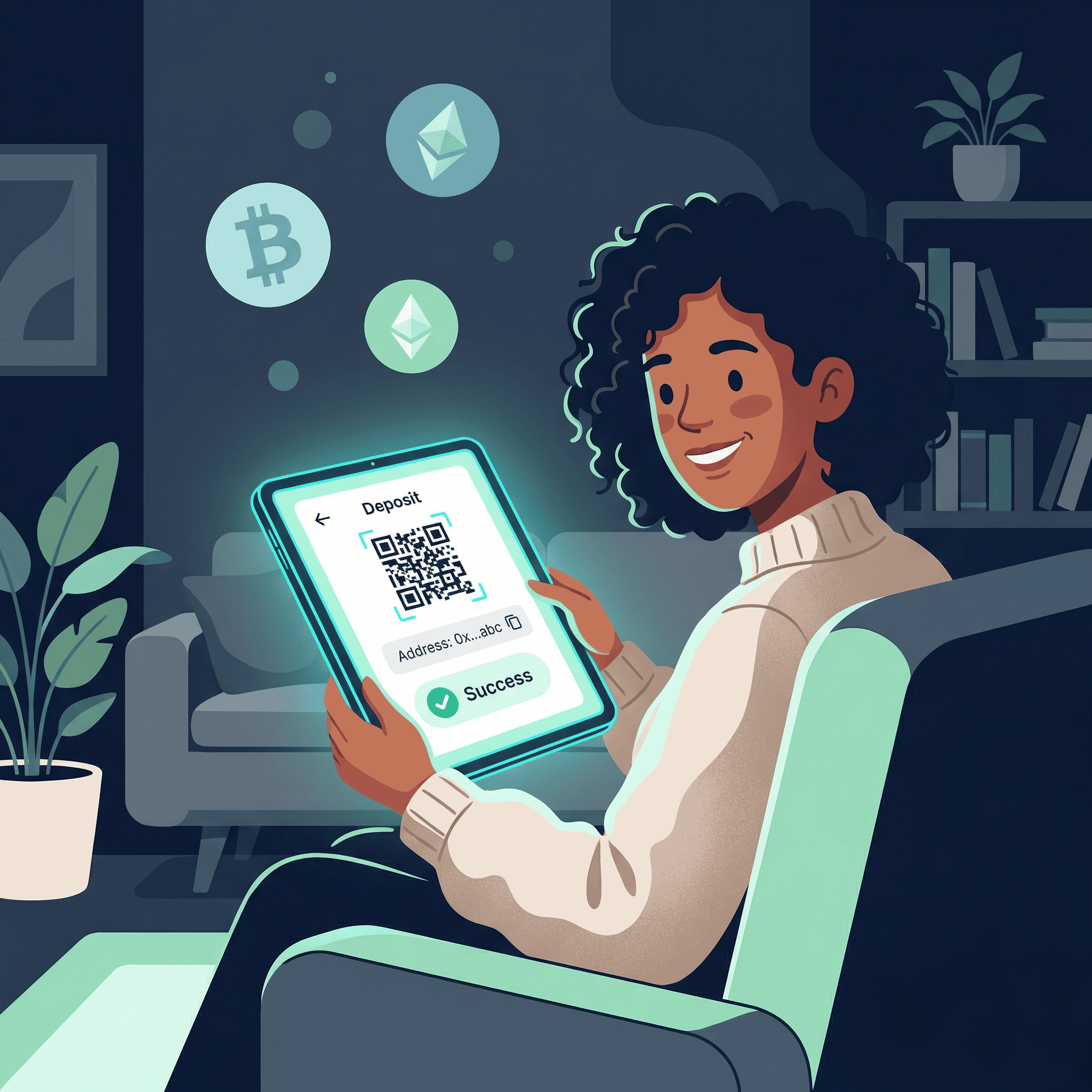
Every crypto deposit follows the same basic process, regardless of which cryptocurrency you are sending or which wallet you are using. Let us walk you through it.
Here are the universal steps that apply to all cryptocurrencies:
We will explain each step in detail below, but this is the backbone of every deposit. Once you understand this flow, you can deposit any supported cryptocurrency.
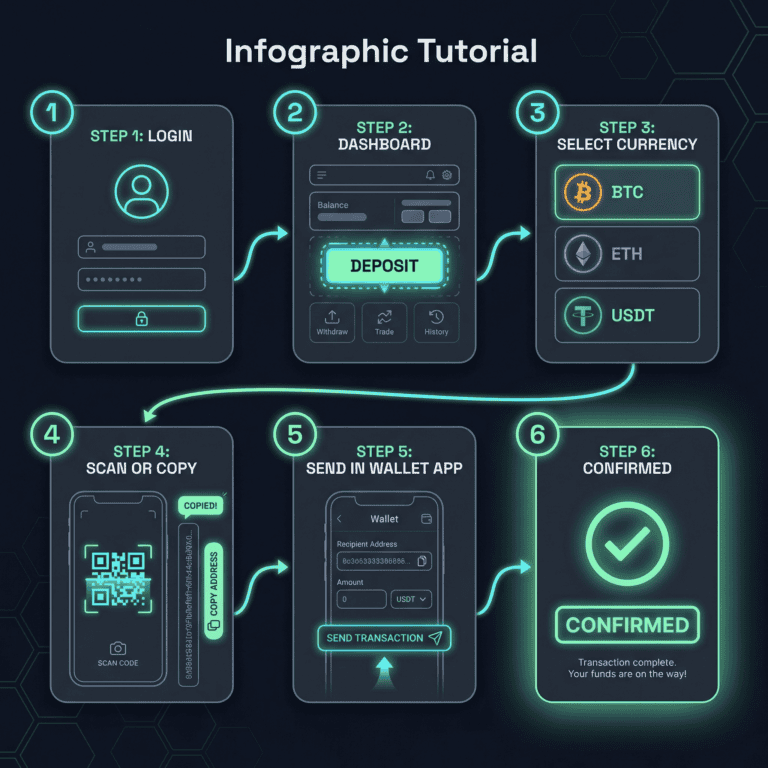
Start by logging into your account on our website or mobile app. Use your email and password (or biometric login if enabled). Once logged in, you will see your account dashboard.
Look for the Deposit button or link in your account menu. This is usually on the main dashboard or under an Account or Wallet section. Click it.
You will see a list of supported cryptocurrencies. Select the one you want to deposit (Bitcoin, Ethereum, USDT, USDC, etc.). If you are unsure which to use, Bitcoin and Ethereum are the most common and widely supported.
We will generate a unique deposit address for you. This address is like a mailbox: it is specific to your account, and only funds sent here will be automatically credited to you.
Important: Copy the address by clicking the copy button. Do not type it manually. Even one wrong character sends your funds to the wrong place.
Alternatively, if you are depositing from your phone, you can scan the QR code with your wallet app instead of copying the address.
Open your cryptocurrency wallet (MetaMask, Trust Wallet, Ledger) or your exchange (Coinbase, Binance, Kraken). Look for the Send or Withdraw option. Paste the address you copied, enter the amount you want to deposit, and review the transaction details. Then send.
Your wallet or exchange may show a network fee (blockchain cost). This is normal and necessary. You will need to approve this fee to proceed.
Your transaction is now on the blockchain. You will see it as Pending in your deposit history. The blockchain needs several confirmations (verifications) before we can credit your account. This typically takes 1–30 minutes, depending on which cryptocurrency and network you used.
Once confirmations are complete, your funds will appear in your account balance and are ready to use.
Bitcoin is the most recognized cryptocurrency, but it is also one of the slowest to confirm. Here is what you need to know.
Bitcoin has two main ways to deposit: the Bitcoin Mainnet (the standard blockchain) and the Lightning Network (a faster layer built on top).
Bitcoin Mainnet: This is the most common method. It is secure but slower. Typical time: 15–60 minutes. Fees are variable, usually $1–$5.
Lightning Network: This is much faster (seconds to minutes) and cheaper, but less commonly supported. If we offer it, choose it for speed and lower fees.
If you are unsure, use the Mainnet. It is the safest, most widely supported option.
Bitcoin mainnet typically confirms in 15–60 minutes. During periods of high network activity (market volatility, major events), confirmation times can stretch to 1–2 hours. Network fees are not fixed; they depend on how busy the network is. You will see the estimated fee before you send.
The most common mistake is sending to the wrong address. Bitcoin addresses are long (26–35 characters) and look random. Always copy-paste the address; never type it. Another mistake is not waiting long enough before assuming the deposit is lost. Bitcoin can take an hour. Check the blockchain explorer (blockchain.com) to verify your transaction is progressing.
Ethereum deposits are faster than Bitcoin and work well for larger amounts. Here is what you need to know.
Ethereum mainnet is the primary Ethereum blockchain. When you deposit Ethereum (ETH) or ERC20 tokens (like USDT or USDC on Ethereum), they use the Ethereum mainnet by default. This is secure and widely supported.
ETH is the native Ethereum coin. ERC20 is a standard for tokens built on Ethereum. Popular ERC20 tokens include USDT, USDC, and DAI. The deposit process is identical for both; just select the token you want to send in Step 3.
Ethereum typically confirms in 5–15 minutes. Gas fees (network costs) are higher than newer networks but lower than Bitcoin. Expect $5–$30 depending on network congestion. If fees are very high, you can wait a few hours for congestion to decrease, or choose a different network (like Polygon) for the same token.
Stablecoins are cryptocurrencies tied to the US dollar (or another fiat currency). They do not fluctuate in price, which makes them popular for deposits. USDT is the most common. Here is the critical thing to understand: stablecoins can exist on multiple networks.
USDT exists on Ethereum (ERC20), Tron (TRC20), Polygon, and other networks. Each network version is identical in value but uses different networks to move money.
ERC20 (Ethereum): Secure, widely recognized. Fees higher. Time: 5–15 minutes.
TRC20 (Tron): Very fast and very cheap. Fees often under $1. Time: instant to 60 seconds. Excellent for small to medium deposits.
Polygon: Fast, cheap, Ethereum-compatible. Fees under $1. Time: 1–5 minutes. Growing in popularity.
All three options are equally safe. The only difference is speed and cost. If we support multiple networks for USDT, choose based on your priority: speed (Tron), cost (Polygon or Tron), or security (Ethereum).
USDC, BUSD, and other stablecoins work the same way. You will choose the network when depositing. Check which networks we support for each stablecoin.
Stablecoins do not lose value while you wait for confirmation. If you deposited a volatile coin like Bitcoin and had to wait an hour, the price might drop. With a stablecoin, it stays at $1 (or whatever it is pegged to). This removes price risk during the deposit waiting period.
We support many cryptocurrencies beyond Bitcoin, Ethereum, and stablecoins. Litecoin, Dogecoin, Ripple (XRP), and others follow the same basic deposit process: select the crypto, copy the address, send from your wallet, and wait for confirmations.
Timing and fees vary by coin. If you are unsure about a specific coin, contact our support team or check the deposit page for timing estimates.
You can deposit from two types of sources: a personal wallet or a cryptocurrency exchange. The process is identical from our end; the only difference is the sending platform.
These are personal wallets you control. In MetaMask or Trust Wallet, go to Send or Withdraw, paste our deposit address, select the network, enter the amount, and confirm. The wallet will show a gas fee; approve it and the transaction will send.
These are exchanges. Go to Withdraw, select the cryptocurrency, paste our deposit address, select the network if prompted, enter the amount, and confirm. Some exchanges may ask for a memo or destination tag (for certain coins like XRP). Do not skip this if asked; it is required. The process is otherwise identical to a personal wallet.
Hardware wallets are physical devices that store your crypto offline for security. Connect your hardware wallet to your computer or use the mobile app. Send from there the same way you would send from MetaMask or Trust Wallet. The extra security step (confirming on the device) is normal.
—
If you see terms like ERC20, TRC20, or BEP20 when depositing, you are choosing which network to use. This is one of the most common sources of confusion, so let us clarify it.
Think of networks as shipping routes. Bitcoin uses the Bitcoin network. Ethereum uses the Ethereum network. But some cryptocurrencies (especially stablecoins like USDT) can travel on multiple networks. Choosing the right network ensures your crypto arrives quickly and cheaply.
If you pick the wrong network, your funds may not appear in your account (and recovery may be difficult). If you pick the right network but the wrong address, your funds are lost permanently. This section helps you pick the right network. The address section below covers sending to the wrong address.
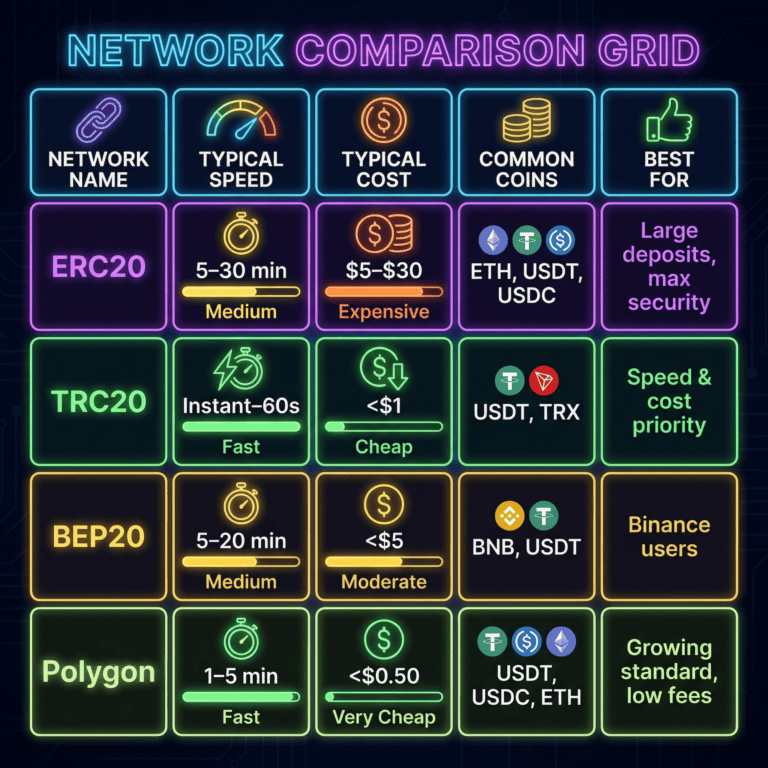
ERC20 is the standard Ethereum network. It is the most secure and widely recognized. Most large-cap cryptocurrencies and tokens are available on ERC20.
Speed: 5–30 minutes (depends on congestion).
Cost: $5–$50+ during peak times. Lower during off-peak.
Best for: Large deposits where security is the priority. Users who prefer Ethereum ecosystem tokens.
Common coins: Ethereum (ETH), USDT, USDC, DAI.
TRC20 is the Tron network. It is newer and less well-known than Ethereum, but it is very fast and very cheap. It is especially popular in Asia.
Speed: Instant to 60 seconds.
Cost: Under $1 (often nearly free).
Best for: Cost-conscious users and frequent small deposits. Users who want instant or near-instant confirmation.
Common coins: USDT (very common on TRC20), TRX (Tron native token).
BEP20 is the Binance Smart Chain network. It is fast, cheap, and compatible with Ethereum tools (like MetaMask). It is growing in popularity.
Speed: 5–20 minutes.
Cost: Under $1 to $5.
Best for: Balance of speed, cost, and security. Users familiar with Binance.
Common coins: Binance Coin (BNB), USDT, BUSD.
Polygon is a layer-2 network built on top of Ethereum. It combines Ethereum’s security with very fast and cheap transactions.
Speed: 1–5 minutes.
Cost: Under $0.50 (usually pennies).
Best for: Users who want Ethereum security with faster speed and lower cost. Becoming the standard for low-fee deposits.
Common coins: USDT, USDC, Ethereum, Polygon (MATIC).
We may support other networks depending on the cryptocurrency. Each has unique characteristics:
For each supported cryptocurrency, we will show you which networks are available. Pick based on your priority.
Here is the decision framework:
Most deposits confirm within 30 minutes regardless of network. Unless you need instant confirmation or have a specific preference, any supported network is fine.
If you select the wrong network, your deposit will not appear in your account. Here is the critical distinction:
We address the unrecoverable scenario in detail below. For now, the takeaway: choose the network carefully, but if you pick the wrong one, contact us immediately. There is a chance we can fix it.
—
Your deposit should appear in your account within minutes to half an hour. If it has not, do not panic. Most delays are just the blockchain doing its job. Let us walk through the diagnostic steps.
Deposits are not instant. When you send crypto, the transaction has to propagate to the blockchain network (30 seconds to 2 minutes), then get confirmed by miners or validators (seconds to minutes), then sync with our system. Total time: 1–5 minutes typically, longer if the network is busy.
If it has been less than 5 minutes, wait. Grab a coffee. Most deposits appear within this time frame. If you are still not seeing it after 10 minutes, proceed to the steps below.
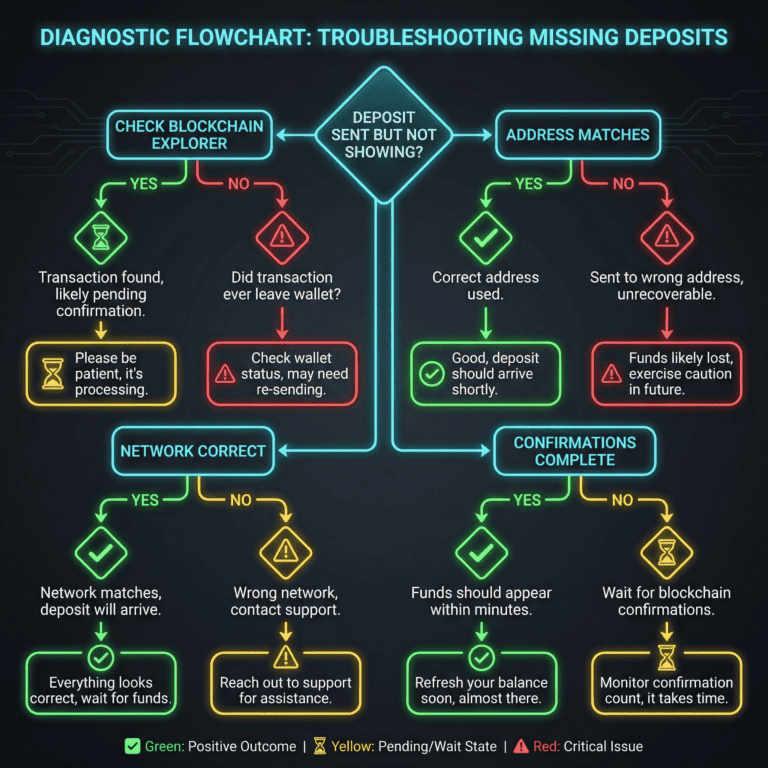
The blockchain is like a public ledger. Every transaction is recorded. If your deposit is on the blockchain, it will arrive eventually.
To check the blockchain, use a blockchain explorer. These are free, public tools:
How to check: Go to the explorer, paste your deposit address in the search box, and hit Enter. You will see all transactions to that address. Look for your transaction. If you see it, the funds are definitely coming. If you do not see it, the transaction either failed or was never sent from your wallet.
If you see it: Move to Step 4 below (checking confirmations).
If you do not see it: Check your wallet or exchange. Did the withdrawal actually send, or did it fail? Look at your transaction history on the sending platform. If it shows failed, try again. If it shows pending, wait for it to go through before checking the blockchain again.
Blockchain addresses are exact. One wrong character sends funds to the wrong place.
How to verify: Go to your account deposit history. Find your recent deposit. Compare the receiving address to the one we gave you on the deposit page. They must match exactly, character for character.
Pro tip: You can use Ctrl+F (or Cmd+F on Mac) to search for a portion of the address in both places. If they do not match, the funds went to a different address.
If the address matches: Proceed to Step 3 (checking network).
If the address does not match: Unfortunately, if you sent to a different address, the funds are in someone else’s wallet. We will address this in detail in the “Wrong Address” section below. The short answer: wrong address deposits are not recoverable.
This is the most common error with stablecoins like USDT. You might have sent USDT on Ethereum, but we only accept USDT on Polygon. In that case, your deposit will not appear in your account, but it may be recoverable.
How to check: Go to the blockchain explorer, find your transaction, and look at which network it is on. Compare this to which networks we accept for that cryptocurrency.
If it is on a different network than we support, this is fixable. Contact support immediately with your transaction hash (a long string of letters and numbers identifying your transaction). We will assess whether we can recover the funds. Recovery is possible but not guaranteed; it depends on technical feasibility.
If the network matches: Proceed to Step 4 below.
Blockchain confirmations are like verification steps. Each confirmation adds security. Once your transaction has enough confirmations, we credit your account.
Typical confirmation requirements:
How to check: Look at your deposit history in your account. It should show something like “Pending: 3 of 12 confirmations.” This means the transaction is on the blockchain and progressing. No action needed; just wait.
You can also check the blockchain explorer. It will show the current confirmation count for your transaction.
If you see pending confirmations: Your deposit is on the way. Wait for all confirmations to complete. Once done, your balance will update instantly.
If confirmations show complete but your account still shows pending: Rare, but it happens. Refresh your page or wait 5 minutes. Our system sometimes takes a few extra minutes to sync. If it still shows pending after 10 minutes, contact support.
Confirm the withdrawal was successful on the sending side.
In MetaMask, Trust Wallet, or Ledger: Look at your activity or transaction history. Find the outgoing transaction. What does it say? Confirmed? Pending? Failed? If it says failed, the deposit never left your wallet. Try again.
In Coinbase, Binance, or Kraken: Go to Withdraw history. Find your withdrawal. Does it show completed? If yes, the funds are in motion. If it shows pending, wait. If it shows failed, you can retry.
If the sending transaction is confirmed: Combine all the checks above. If blockchain explorer shows it, address matches, network is correct, and confirmations are progressing, your deposit is arriving. Just wait.
At this point, we need your help to investigate. Gather the following information:
Contact our support team with this information. We will investigate and get back to you. Most issues resolve within 24 hours.
—
This is a high-anxiety scenario, but let us be clear about what is recoverable and what is not.
If you sent to an address that is not one of our deposit addresses, the funds are now in someone else’s wallet or a lost address. The blockchain is permanent and immutable. No one can reverse transactions. We cannot retrieve funds from another wallet.
This is true for all blockchains and all platforms. It is a security feature of cryptocurrency: only the person who holds the private key to that address can move the funds.
We are very sorry, but funds sent to the wrong address are not recoverable. This is why verification is so important.
What to do now: If this just happened, contact our support team immediately. In rare cases, the address might have been one we recently deactivated or one you misread. We will check. But if it is truly a different address, there is nothing we or anyone can do.
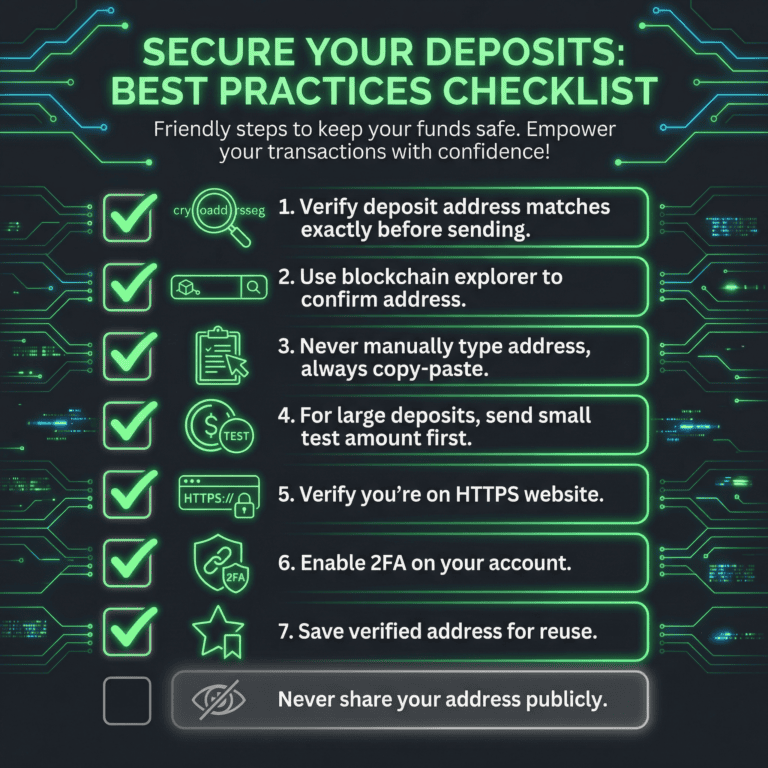
For the future: Always copy-paste addresses, never type them. For large amounts, send a small test amount first. Use a checksum verification tool if available.
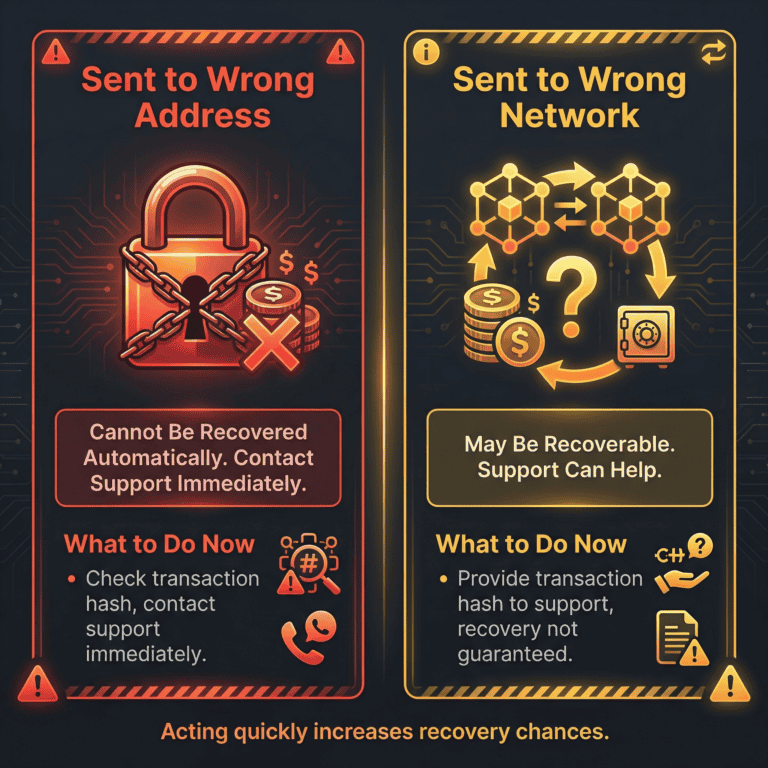
If you sent to our correct address but on the wrong network (for example, USDT on Ethereum instead of Polygon), there is hope. Here is why: the address exists on multiple blockchains, so the funds are technically in a wallet we control, just on the wrong chain. Recovery depends on technical feasibility, but it is possible.
What to do: Contact support immediately with:
Our team will assess recovery options. This may take 24–48 hours.
Manage expectations: Not all wrong-network deposits can be recovered. It depends on the network pairing and our technical capabilities. But if you act immediately, we have the best chance of helping.
Some cryptocurrencies, like Ripple (XRP) and Stellar (XLM), require a memo or tag in addition to the address. Think of it like an address and apartment number. If you send to the address without the memo, the funds land in a shared wallet, not your individual account.
If this happened: Contact support immediately with your transaction hash. We will manually credit your account once we verify the deposit. This usually takes 24 hours.
Our deposit page clearly indicates if a memo or tag is required. Always read the deposit instructions for each cryptocurrency.
If your deposit was sent to a truly different address (not ours) on the blockchain, it is permanent. Blockchains are designed to be irreversible; that is their core security feature.
We understand this is frustrating. But here is what you can do now:
—
You want to know where your deposit is at every moment. Here is how to track it and what each status means.
Log in to your account and go to the Deposits section (usually under Account or Wallet). You will see a list of all your deposits with the following details:
Pending means the transaction is on the blockchain but not yet fully confirmed. Confirmed means all confirmations are complete and you can use the funds.
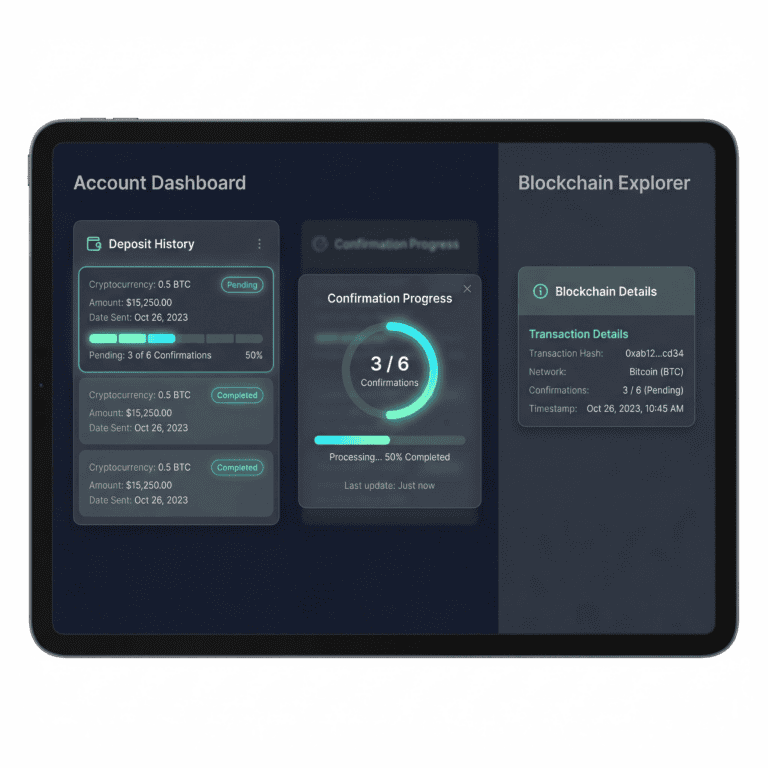
Blockchain confirmation is like mail traveling through a postal system. Each confirmation is another sorting office handling your letter. Once it reaches enough sorting offices (usually 3–12, depending on the blockchain), it is considered fully delivered and secure.
Each blockchain has a different confirmation requirement:
This is automatic. You do not need to do anything. The network handles it. And you cannot speed it up; we all have to wait.
Typical timing:
These times assume normal network conditions. During peak congestion (market crashes, major events), times can stretch significantly. Bitcoin might take 2 hours. Ethereum might take 30 minutes. But it always eventually confirms.
Once fully confirmed, your balance updates instantly and you can use the funds.
For the impatient: you can check your exact confirmation status on the blockchain before we credit your account.
Go to the relevant blockchain explorer (Etherscan for Ethereum, Tronscan for Tron, etc.), paste your deposit address, and search. You will see your transaction with the current confirmation count. This is the source of truth. If it shows confirmed, your funds are ours and will be credited. If it shows pending, your funds are on the way.
Confirmed on the blockchain does not always mean confirmed in our system immediately. Sometimes our system takes a few extra minutes to sync. Refresh your page. If it still shows not credited after 5 minutes, refresh again. Our system usually catches up within 10 minutes.
If it has been over 30 minutes and the blockchain shows confirmed but your account does not, contact support. If the blockchain shows confirmed, your funds are definitively ours and will be credited. No funds are ever lost at this stage.
—
Deposit bonuses are free money we add to your account when you deposit. But they come with conditions. Let us explain how they work and what they actually mean for you.
A deposit bonus is free funds we credit to your account when you make a qualifying deposit.
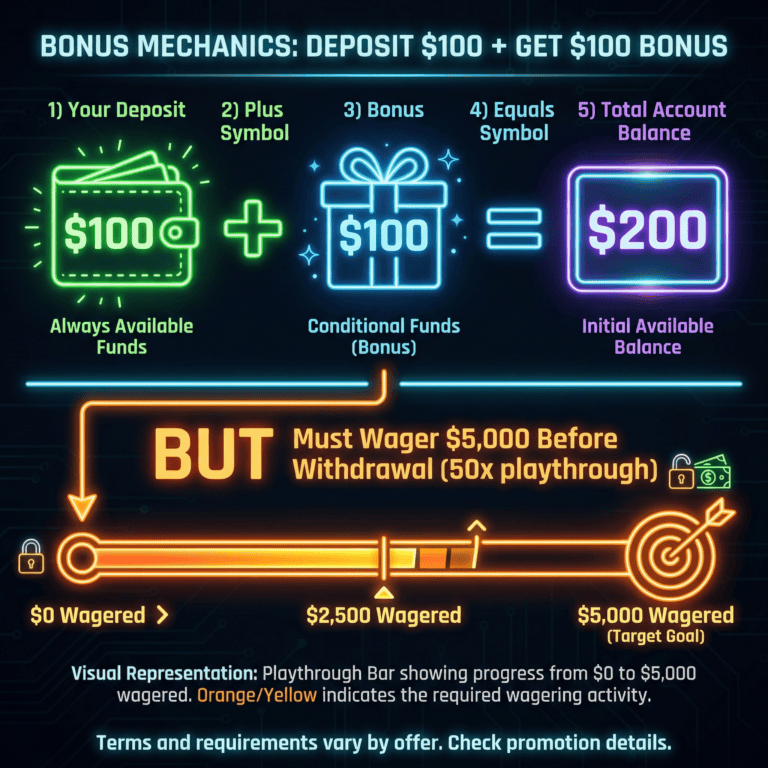
Example: You deposit $100. We add a $100 bonus. You now have $200 in your account.
The catch: Bonuses usually come with a wagering requirement. You have to bet the bonus (and sometimes your original deposit) a certain number of times before you can withdraw the bonus money. This is called playthrough.
Your original deposit is always yours. Only the bonus funds have wagering requirements.
Your first deposit often qualifies for our most generous bonus. A common offer is “100% match up to $500.” Here is what that means:
Some bonuses require a promo code. Find the code on our promotions page, enter it at checkout, and the bonus credits automatically. If you forget the code, contact support; we can apply it retroactively in many cases.
After your first deposit, we offer reload bonuses on subsequent deposits. These are smaller than the first deposit bonus but still worthwhile. A typical reload might be “50% match up to $250.”
Reload bonuses usually apply once per day or once per week, depending on our current promotion. Check the promotions page regularly for active offers.
The wagering requirement (or playthrough) is how many times you must bet the bonus before you can withdraw it.
Example: $100 bonus, 50x wagering requirement. You must wager $5000 total (100 × 50) before the bonus becomes withdrawable. All your bets across all games count toward this total.
Important: This applies to the bonus only. Your original deposit is always available. The wagering requirement just means you cannot withdraw the bonus money until you have wagered it sufficiently.
Wagering requirements are standard across all online casinos. They protect against fraud. But they do mean bonuses come with a catch.
Each bonus offer has specific terms. Before claiming a bonus, skim these key points:
Our terms are fair and transparent. If anything is unclear, contact support.
If your bonus did not appear after your deposit, here are the most common causes:
If none of these apply, contact support with your deposit details and the bonus offer name. We will investigate.
Crypto deposits qualify for bonuses the same as other payment methods. There are no crypto exclusions (unless noted in a specific offer). Use your bonus code with your crypto deposit, and the bonus will credit just like with any other method.
—
How much can you deposit? It depends on your account tier and our policies. Let us break this down.
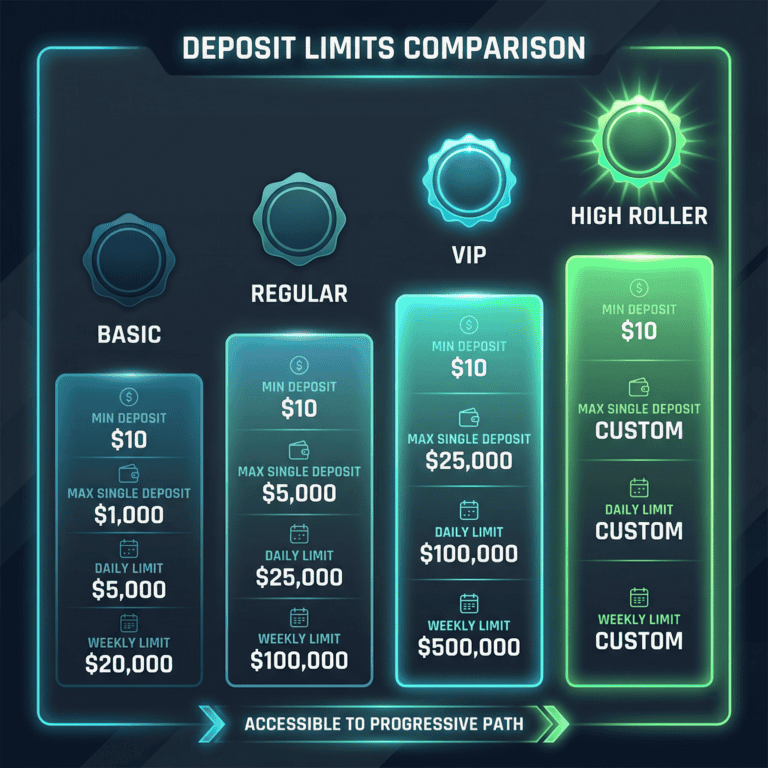
We require a minimum deposit to process transactions efficiently. The minimum is typically $10 or the equivalent in cryptocurrency. You can deposit any amount at or above this minimum.
For most users, this minimum is very accessible. If you have questions about whether a specific amount qualifies, contact support.
There is a maximum per single deposit to manage platform liquidity and comply with regulations. This maximum varies by account tier and may be $1000, $5000, $50,000, or higher depending on your account status.
If you want to deposit more than the maximum, you can make multiple deposits. Each will be processed separately.
In addition to per-deposit limits, we set cumulative limits on how much you can deposit within a day, week, or month. These reset automatically on the set schedule (e.g., daily limit resets at midnight).
These limits help us prevent fraud and protect users. But they are set generously for regular players. Most casual users will never hit them.
As you play and earn loyalty points or status, your account tier may increase. Higher tiers have higher deposit limits:
Your tier is determined automatically based on your account activity. Tier perks are applied instantly; no action needed.
If you want to deposit above your current limit, contact support with your account ID and desired new limit. We may require account verification (to comply with regulations). Most reasonable requests are approved within 24 hours.
Increases are subject to our risk and compliance policies. We assess each request individually.
You can also set your own limits to protect yourself. We offer tools to impose daily, weekly, or monthly deposit caps.
To set a limit, go to Account Settings > Responsible Gaming > Deposit Limits. You can adjust or remove these limits anytime. Setting deposit limits is a healthy practice and a sign of responsible gaming.
—
We protect your account through verification and security measures. Here is how it works and why it matters.
We verify deposits as required by law. AML stands for anti-money laundering. KYC stands for know-your-customer. These regulations exist to prevent fraud, money laundering, and illegal activity.
Verification protects both you and us. It ensures your account is legitimate and that deposits come from you, not a stolen card or hacked wallet.
Verification is normal, required, and confidential. Your information is encrypted and secure. We do not share it with third parties.
First deposits may be delayed 24–48 hours while we verify your account. Subsequent deposits are typically instant once you are verified.
To verify your account, we may request:
This is standard across all regulated online gambling platforms.
How to submit: Upload documents through your account dashboard. Our verification team reviews them and gets back to you within 24 hours, usually faster.
Privacy: We collect only the minimum information necessary. Your documents are encrypted and stored securely.
We generate a unique deposit address for each of your deposits. This allows us to automatically know which deposit is yours and credit it instantly. It is like a personalized mailbox.
Keep your address confidential. Do not share it publicly. Treat it as you would a bank account number.
Follow these simple habits to prevent security issues:
These simple habits prevent 99% of security issues.
Scammers sometimes impersonate online casinos in emails or fake websites. They might ask you to “confirm” your deposit address or click a link to “speed up” your deposit. Here is how to protect yourself:
We require verified account information before crediting deposits. This is mandatory for security and regulatory compliance.
However, first small deposits may be processed while verification is in progress, pending final approval. But verification must be complete before you can withdraw funds or claim large bonuses.
Verification is non-negotiable but fast: most accounts are verified within 24 hours.
—
Your deposit is not lost if it does not arrive instantly. Blockchain confirmation takes time. Here is what to expect.
Note: These are typical times under normal network conditions. During peak congestion (market volatility, major events), times can increase significantly.
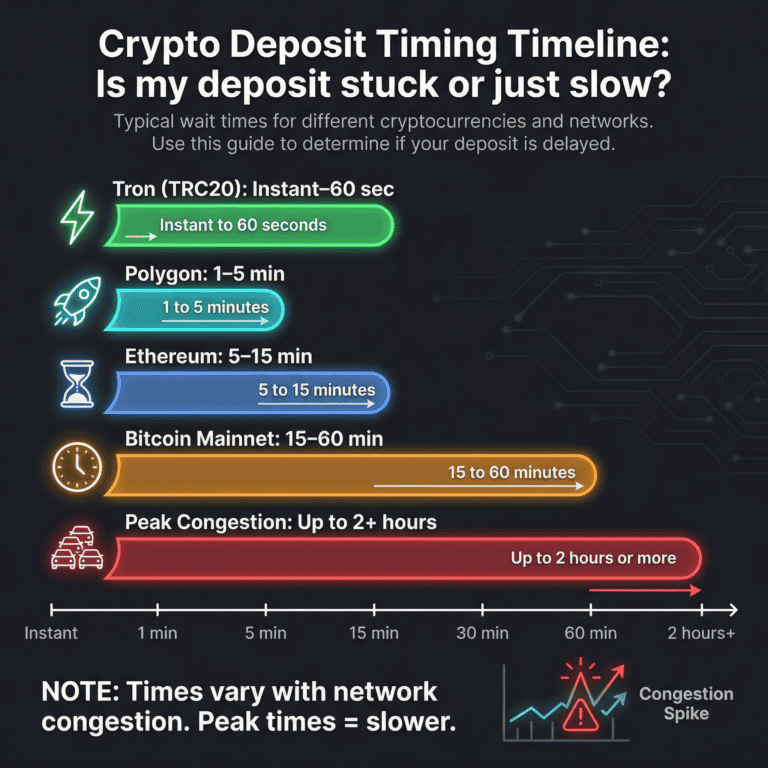
If you want the fastest deposit, use Polygon or Tron. Both typically confirm in 1–60 seconds. The trade-off: they are less well-known than Bitcoin or Ethereum. But they are fully safe and increasingly popular.
Layer 2 networks like Polygon are built on top of Ethereum, so they inherit Ethereum’s security while being much faster and cheaper.
Blockchains need multiple confirmations (verifications) before they consider a transaction final. Bitcoin requires 6 confirmations. Ethereum requires 12. This is built into blockchain security. We cannot skip this; we must wait.
Think of it like a bank clearing a check. It does not instantly move to your account. It goes through clearing, verification, then settlement. Blockchains work the same way, except the process is public and transparent.
Once all confirmations are done, funds appear in your account instantly.
Blockchains get busy. During peak times (market crashes, major news events, holidays), more people are transacting. Confirmations take longer.
Bitcoin mainnet can take 1–2 hours during heavy congestion. Ethereum can take 30+ minutes. We cannot speed this up; it is blockchain-wide.
What you can do: During heavy congestion, use a faster network (Polygon or Tron). Or wait for congestion to ease (usually within a few hours).
Once a transaction is on the blockchain, we cannot speed it up. But for your next deposit, you can:
Slow deposits always eventually complete. Patience is required.
If timing exceeds our usual estimates:
—
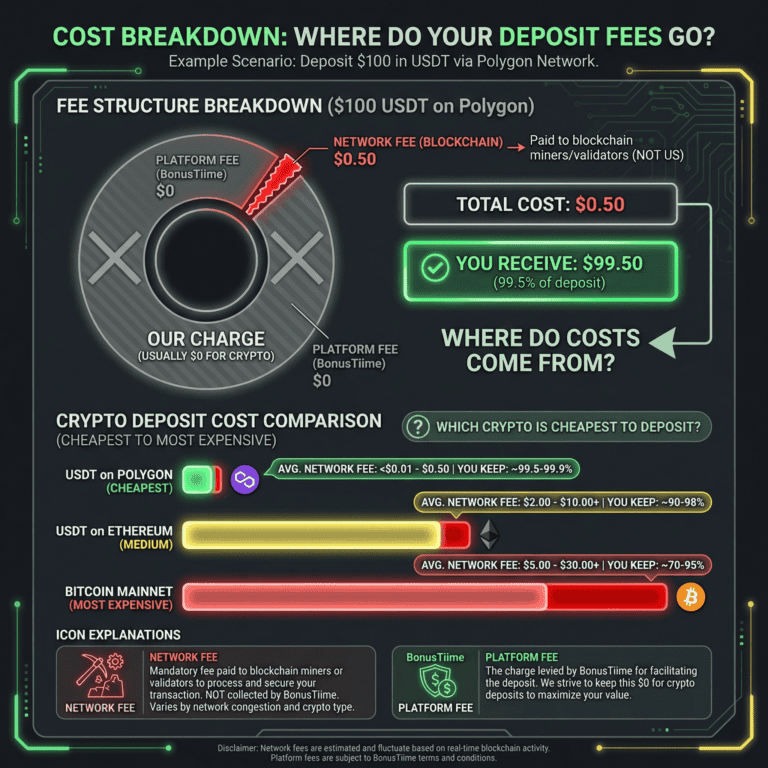
Deposits have costs, but they vary significantly by network and cryptocurrency. Here is how to understand and minimize them.
There are two types of fees:
Bottom line: You pay a network fee (mandatory, goes to the blockchain) and usually no platform fee (we absorb this cost).
These are typical ranges. Fees fluctuate with network demand. During peak congestion, mainnet fees spike. During off-peak hours, they are lower.
You do. The network fee is deducted from your deposit. If you deposit $100 and the network fee is $2, you receive $98 in your account.
We cannot waive network fees; they go to the blockchain itself. But we can occasionally reimburse platform fees for VIP members or run promotions that cover fees.
We periodically offer promotions where we reimburse network fees or waive platform fees. Check our promotions page for current offers.
Even when we waive platform fees, blockchain network fees still apply. But using cheap networks (Polygon, Tron) keeps those fees minimal anyway.
To minimize fees, follow this logic:
Before sending, check the expected network fee. Most wallets show this. You can also check a blockchain fee estimator (e.g., Etherscan’s gas tracker for Ethereum).
Example: “Ethereum current gas is 50 gwei, average fee $15.” Or: “Tron current fee is $0.50.”
This helps you decide if the network is worth it for your deposit size.
—
We are here to help. If you cannot resolve your deposit issue using the steps above, contact us.
Reach out if:
No question is too small. We are here.
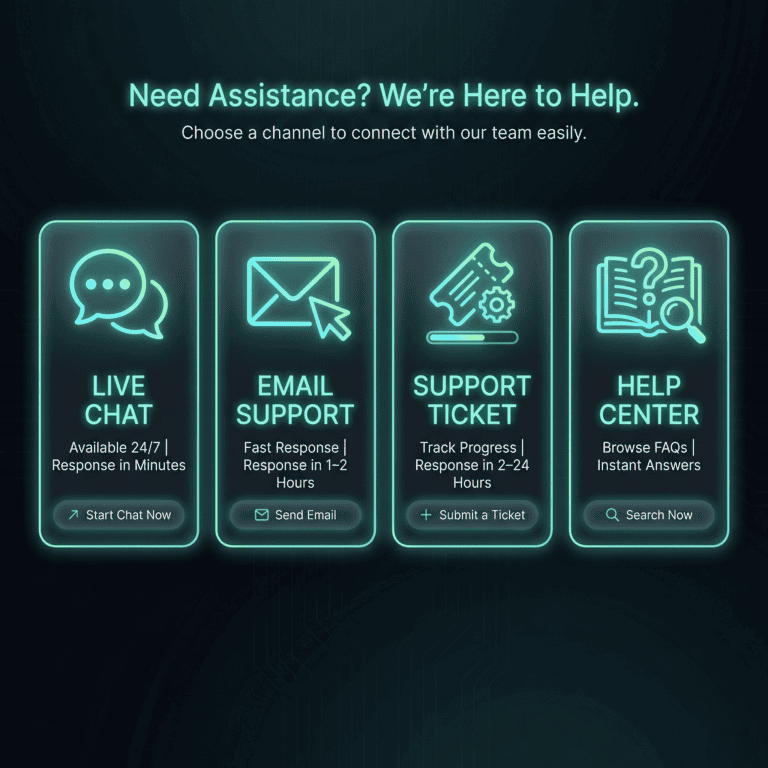
We offer multiple ways to reach us:
For urgent deposit issues, use live chat. For less urgent matters, email is fine.
To help us help you faster, have this ready:
This information lets us investigate quickly and accurately.
Here are typical response times:
We prioritize deposit issues. You will hear from us.
Some issues (wrong address recovery attempts, compliance holds, complex disputes) require our operations or finance team. These take longer: 2–5 business days.
We will keep you updated. You will hear from us regularly if your issue is complex.
—
You now understand crypto deposits inside and out. Here are the critical points to remember.
These 5 rules prevent 95% of deposit issues.
Before every deposit, use this checklist:
Follow this checklist. You will not have problems.
You now understand deposits, networks, fees, timing, and troubleshooting. Whether it is your first deposit or your hundredth, you have the knowledge to do it safely and efficiently. If anything remains unclear, our support team is here. Welcome to BonusTiime, and we are glad you are here.
—
Typical times depend on the cryptocurrency and network:
These times are typical under normal network conditions. During peak congestion, times increase. See the “Deposit Speed & Timing” section for more detail and a full comparison table.
Do not panic. Most delays are just the blockchain processing. Follow these steps:
See the “Deposit Not Showing Up?” section for detailed steps.
We support multiple networks including:
The deposit page shows which networks we accept for each cryptocurrency. See the “Choosing the Right Network” section for a full comparison and decision framework.
It depends:
See the “I Sent Crypto to the Wrong Address or Wrong Network” section for more detail.
Deposit fees come in two forms:
Network fees are unavoidable but vary by network. Typical costs: Bitcoin $1–$20+, Ethereum $5–$30+, Polygon $0.01–$0.10, Tron $0–$1.
To minimize fees, use cheap networks like Polygon or Tron for small deposits. See the “Deposit Fees & Costs” section for more detail.
Deposit bonuses are automatic:
Example: Deposit $100, get $100 bonus (100% match). You have $200 total. You must wager $5000 (50x playthrough) before you can withdraw the bonus.
See the “Deposit Bonuses & Promotions” section for detailed explanation and wagering requirements.
Limits vary by account tier:
You can request a limit increase by contacting support. See the “Deposit Limits” section for more detail.
Verification is required to comply with regulations (anti-money laundering and know-your-customer laws). You may need to provide ID, proof of address, and source of funds information.
First deposits may be processed while verification is pending (within 24–48 hours). But verification must be complete before withdrawal.
See the “Deposit Security & Verification” section for what is required.
Yes. We use:
Following best practices (verify address, use HTTPS, enable 2FA) prevents 99% of security issues. See the “Deposit Security & Best Practices” section for safe habits.
“Pending” means your blockchain transaction is still being confirmed. Once enough confirmations are complete (typically 3–12, depending on the blockchain), your deposit is credited.
Typical timing: Bitcoin (1 hour), Ethereum (2–5 min), Polygon (2–3 min), Tron (1 min).
Refresh your page after full confirmation. If it still shows pending after 30 minutes, contact support.
The blockchain and our account system are separate. Just because your transaction is on the blockchain does not mean our system has processed it yet.
If the blockchain shows confirmed, your deposit will appear in your account within minutes. Refresh your page. If still not showing after 10 minutes, wait a bit longer. Our system sometimes takes a few extra minutes to sync.
If it is still not showing after 30 minutes and the blockchain shows confirmed, contact support.
We support most major cryptocurrencies including Bitcoin, Ethereum, USDT, USDC, and many others. For less common cryptos, check the deposit page or contact support for availability.
If we support it, the deposit process is identical: select the crypto, copy the address, send from your wallet, and wait for confirmation.
A deposit bonus code is a promotional code that unlocks a specific bonus offer.
To use it: Find the code on our promotions page, enter it during deposit checkout, and the bonus credits automatically if you meet the requirements.
If you forgot to enter the code, contact support. We can often apply it retroactively.
Common causes:
Check your wallet balance, verify your account, confirm the address is correct, and check if your region has any restrictions. If still unclear, contact support with the error message.
Once a transaction is on the blockchain, it cannot be cancelled. The blockchain is permanent.
If the transaction is still pending in your wallet/exchange (not yet sent to the blockchain), you can cancel it there before broadcast.
If already on the blockchain, it will eventually arrive. If you no longer want the funds, you can request a refund to your original wallet after it is credited.
Log in to your account and go to Deposits (usually under Account or Wallet). You will see all your past and pending deposits with amounts, dates, and status.
All deposits are tracked and transparent. You can download a statement for records.
Funds arrive in a wallet on that network. If we support that network for that cryptocurrency, we may be able to recover them. Contact support immediately with your transaction hash.
Recovery is not guaranteed. It depends on the network pairing and our technical capabilities. But there is a chance if you act quickly.
Some cryptocurrencies (Ripple/XRP, Stellar/XLM) require a memo or tag. Our deposit page clearly indicates if one is required.
If you forgot to include it, the funds go to a shared wallet. Contact support with your transaction hash. We will manually credit your account within 24 hours.
We offer multiple support channels:
For urgent issues, use live chat. Have your account ID, transaction hash, and deposit details ready. We will help you quickly.

Secod has streamed and tested games on Stake extensively, giving him direct insight into the platform’s bonuses, features and gameplay conditions. His experience ensures every Stake review reflects real usage rather than surface level analysis.

© 2018-2026 bonustiime.com







Casiibro is currently offline.
Learn more about them on their channel!
▶ Visit Casiibro's channelOr head to the Stream Hub.