







+18 - Check if the casino you want to register with is eligible in your country.
Every failed MoonPay deposit traces back to one of five categories: payment method, balance, wallet, verification, or blockchain. Identify which one affected you, then move to the fix section.
Your card was rejected, your bank blocked the transfer, or your digital wallet payment didn’t process. This is the most common failure point and usually has a simple cause.
Your card issuer rejected the transaction instantly. Reasons include a fraud protection block, available balance below the deposit amount, an expired or deactivated card, or MoonPay being flagged as a high-risk merchant. Contact your card issuer to ask why it was declined and request they whitelist MoonPay for future attempts.
If you used a bank transfer (ACH in the US, SEPA in Europe), the transfer failed at your bank’s end. Common reasons: account number or routing number incorrect, your name on file doesn’t match the account name, the account has been closed, or your available balance is insufficient. Verify the details with your bank before retrying.
Some card issuers require 3D Secure (an additional verification step) for online purchases. You may have entered the wrong verification code, the verification window expired, or the device you’re using doesn’t match the one your bank registered. Retry and watch for the 3D Secure prompt; complete it within the time limit.
Digital wallets have their own approval rules. Your card may not be registered with Apple Pay or Google Pay, you may have hit the transaction limit for that device, or the payment network is temporarily unavailable. Verify the payment method is active in your wallet app, then retry.
MoonPay approved the deposit, but your bank or card rejected it because your available balance was too low. Note: your available balance may be less than your total balance (holds, pending transactions, overdraft limits).
Log into your bank account and look for “Available Balance” (not “Total Balance”). The available balance is what you can spend right now. The rest may be on hold due to pending deposits, transfers, or other temporary locks. MoonPay checks available balance, not total.
MoonPay shows you the fee before you confirm the deposit (usually 2–5% depending on payment method). Add that fee to your desired deposit amount, then verify your available balance is at least that total. If not, either wait for pending transactions to clear or reduce the deposit amount.
Pending transactions typically clear within 24–48 hours. Once cleared, your available balance increases and you can retry the deposit. Don’t retry before the hold lifts; it will fail again.
If your available balance looks correct but the deposit still fails, ask your bank directly if there’s a fraud hold or block on your account. Some banks apply holds you can’t see in the app. The bank can lift them immediately or explain the reason.
You entered or copied an incorrect wallet address. Blockchain transactions are final and irreversible—funds sent to the wrong address cannot be recovered.
Blockchain transactions cannot be undone. Once the transaction is confirmed, funds sent to the wrong address are lost permanently. Before you confirm the deposit, compare your wallet address as it appears in MoonPay against your wallet app, character by character. Check the first 6 and last 6 characters at minimum; if they match, the address is likely correct.
Open your crypto wallet app (MetaMask, Trust Wallet, Ledger Live, etc.), tap “Receive” or “Copy Address,” and paste it directly into MoonPay. Do not type the address manually or edit it. Copy-paste eliminates typos.
Bitcoin addresses (starting with 1, 3, or bc1) are incompatible with Ethereum. Ethereum addresses (starting with 0x) are incompatible with Bitcoin. If you paste a Bitcoin address into an Ethereum deposit field (or vice versa), the funds will be lost. Before you confirm, verify the address format matches the cryptocurrency you’re depositing and the network (Bitcoin, Ethereum, Polygon, etc.).
If you’ve already confirmed a deposit to the wrong address, contact MoonPay support immediately with your transaction ID. While blockchain transactions cannot be reversed, MoonPay may be able to investigate the receiving address or explore other limited options. Set realistic expectations: recovery is extremely unlikely, but reaching out quickly gives you the best chance.
MoonPay or a regulatory requirement blocked your deposit. Common reasons: expired ID, address mismatch, face verification failed, or UK travel rule recipient not verified.
Log into MoonPay and look for a notification, message, or email explaining what was rejected. It will typically say something like “ID verification failed: document expired” or “Face verification unclear.” This tells you exactly what to resubmit or fix.
MoonPay requires a valid photo ID (passport, driver’s license, or national ID card). If your ID has expired, it will be rejected. Renew it with your government agency before resubmitting.
Your registered address in MoonPay must match your ID exactly—same apartment number, same street spelling, no abbreviations. If your ID says “Suite 200” but you entered “Ste 200,” it will fail. Update your MoonPay address to match your ID word-for-word, then resubmit.
Face verification (“liveness check”) requires a clear photo of your face in good lighting, both eyes visible, and ideally without glasses. If your first attempt was rejected, retake it in daylight and without obstructions. Avoid shadows, hats, or heavily tinted glasses.
If you’re a UK user, the UK Financial Conduct Authority (FCA) travel rule may apply. This rule requires deposits to be sent only to verified wallets or to regulated exchanges and custodians. If your receiving wallet is a personal wallet (MetaMask, Trust Wallet, etc.), verify it in your MoonPay account in advance, or deposit to a verified exchange instead (Coinbase, Kraken, etc.).
Your deposit reached MoonPay’s system and was approved, but the blockchain network is slow, congested, or experiencing high fees. This is external and temporary.
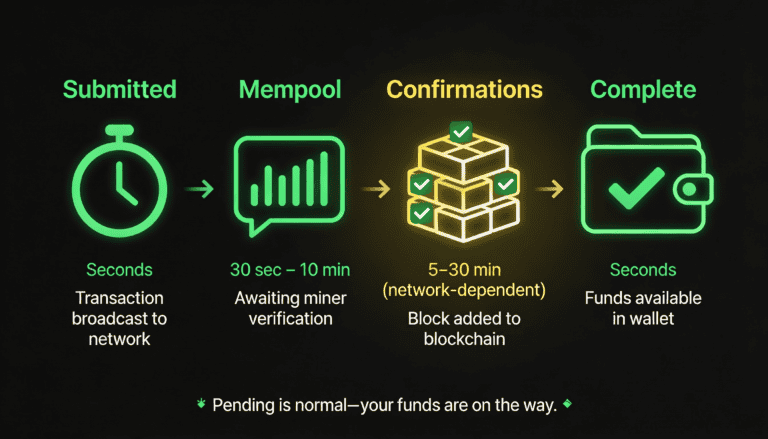
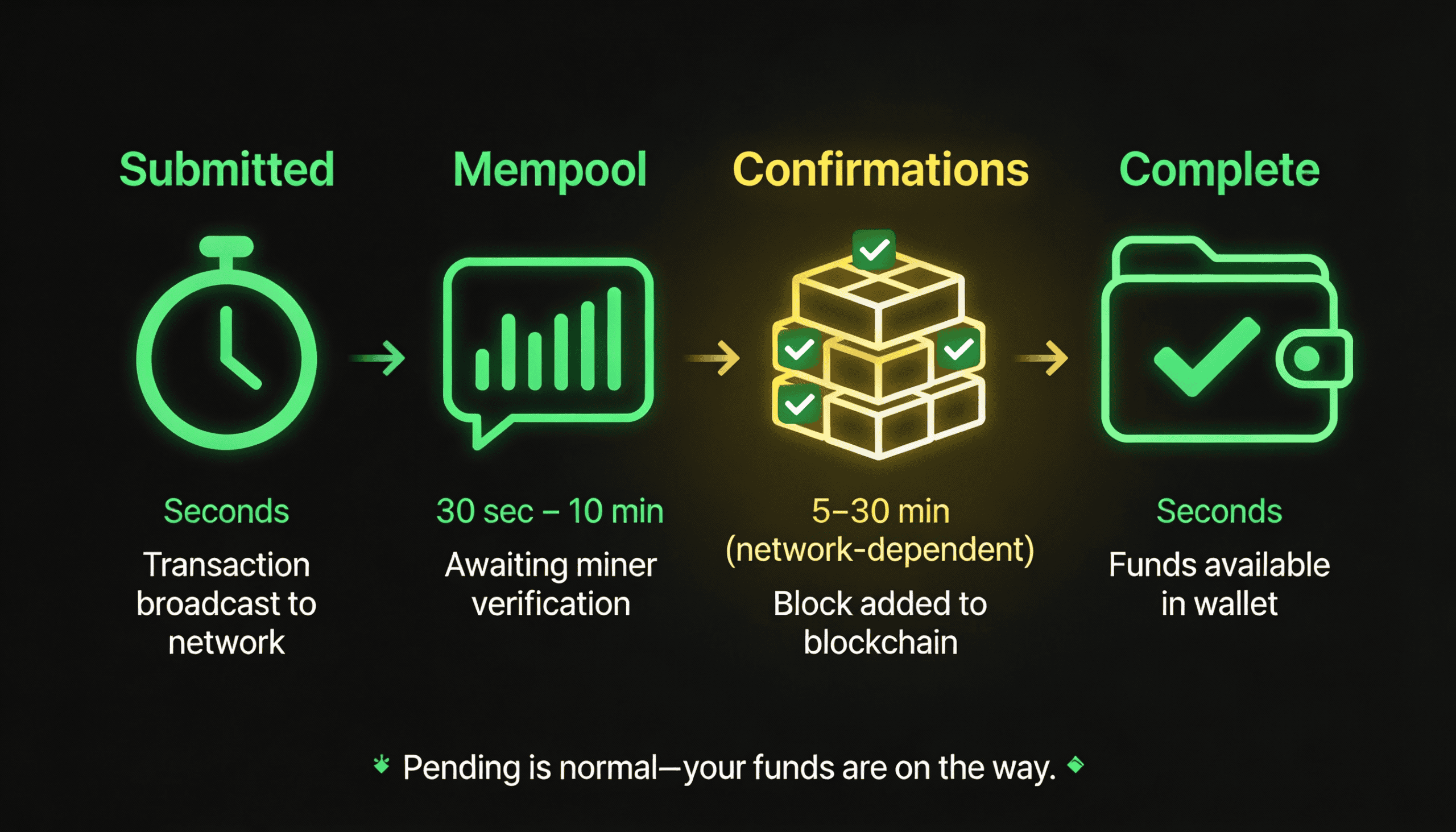
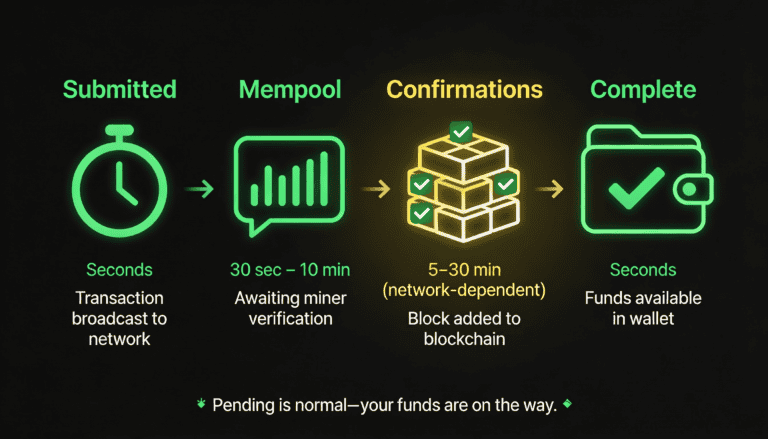
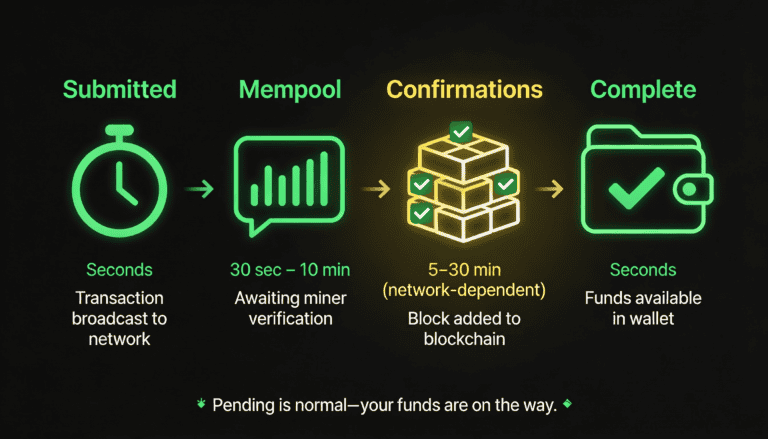
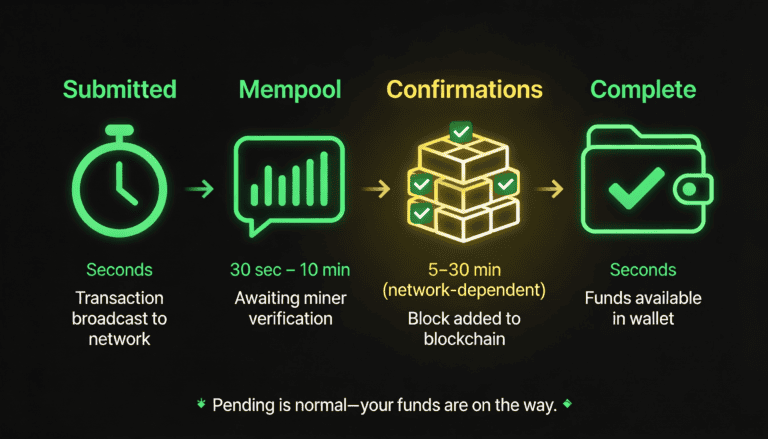
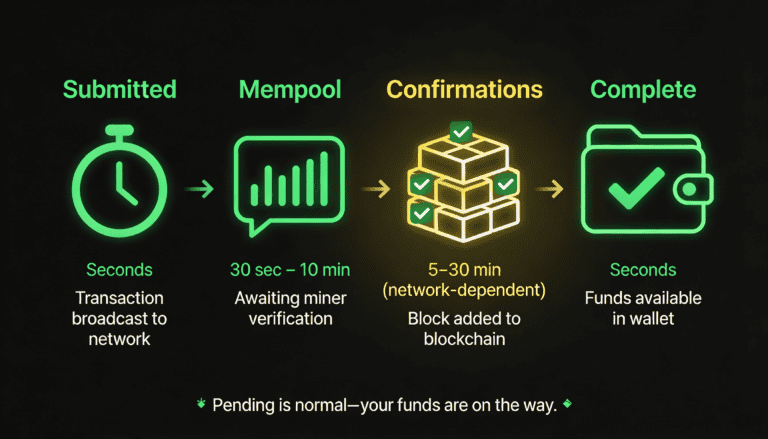
After MoonPay submits your transaction, the blockchain network queues it (the “mempool”) before confirming it. During this wait, the transaction is valid and will eventually be confirmed—it’s not failed.
Blockchain confirmation times vary by network and traffic. Bitcoin typically takes 10–30 minutes; Ethereum can be faster but depends on network congestion. During peak hours (roughly 8am–8pm UTC), expect longer waits. This is normal and not a problem.
When blockchain network fees spike, MoonPay may submit your transaction with lower priority to save on costs, which can increase confirmation time. This is a trade-off between cost and speed—your transaction will still arrive, just more slowly.
A “pending” status is not a failure. It means the blockchain is doing its job. Your funds are on the way. Wait 30 minutes to 2 hours depending on network congestion; if it’s still pending after 2 hours, check your transaction ID in a blockchain explorer (Etherscan for Ethereum, Blockchain.com for Bitcoin) to confirm it’s still in the queue.
Follow these steps in order to diagnose and resolve your failed deposit. Stop when you find the match.
MoonPay usually displays the reason for failure. Log in, find your failed transaction, and read the error code or message carefully.
Your payment method was rejected by your bank or card issuer. Review the payment method section above for specific reasons and next steps, then contact your bank to resolve the block.
Your available balance (not total balance) is below the deposit amount. Check your bank account for the available balance, wait 1–2 business days for pending transactions to clear, then retry.
You entered an invalid wallet address. If you haven’t confirmed yet, fix the address and retry. If you’ve already sent to the wrong address, contact MoonPay support immediately with your transaction ID.
Your ID, address, or face verification was rejected. Review the verification section above, fix the issue (renew ID, update address, retake face verification), and resubmit. Wait 24–72 hours for MoonPay’s compliance team to review.
A pending status is normal. The blockchain is confirming your transaction. Wait 24–48 hours; if it’s still pending or has disappeared, contact MoonPay support with your transaction ID.
If you’re about to retry a deposit, triple-check that the wallet address is correct. This is non-negotiable.
Open the wallet where you want to receive the crypto. This could be a browser extension (MetaMask), mobile app (Trust Wallet), hardware wallet interface (Ledger Live), or any other wallet you control.
Look for a “Receive” button or a copy icon next to your address. Tap it to copy the full address to your clipboard. Do not manually type the address; copy-paste eliminates typos.
Go to MoonPay, navigate to the deposit screen, and paste the address into the wallet address field.
Look at your wallet app and MoonPay side-by-side. Check that the first 6 characters and the last 6 characters of the address match. If they do, the address is almost certainly correct. If any character differs, do not proceed.
If you’re switching to a new wallet, repeat all the steps above with the new wallet’s address. Do not assume you remember the address or that it’s the same as before.
Before retrying, ensure your payment method (card, bank account, or digital wallet) is active and unblocked.
Check if your account is in good standing. Look for any notices about frozen accounts, suspended services, or security locks. If you see any warnings, contact your bank before retrying.
Some banks apply temporary holds you may not see in the app. Call your bank and ask if there are any holds, fraud blocks, or restrictions on your account. If there are, ask them to lift the holds.
Check your card details: expiration date (month/year), CVV (three digits on back), and card status. If the card is expired, reported lost, or deactivated, you’ll need a different card.
Verify the account details you provided to MoonPay. If your bank shows a recent failed transfer, ask them why it failed (wrong account number, name mismatch, account closed, etc.) and fix the issue before retrying.
Open Apple Wallet or Google Wallet and verify the card or account you want to use is still registered. If it’s missing, re-add it before retrying the deposit.
Ensure you have enough available funds (not just total balance) to cover the deposit amount plus any fees.
Find the section showing your account balances. There should be two: total balance (all your money) and available balance (money you can spend right now). Focus on available balance.
If you see pending transactions or holds listed, subtract their amounts from your total balance. The remaining amount is your available balance, which is what MoonPay checks.
Add your desired deposit amount to the fee MoonPay quoted (shown on the confirmation screen). This total must be less than or equal to your available balance. If it’s not, either wait for pending transactions to clear or reduce the deposit amount.
Pending transactions typically clear within 24–48 hours. Once cleared, your available balance will increase. Then you can retry the deposit.
If the above steps didn’t resolve the issue, either retry the deposit or contact support.
You’ve verified the address, confirmed your payment method is active, and checked your available balance. You’re ready to retry. Follow the same deposit flow as before, but this time it should succeed.
Network fees and availability can change between attempts. Review the fee and any new error messages before confirming.
Multiple failures with the same error indicate a deeper issue that requires support investigation. Screenshot the error and note your transaction ID (found in your MoonPay transaction history). Contact support with all this information.
When you contact support, include: the exact error message or code, the payment method you used (card, bank transfer, etc.), your wallet address (first 6 and last 6 characters, masked for security), the deposit amount, and when you attempted the deposit. The more detail you provide, the faster support can help.
Failed deposits follow predictable patterns. Know what normal looks like so you don’t panic or waste time.
The failure is immediate, but fixing it depends on your bank or card.
As soon as you click “Confirm” on MoonPay, your bank evaluates the transaction and either approves or declines it. A decline appears within seconds.
Call your bank’s customer service line or use their app’s live chat. Explain that a deposit was declined and ask why. If it’s after hours, you may need to wait until the next business day.
If the decline was due to a fraud block or suspicious activity flag, the bank may need to investigate before unblocking you. This can take 24–48 hours.
Once your bank has unblocked the charge or resolved the issue, retry the deposit on MoonPay. It should go through.
Your bank denied the deposit, but this is temporary if it’s caused by pending transactions or holds.
You’ll see the insufficient funds error right after you try to deposit, because MoonPay checks your available balance before submitting the request.
Holds and pending transactions are temporary. Most clear within 24–48 hours. Check your bank account after this time.
After pending transactions clear, your available balance will increase. Retry the deposit; it should succeed this time.
If you’ve waited for pending transactions to clear and the deposit still fails, ask your bank if there are any holds or blocks you’re not seeing in the app. They can often lift these immediately.
After you resubmit documents, MoonPay’s compliance team reviews them.
MoonPay will notify you via email when your verification fails, explaining the specific reason. This email will tell you exactly what to fix or resubmit.
Once you understand what failed, fix it and resubmit right away. Renew your ID if expired, update your address if it doesn’t match, or retake face verification in better lighting. Don’t wait.
After you resubmit, their compliance team will review within 1–3 business days. You’ll receive another email with the result.
Once verification is approved, the block is lifted. Retry the deposit with the same wallet address and payment method, and it should go through.
If your transaction is “pending” in MoonPay’s system, the blockchain is doing its job.
Pending status means MoonPay submitted the transaction to the blockchain and it’s waiting to be confirmed. This is normal and expected. It’s not a failure.
On most networks, confirmation takes 5–30 minutes. Bitcoin is usually on the slower end (10–30 minutes); Ethereum can be faster (5–15 minutes) when network is not congested.
When the blockchain is busy, waits are longer. Don’t deposit during peak hours if you need the funds urgently, or accept that confirmation may take 1–2 hours.
If your transaction is still pending after 2 hours, check a blockchain explorer (Etherscan for Ethereum, Blockchain.com for Bitcoin) to see if the transaction is visible on-chain. If it’s not visible after 2 hours, contact MoonPay support with your transaction ID.
Some scenarios require MoonPay or bank support; don’t waste time troubleshooting.
If you’ve retried 3+ times and the same error appears each time, there’s a deeper issue. Contact support instead of retrying again.
If MoonPay shows an error code or message that doesn’t match anything in this article or MoonPay’s help center, contact support. You may need assistance decoding it.
If a transaction you initiated is no longer visible in your history, contact support right away. It may have been canceled or rolled back, and you need to know the status.
Pending should resolve in 24 hours max. If it doesn’t, contact support with your transaction ID and a screenshot of the pending status.
If your bank shows the money was transferred but your wallet doesn’t show the crypto, contact MoonPay immediately with your transaction ID. Also contact your bank to document the discrepancy. Do not retry; you may end up charged twice.
Most failures are preventable. Adopt these habits before your next deposit.
Address errors are irreversible. This is the single most important prevention step.
Use the wallet app you’ll actually deposit to, not a different one. Consistency is critical.
Always use the copy function. Do not type the address by hand.
Open a blank note or email and paste the address. This gives you a copy to reference.
Look at both versions (your wallet and the pasted copy). Check the first 6 and last 6 characters at minimum. They must match exactly.
Once verified, paste the full address into MoonPay. Do not edit it or remove characters.
Test your entire flow (payment method, wallet, verification) with a small amount before depositing larger sums.
A small test deposit lets you catch problems (wrong wallet, declined card, slow network) without significant risk.
Test with the exact setup you plan to use. This confirms everything works together.
A successful small deposit proves your wallet address is correct, your payment method works, and your verification is approved. You’re ready for larger deposits.
A small failed deposit is a cheap learning experience. You’ll know exactly what’s broken before risking more money.
Limits, fees, and timelines vary by payment method. Check before you deposit.
Don’t skip ahead to the confirmation page. Start from the beginning and review all available options.
You’ll see a list of payment methods available to you, each with a minimum and maximum deposit limit and a fee. Write these down or screenshot them.
Multiply your deposit amount by the fee percentage, then add the flat fee. This is the total you’ll be charged. Make sure your available balance covers the deposit + fee.
Card deposits are fast but expensive (usually 3–5% fee). Bank transfers are cheaper (1–3% fee) but slower (1–3 days). Choose based on your needs and budget.
Name mismatches are a common cause of payment method and verification failures.
Log into MoonPay and check your profile name. Then check your bank account. They must match exactly—same first name, middle initial (if any), and last name. No nicknames or shortened versions.
MoonPay may allow you to register multiple wallet addresses. Confirm that the address you’re using for this deposit is already registered, or register it before depositing.
Life changes (marriage, move, bank switch) require profile updates. Do this before depositing; it prevents verification and payment method failures.
Don’t wait until the deposit fails to verify your wallet. Do it now, before you deposit.
Don’t hit “send” and disappear. Watch for the first confirmation.
Once MoonPay says the deposit is sent, open your wallet app. You should see a pending transaction (it may not show the final amount or may show as “receiving,” depending on your wallet). This confirms the transaction is on the blockchain.
Confirmations usually take 5–10 minutes on faster networks (Polygon, Arbitrum) and up to 30 minutes on congested ones (Ethereum, Bitcoin). Note when you initiated the deposit so you know if it’s taking abnormally long.
If your wallet still doesn’t show the transaction after 30 minutes, log into MoonPay and check the deposit status. It should say “completed” or show a final amount. If it says “pending” or shows an error, note it.
By monitoring the first deposit, you learn what normal looks like for your wallet, payment method, and network. You’ll immediately recognize if something is wrong on the next deposit.
You’ve troubleshot, but the deposit still hasn’t worked. Here’s how to get help, what to provide, and what to expect.
Escalate after these conditions are met (don’t waste support’s time before).
Before contacting support, confirm that you’ve checked your wallet address (first 6 and last 6 characters match) and that your payment method is active (card not expired, bank account not frozen, etc.).
One failure might be a fluke. Two failures with the same error indicate a real problem worth escalating.
Pending transactions can take 24+ hours on congested networks. Wait before escalating.
Confirm your bank account shows an available balance at least equal to the deposit amount + fee.
If you’ve exhausted the troubleshooting steps above and still don’t understand the error, contact support. They have access to more detailed logs.
MoonPay offers support via in-app chat and email; in-app is usually faster.
On the MoonPay app or website, find the support icon (often in the top right or bottom menu). It’s usually labeled “Help,” “Support,” or represented by a chat bubble or question mark.
Start a live chat if available. Response time is usually 1–4 hours during business hours (Monday–Friday, 9am–6pm GMT).
Email support is also available through MoonPay’s help portal. Email typically takes 24 hours for a first response.
Weekends and after-hours support is slower. If your issue is urgent, prioritize weekday contact or use in-app chat.
Give support everything they need to help you immediately.
Every MoonPay transaction has a unique ID. Find it in your transaction history or in the error message you received. This is the most important detail.
Provide the word-for-word error. A screenshot is ideal so support sees exactly what you saw.
Tell support whether you used a debit card, credit card, bank transfer, Apple Pay, Google Pay, etc. Don’t include card numbers or bank details—just the type.
Example: “Depositing $100 in Ethereum” or “Depositing 0.5 Bitcoin.” Be specific.
Don’t provide your full wallet address (security risk), but do provide the first 6 and last 6 characters so support can verify you’re using the right wallet. Example: “bc1qw5…z4n5s”
Example: “Attempted on Monday, November 18 at 3pm UTC. Retried twice, same error.”
Example: “Verified my wallet address, confirmed my card is active, checked my available balance, retried the deposit.” This helps support avoid repeating steps you’ve already done.
Know the typical timeline so you’re not left wondering.
If you use in-app chat, expect a first response during business hours (1–4 hours) and a resolution or clarification within 24 hours.
Email is slower; plan for 24 hours for a response and 1–3 business days for resolution.
If your issue involves KYC or verification, support may escalate to the compliance team. This adds 1–5 business days.
MoonPay support can help troubleshoot why a payment method failed, check on pending blockchain transactions, and investigate other issues. However, they cannot reverse transactions that have already been confirmed on the blockchain. Set realistic expectations about what they can and cannot do.
Short answer: No, blockchain transactions are final and irreversible.
Explanation: Once a transaction is confirmed on the blockchain, it cannot be undone, reversed, or redirected. If you sent to a wrong address, that wallet’s owner (if unknown) now holds your funds, and there is no technical or legal mechanism to recover them. Contact MoonPay support immediately if this happens, but set expectations accordingly. This is why wallet address verification is critical before sending.
Short answer: If MoonPay failed (payment declined, verification failed), there’s no refund—the transaction never left your bank. If your bank processed the transfer but blockchain failed, refund is 1–5 business days.
Explanation: If your payment method was declined, MoonPay never charged you; check your bank to confirm no charge posted. If your bank transferred the funds (e.g., bank wire) but the blockchain deposit failed, MoonPay initiates a refund, which the bank typically processes in 1–5 business days. You’ll see the refund in your bank account, not MoonPay.
Short answer: ‘Pending’ means the blockchain is still confirming the transaction; it’s normal and will arrive.
Explanation: Blockchain transactions go through stages: submitted → mempool (queue) → confirmations (blocks adding the transaction to the chain) → final. During this 5–30 minute window (or longer during network congestion), the transaction shows ‘pending’ in MoonPay but won’t appear in your wallet until it’s confirmed. Wait 30 minutes, then check again. If it’s still pending after 2+ hours, contact MoonPay support with your transaction ID.
Short answer: You can retry immediately, but only if you’ve resolved the underlying issue (e.g., contact your bank to unblock it).
Explanation: If your card was declined due to fraud protection or a temporary block from your bank, retrying right away will fail again. Contact your card issuer or bank first to understand why it was declined (fraud alert, insufficient funds, card expired, etc.), resolve the issue, then retry. If the decline was due to MoonPay being an unrecognized merchant, your bank may process the second attempt without issue. Don’t retry more than 3 times in quick succession; multiple failures can trigger additional blocks.
Short answer: No, if MoonPay or your payment method declines the deposit, you are not charged.
Explanation: MoonPay only charges a fee if the deposit goes through successfully. If your payment is declined before or during processing, the transaction is canceled and no fee is applied. However, your bank may charge a fee for a declined transaction (rare, but some banks do); contact your bank to confirm. If your bank charged you a fee incorrectly, dispute it with your bank.
Short answer: They mean the same thing, but ‘available balance’ (what MoonPay checks) is different from ‘total balance’ (what you see in your account summary).
Explanation: Your bank account has a ‘total balance’ (all your money) and an ‘available balance’ (money you can spend right now). The difference is holds on pending transactions, recent deposits not yet cleared, overdraft limits, etc. MoonPay checks your available balance, not total. If you have $500 total but only $200 available (due to a pending $300 transaction), MoonPay will decline a $300+ deposit, even though your account shows $500. Wait 1–2 business days for the pending transaction to clear, then retry.
Short answer: Yes, address format is critical. Bitcoin addresses look completely different from Ethereum addresses; using the wrong format for the wrong blockchain is a common, irreversible mistake.
Explanation: If you’re depositing Bitcoin, use a Bitcoin address. If you’re depositing Ethereum, use an Ethereum address. If you paste a Bitcoin address into MoonPay’s Ethereum deposit field (or vice versa), the funds will be sent to a wallet format that doesn’t support the blockchain, and your funds will be permanently lost. MoonPay tries to prevent this (it often validates address format), but user copy-paste errors still happen. Always verify that the address format matches the cryptocurrency you’re depositing and your wallet’s blockchain network.
Short answer: Common reasons: expired ID, face doesn’t match ID, address doesn’t match ID, or poor photo quality.
Explanation: MoonPay (and regulators) require ID, address verification, and sometimes face verification. For ID: ensure it’s not expired and clearly visible. For address: ensure it matches your ID exactly (apartment number, spelling, etc.) and your account on file matches both. For face verification: take it in good lighting, show both eyes clearly, and no glasses if possible. Resubmit and wait 24–72 hours. If it fails again, contact MoonPay support with a screenshot of the rejection reason; they can clarify what’s wrong (e.g., ‘address doesn’t match’ means your submitted address doesn’t match what’s on your ID).
Short answer: The UK travel rule requires deposits to wallets outside of regulated exchanges to include verifiable information about who owns the receiving wallet; if it’s unverified or anonymous, MoonPay may block it.
Explanation: This is a UK Financial Conduct Authority (FCA) compliance requirement, not a MoonPay choice. If your receiving wallet is on a personal or unverified service (like MetaMask), MoonPay may require you to verify that wallet or confirm the wallet owner’s identity before allowing the deposit. If you’re depositing to your own verified Coinbase or Kraken account, you’re typically fine. If you’re depositing to a personal wallet, verify it in advance or check with MoonPay support about whether your specific wallet is covered under the travel rule exception.

Secod has streamed and tested games on Stake extensively, giving him direct insight into the platform’s bonuses, features and gameplay conditions. His experience ensures every Stake review reflects real usage rather than surface level analysis.

© 2018-2026 bonustiime.com








Casiibro is currently offline.
Learn more about them on their channel!
▶ Visit Casiibro's channelOr head to the Stream Hub.