
How to Deposit Crypto on Stake: Step-by-Step Guide (Zero Fees)
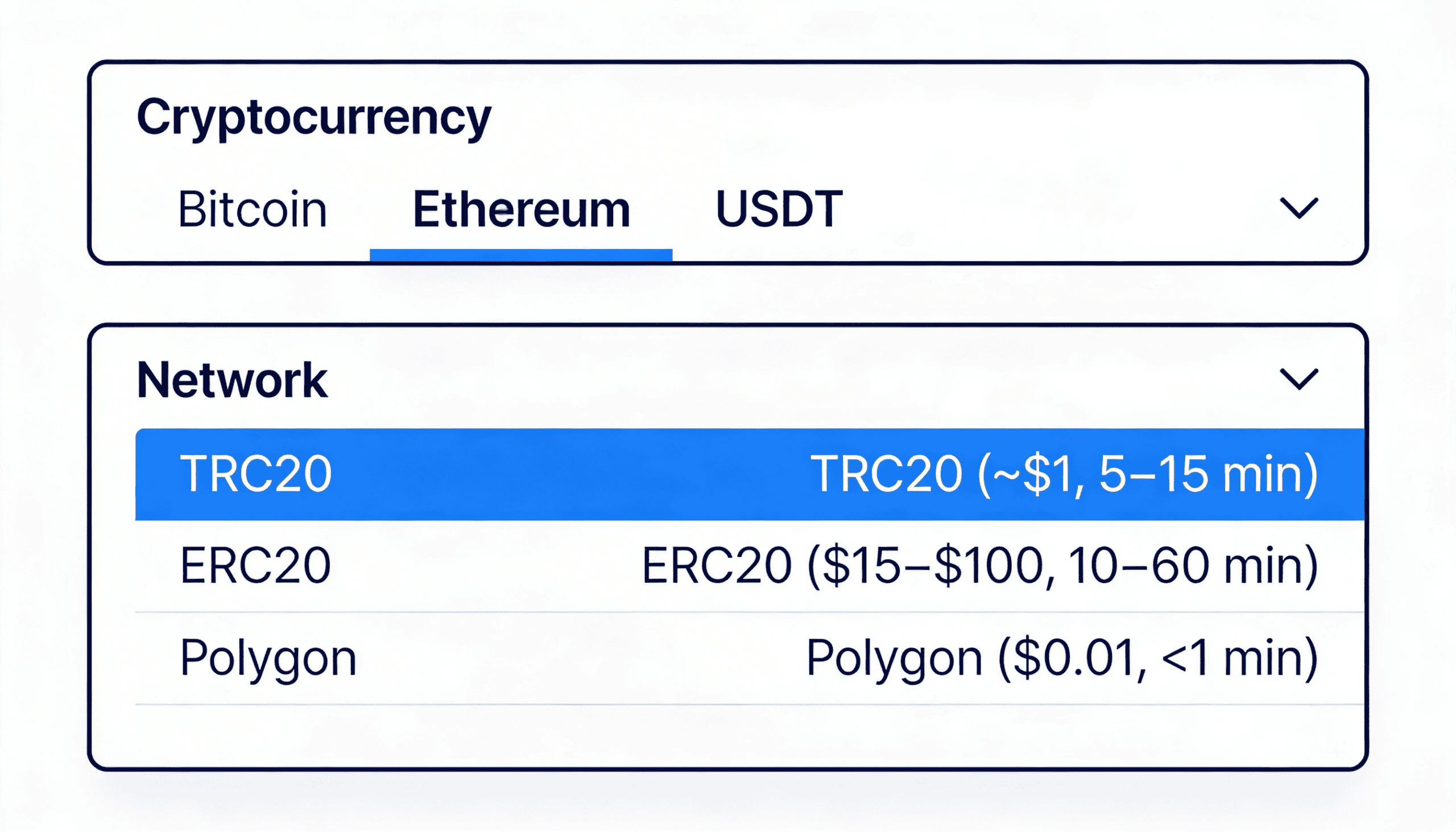
Stake accepts 20+ cryptocurrencies across multiple networks. TRC20 (Tron) is fastest and cheapest (roughly $1 fee, 5â15 minutes). ERC20 (Ethereum) is most secure but pricier ($15â$50, depending on network traffic). Choose based on your priority: speed, cost, or security.
Written by Secod on 13-02-2026


- Step-by-Step: Send Your First Deposit to Stake
- Real-Time Fee Comparison: What You’ll Actually Pay
- Crypto-Specific Deposit Guides: TRC20 vs ERC20 vs Polygon
- Why Your Deposit Is Stuck, Pending, or Failed (And How to Fix It)
- Deposit Bonuses, Promotions & Wagering Requirements
- Deposit Limits & Verification: What You Need to Know
- Frequently Asked Questions
Choose Your Deposit Method & Network
Stake accepts 20+ cryptocurrencies across multiple networks. TRC20 (Tron) is fastest and cheapest (roughly $1 fee, 5–15 minutes). ERC20 (Ethereum) is most secure but pricier ($15–$50, depending on network traffic). Choose based on your priority: speed, cost, or security.
Here’s what matters: Stake charges zero platform fees. Every other cost you’ll see is a blockchain network fee, identical on all platforms. No hidden markup. No “processing fee.” Just the network cost, which you’d pay anywhere.
Comparison: Crypto, Network & Fees
| Cryptocurrency | Supported Networks | Typical Fee | Time to Confirm | Best For |
|---|---|---|---|---|
| Bitcoin | Lightning Network, On-chain | $0–$1 (Lightning), $5–$30 (On-chain) | <1 minute (Lightning), 10–60 minutes (On-chain) | Lightning: speed. On-chain: security. |
| Ethereum (ETH) | ERC20, Polygon | $20–$200 (ERC20), $0.01–$0.10 (Polygon) | 10–60 minutes (ERC20), <1 minute (Polygon) | Polygon: budget-conscious. ERC20: mainnet native. |
| USDT | TRC20, ERC20, Polygon | $0.10–$0.50 (TRC20), $15–$100 (ERC20), $0.01–$0.10 (Polygon) | 5–15 minutes (TRC20), 10–30 minutes (ERC20), <1 minute (Polygon) | TRC20: best value. Polygon: balanced. |
| USDC | ERC20, Polygon, Solana | $20–$200 (ERC20), $0.01–$0.10 (Polygon), $0.00025 (Solana) | 10–60 minutes (ERC20), <1 minute (Polygon), <1 minute (Solana) | Solana: ultra-fast. Polygon: ultra-cheap. |
| XRP (Ripple) | On-chain (requires Destination Tag) | $0.10–$1 | 3–5 minutes | Fast confirmation, but tag is mandatory. |
| Dogecoin | On-chain | $0.01–$0.10 | 5–10 minutes | Low fees, playful asset. |
| Litecoin | On-chain | $0.50–$2 | 2–5 minutes | Faster than Bitcoin, low fees. |
The catch: Network congestion affects ERC20 fees. During bull markets or peak hours (US afternoon, Asia evening), Ethereum gas can spike to $100–$200 per transaction. Check Etherscan’s Gas Tracker before sending.
Stake charges zero platform fees. These are blockchain network costs, identical on all platforms.
Why Network Matters (And Why You Pick, Not Us)
Blockchain networks are separate roads to the same destination. TRC20 is Tron, built for speed and low fees (popular in Asia). ERC20 is Ethereum’s mainnet, the most secure but most congested. Polygon is an Ethereum sidechain (layer-2 solution)—cheaper and faster than mainnet, still safe, but a different route.
Here’s the risk: If you send ERC20 tokens over a TRC20 network, those funds are stuck. Not lost forever, but trapped on the wrong blockchain. (This is why we ask you to double-check the network. One wrong choice and we can’t recover it for you.)
The most common mistake? Sending ERC20 USDT to a TRC20 address. Your wallet doesn’t stop you. The blockchain doesn’t block it. The funds arrive at Stake’s Tron address instead of Ethereum address. Recovery is possible (contact support with your transaction hash), but it takes 24–72 hours and manual intervention.
The fix: Always send a test deposit first. Send $10–$50, wait for it to arrive, then send your full amount. Costs a few dollars in network fees but prevents a much bigger headache.
Step-by-Step: Send Your First Deposit to Stake
To deposit, log into Stake, go to Cashier, select your cryptocurrency and network, copy your unique wallet address, send funds from your external wallet, and wait for blockchain confirmation (typically 5–30 minutes). Here’s the detailed process.
Step 1: Log In & Navigate to Cashier
Open Stake and click your profile icon in the top right corner. Select “Cashier” from the menu. Click the “Deposit” button. You’ll see a list of supported cryptocurrencies. This is your starting point.
Step 2: Select Your Cryptocurrency & Network
Choose your cryptocurrency from the list (Bitcoin, Ethereum, USDT, etc.). Then select the network. This step is critical. Wrong network equals funds stuck or lost.
Use this logic: If you’re sending from Binance and selected TRC20, make sure Binance also has TRC20 selected. If uncertain, pick Polygon. It’s cheap, fast, and widely supported.
Note on Memo/Tag: Only Ripple, Stellar, and Cosmos require a memo or tag. If your chosen crypto needs one, Stake will show the field. If it doesn’t, leave it blank.
Step 3: Copy Your Deposit Address
Your unique Stake wallet address will display on screen. This is your public key (safe to share; anyone can send to it). Copy it by clicking the copy button or highlighting and pressing Ctrl+C (Cmd+C on Mac). Do not paste this address into untrusted websites. Use it only in your own wallet’s send field.
Open your external wallet (Binance, MetaMask, Coinbase, wherever your crypto currently lives). Find the Send or Withdraw option. Paste Stake’s address in the recipient field. Double-check it matches exactly. One typo and your funds go to the wrong place.
Step 4: Enter Amount & Send
In your external wallet, enter the amount you want to send. The wallet will show the network fee (called gas on Ethereum). Review it. If the fee seems high, you can wait and retry later (fees fluctuate). Then press Send or Confirm. You’ll get a transaction ID (tx hash, a long string of characters). Copy and save this. You’ll use it to verify your deposit in the next step.
The blockchain now has your request. Your wallet will show a “pending” status. This is normal. Breathe.
Step 5: Verify with Blockchain Explorer
While waiting, check your transaction on a blockchain explorer. This is the step most guides skip. We don’t.
Open the appropriate explorer for your network: Etherscan.io for ERC20, Tronscan.io for TRC20, PolygonScan.com for Polygon. Paste your tx hash into the search bar. You’ll see your transaction details: sender address (your wallet), receiver address (should match Stake’s address), amount sent, and status (pending or confirmed).
Look for the “Confirmations” count. As the blockchain confirms your transaction, this number increases. Ethereum requires 12+ confirmations, Tron requires 19+. Once you hit the threshold, your deposit hits Stake instantly. Your balance updates within 1–2 minutes.
If you see “Failed” status, the transaction didn’t go through (usually low gas or wallet error). Contact support with the tx hash, and we’ll help you retry.
Direct links to blockchain explorers:
Real-Time Fee Comparison: What You’ll Actually Pay
Stake charges zero platform deposit fees. Your only cost is the blockchain network fee, which ranges from $0.10 (TRC20) to $50+ (ERC20 during congestion). Network fees are identical across all platforms. Stake adds no markup.
Network Fee Table: 2024 Actual Costs
| Cryptocurrency | Network | Typical Fee (Low / Normal / High Traffic) | Confirmation Time | Use Case |
|---|---|---|---|---|
| Bitcoin | Lightning Network | $0–$0.01 | <1 minute | Best for speed and micro-transactions |
| Bitcoin | On-chain | $5–$30 (low) / $15–$50 (normal) / $30–$100 (high) | 10–60 minutes | Most secure, slowest option |
| Ethereum (ETH) | ERC20 (Mainnet) | $15–$50 (low) / $40–$100 (normal) / $100–$250+ (peak) | 10–60 minutes | Network native, but expensive during bull runs |
| Ethereum (ETH) | Polygon | $0.01–$0.05 | <1 minute | Fastest and cheapest Ethereum option |
| USDT | TRC20 | $0.10–$0.50 | 5–15 minutes | Best value for stablecoin deposits |
| USDT | ERC20 | $20–$100 | 10–30 minutes | Only if you must use Ethereum mainnet |
| USDT | Polygon | $0.01–$0.10 | <1 minute | Fast, cheap, widely supported |
| USDC | Polygon | $0.01–$0.10 | <1 minute | Fastest stablecoin option |
| USDC | Solana | $0.00025–$0.01 | <1 minute | Ultra-fast, ultra-cheap |
| XRP | On-chain | $0.10–$1 | 3–5 minutes | Fast and cheap (Destination Tag required) |
Fee timing note: Check Etherscan’s Gas Tracker before sending ERC20. Low gas periods are typically early morning UTC (6 AM–10 AM). High traffic hits during US afternoon hours (2 PM–6 PM ET) and Asia evening (6 PM–midnight SGT). Fees can spike 10x between low and high periods.
How Stake’s Zero-Fee Model Works
Every crypto platform broadcasts your transaction to the blockchain. This costs money (network fee). Some platforms hide this by charging you a 2–5% “platform deposit fee” on top. Stake doesn’t.
We pass zero platform fees to you. You pay only the network fee, which is identical on Stake, Roobet, Rollbit, or any other platform. It’s a blockchain cost, not Stake’s markup. This is why we’re transparent about fee comparisons. You control your money, and we don’t hide the true cost.
Crypto-Specific Deposit Guides: TRC20 vs ERC20 vs Polygon
TRC20 (Tron) is fastest and cheapest for USDT (cost: roughly $1, time: 5–15 minutes). ERC20 (Ethereum mainnet) is most secure but expensive ($15–$100, 10–60 minutes depending on congestion). Polygon is the middle ground (cheap, fast, suitable for most assets). Choose based on your wallet’s support and your priority: speed over cost, or security over speed.
TRC20 (Tron): The Speed Champion
TRC20 is built on the Tron blockchain, designed for speed and low cost. Average fee: $0.10–$0.50. Confirmation time: 5–15 minutes. Best for players sending stablecoins (USDT, USDC) from Asia-based exchanges or MetaMask configured for Tron.
Limitation: Only supports tokens built on Tron (USDT-Tron, USDC-Tron). Bitcoin and Ethereum don’t run natively on Tron.
How to check if your wallet supports TRC20: In your exchange or MetaMask, look for the “Tron Network” or “Tron (TRC20)” withdrawal option. If you see it, use it.
Pro tip: Tron uses Energy (like gas on Ethereum). If you’re sending for the first time from a wallet, the sender might need 50+ TRX (roughly $5) worth of Energy. Most exchanges handle this. Some wallets don’t. If your transaction fails, contact support and mention Energy requirements.
ERC20 (Ethereum Mainnet): The Most Secure
ERC20 is the original Ethereum standard. Most decentralized, most secure, longest history, most validators. But expensive and slow during peak hours.
Average fee: $15–$100 (varies wildly with network traffic). Confirmation time: 10–60 minutes. Best for players who already hold Ethereum or tokens on Ethereum and want native security.
Limitation: High fees make small deposits uneconomical. If depositing $500, a $50 fee is a 10% hit. Not recommended unless you have to.
How to check: In your wallet, switch to “Ethereum Mainnet” (not a test network, not Sepolia).
Pro tip: Check Etherscan’s Gas Tracker before sending. If base fee is over 100 Gwei, wait a few hours (usually cheaper after-hours UTC). If you must send now, use “Fast” or “Instant” gas setting to jump the queue.
Polygon: The Balanced Choice
Polygon is an Ethereum sidechain (layer-2 scaling solution). It bundles transactions and posts them to Ethereum in batches, reducing individual fees. Inherits Ethereum’s security, keeps costs low.
Average fee: $0.01–$0.10. Confirmation time: Less than one minute. Best for players who want balance between security and cost.
Supports most ERC20 tokens (USDT, USDC, USDC.e) via automatic bridge (conversion happens instantly). Limitation: If you send native Ethereum (ETH) to Polygon, it converts to MATIC (Polygon’s native token) unless you use a bridge. Most wallets handle this automatically.
How to check: In your wallet, switch to “Polygon Mainnet” or “Matic Mainnet”.
Pro tip: Polygon is the fastest and cheapest for most players. If unsure which network to choose, pick Polygon (especially for stablecoins under $10,000). We recommend it as the default.
Quick Network Decision Tree
Are you sending USDT? Use TRC20 if your wallet supports it; otherwise Polygon.
Sending from a US exchange like Coinbase or Kraken? Choose Polygon or ERC20.
Sending Bitcoin? Use Lightning if your wallet supports it; otherwise on-chain.
First-time sender and nervous? Choose Polygon. It’s fast, cheap, and beginner-friendly.
Why Your Deposit Is Stuck, Pending, or Failed (And How to Fix It)
Pending deposits are normal (blockchain takes 5–30 minutes). Failed deposits usually mean low gas, wrong network, or wallet error (not a Stake issue). Stuck deposits on the wrong network are recoverable but complex. Contact support with your tx hash and source wallet address.
Troubleshooting Flowchart: Diagnose Your Issue
Step 1: Did you copy Stake’s address correctly and paste it in your wallet’s recipient field? If no, verify the address in Stake Cashier again (copy-paste, don’t type). If yes, proceed to Step 2.
Step 2: Did you select the same network in both your wallet AND Stake? (Example: TRC20 in both.) If no, this is the problem (wrong network). If yes, proceed to Step 3.
Step 3: Does your transaction show “pending” status in your wallet? If yes, proceed to “Pending Deposits” section below. If no (status is “failed” or “error”), proceed to “Failed Deposits” section.
Step 4: In a blockchain explorer, can you find your transaction by tx hash? If no, the transaction never broadcast (wallet error or network timeout). If yes, proceed to verification section.
Pending Deposits: What’s Normal, What’s Not
Pending is normal. Your transaction is in the blockchain’s mempool (queue). Confirmation times vary: Bitcoin Lightning (instant), TRC20 (5–15 minutes), Polygon (less than one minute), ERC20 (10–60 minutes depending on gas price and network traffic).
If your transaction has been pending for over two hours and you chose a fast network (TRC20 or Polygon), there’s likely a problem.
How to verify:
- Go to your blockchain explorer: Etherscan.io for ERC20, Tronscan.io for TRC20, PolygonScan.com for Polygon.
- Search for your tx hash (from your wallet’s transaction history).
- Look at “Confirmations” count. If it shows “0 Confirmations,” your transaction is still propagating (normal for the first 5–30 minutes). If it shows “1+” but Stake hasn’t credited you, our system may be syncing (Stake’s backend updates every 1–2 minutes; wait five minutes then refresh). If it shows “10+” confirmations and Stake still shows nothing, contact support with: tx hash, amount sent, network used, and Stake deposit address. Do not share your private key.
Failed Deposits: Root Causes & Solutions
Insufficient gas. Your wallet showed a gas fee, but you didn’t have enough balance to cover both the transfer and the gas. Solution: Top up your wallet balance and retry.
Wrong network. You sent ERC20 to a TRC20 address (or vice versa). The transaction will fail immediately or be rejected. Solution: In blockchain explorer, confirm which network was actually used. If you sent to the wrong network, funds are not lost but are on a different blockchain. Contact support with tx hash. Recovery is possible but requires manual intervention.
Wallet error or timeout. Your wallet connection dropped or the node you connected to was unresponsive. The transaction didn’t broadcast at all. Solution: Try again from a different wallet or browser.
Network congestion. On ERC20, if you set gas too low, your transaction gets stuck in the mempool indefinitely. Solution: Use “Fast” or “Instant” gas settings next time. To unstick a stalled ERC20 transaction, use your wallet’s “Speed Up” or “Cancel” feature (costs additional gas but clears the queue). In your wallet, find the pending transaction, right-click (or long-press on mobile), select “Speed Up,” pay the new gas fee.
Sent to Wrong Network: Recovery Path
Scary scenario: You sent ERC20 USDT to a TRC20 address. Funds are on the Ethereum blockchain at Stake’s Ethereum address, not the Tron address.
Stake’s team can recover this, but it requires manual action.
- Go to Etherscan.io.
- Search for Stake’s ERC20 address (Stake will provide this; it’s different from your TRC20 deposit address).
- You’ll see your USDT in that address. Screenshot it.
- Contact Stake support with: transaction hash, proof that your funds arrived at Stake’s correct Ethereum address (Etherscan screenshot), and your Stake account email or ID.
- Support will manually transfer the USDT from the wrong network to your Stake account.
- Timeline: 24–72 hours.
Yes, it’s a hassle. No, Stake won’t charge a recovery fee (but you’ve already paid network gas, so you’ve lost time and money).
Lesson: Always send a small test amount first ($10–$50) to confirm the address and network before sending your full deposit.
Verify Deposit Confirmation: Use Blockchain Explorer
You don’t need to wait for Stake’s email or customer support. You can verify your deposit yourself in seconds using a blockchain explorer.
- Open your wallet and find the transaction history for the deposit you sent. Click on the transaction to see the tx hash (a long string like 0x1a2b3c4d5e…).
- Copy this hash.
- Go to the appropriate blockchain explorer: Etherscan.io for ERC20, Tronscan.io for TRC20, PolygonScan.com for Polygon.
- Paste the tx hash into the search bar and press Enter.
- You’ll see your transaction details: From address (your wallet), To address (should match Stake’s address you copied), Amount, Status (Pending, Confirmed, or Failed), and Confirmations count.
- If Status is “Confirmed” and Confirmations is 12 or higher (19+ for Tron), your deposit is settled on the blockchain. Stake should show it within 1–5 minutes. If not, something is wrong with Stake’s backend; contact support with the tx hash.
- If Status is “Failed,” go to the “Failed Deposits” section above.
Deposit Bonuses, Promotions & Wagering Requirements
Stake offers deposit match bonuses (typically 50–200% on first deposit). However, bonuses come with wagering requirements (usually 40x the bonus amount). A $1,000 bonus at 40x means you must bet $40,000 total before withdrawing. These are standard industry-wide. Stake’s terms are transparent and competitive.
How Wagering Requirements Work (Real Math)
Bonus math is simple. If you deposit $1,000 and Stake matches 50%, you get $500 bonus.
To “clear” the bonus (make it withdrawable), you must wager (bet) the bonus amount multiplied by the wagering multiplier. Most bonuses use 40x.
Calculation: $500 bonus times 40 equals $20,000 wagering requirement. You must place bets totaling $20,000 before you can withdraw your bonus balance. You can withdraw your original deposit ($1,000) anytime, but the $500 bonus stays locked until you hit $20,000 in wagers.
Common confusion: “Does wagering requirement mean I have to lose $20,000?” No. Wagering is the total amount you bet, not your net loss.
Example: You deposit $1,000, get $500 bonus, play slots with $10 bets, hit some wins, reach $20,000 total wagers, and end with $1,800 balance. You can now withdraw the full $1,800 (or reinvest it).
The key: Wagering requirements aren’t designed to drain you. They’re designed to keep you playing long enough that Stake profits from the expected house edge. Be honest about this with yourself.
Current Deposit Bonus Offers
| Player Type / Region | Bonus Type | Offer | Wagering Requirement | Eligible Games | Expiry |
|---|---|---|---|---|---|
| New Player (US) | Welcome Deposit Match | 50% match up to $500 | 40x bonus | Slots, Sports | Valid 30 days from deposit |
| New Player (EU) | Welcome Package | First deposit 100% plus free spins | 35x bonus | Slots only | Valid 14 days |
| High Roller (Verified VIP) | Custom Deposit Bonus | Up to $5,000 match | 20x bonus | All games | Ongoing |
| Recurring Deposit | Reload Bonus | 25% match on subsequent deposits | 35x bonus | Slots, Sports | Varies by promotion |
Bonus terms vary by country and account verification level. Check your Promotions page after depositing to see your personalized offers.
Bonus Terms You Must Know Before Claiming
Wagering multiplier. Usually 40x or 35x. Confirm before claiming.
Eligible games. Some bonuses only count on slots or sports. Others unlock all games. High-volatility games (slots) count 100% of wagers. Low-volatility games (certain sports bets or video poker) may count only 25–50%. Example: A $100 wager on a slot counts fully ($100). A $100 wager on a minus-110 sports bet may count as only $50.
Expiry date. Bonuses expire if not claimed or fully wagered within a set window (usually 7–30 days). If you don’t hit the wagering requirement before expiry, the bonus is forfeited (but you keep your deposit).
Max withdrawal cap. Some bonuses have a max win limit (example: “max win $2,000 from welcome bonus”). You can earn more, but only $2,000 is withdrawable; excess is forfeited.
Account restrictions. If you’ve claimed a bonus, you may not be able to withdraw for a period or may not be able to claim another bonus until the first one clears.
Bonus stacking. Some platforms let you claim multiple bonuses. Stake typically allows one active bonus per account.
Deposit Limits & Verification: What You Need to Know
Stake has no maximum deposit limit for verified accounts. Verification (Level 1) requires only email. Higher deposit limits unlock at Level 2 (ID verification) and Level 3 (selfie plus proof of address). Unverified accounts can deposit but have a $500 daily limit as a fraud safeguard.
Verification Levels & Deposit Limits
| Level | Verification Required | Deposit Limit | Withdrawal Limit | Other Perks |
|---|---|---|---|---|
| Level 1 (Email Verified) | Email address confirmed | $500 per day | Pending (withdrawal requires Level 2) | Can play, deposit, place bets |
| Level 2 (ID Verified) | Government ID photo (passport, driver’s license) | Unlimited | Unlimited | Instant withdrawals, access to VIP perks |
| Level 3 (Full KYC) | ID plus selfie plus proof of address | Unlimited | Unlimited | Premium support, higher betting limits, exclusive promotions |
Verification typically completes within 24 hours. Most players only need Level 2. Level 3 is optional and recommended for high-volume players.
Why Verification Exists (And Why It’s Fast)
Anti-money-laundering (AML) and know-your-customer (KYC) laws require that gambling platforms verify users to prevent fraud and illegal funding. Stake asks for minimal info: just email at first, then ID plus address later. This is standard across all regulated gambling sites (DraftKings, FanDuel, etc.). Stake’s verification process is automated and quick (most approvals in under one hour). You’re not being investigated. This is about compliance and your protection.
Here’s the catch: It also protects Stake from fraudsters (chargebacks, fake accounts). The faster you verify, the fewer restrictions you hit. Unverified depositors can’t withdraw (only verified accounts can). So even if you deposit without verification, you’re stuck if you want to cash out.
Verify early. It takes five minutes.
Gambling involves risk. Never bet more than you can afford to lose. If you need support, visit BeGambleAware.org or contact a local helpline.
Frequently Asked Questions
How long does a crypto deposit take to show up on Stake?
Typically 5–30 minutes depending on the network. TRC20 is fastest (5–15 minutes). ERC20 is slowest (10–60 minutes during congestion). After blockchain confirmation, Stake updates within 1–2 minutes. Total: expect 15–45 minutes from send to playable balance.
Can I deposit Bitcoin directly to Stake?
Yes. Stake accepts Bitcoin via on-chain (traditional) and Lightning Network (instant, cheaper). On-chain takes 10–60 minutes and costs $5–$30 in network fees. Lightning takes less than one minute and costs pennies but requires your wallet to support Lightning. Choose based on speed priority.
What if I sent crypto to the wrong Stake address?
If sent to another Stake user’s address, contact support immediately with proof. Stake can sometimes recover it (no guarantee). If sent to a non-Stake address, the funds are gone forever (blockchain is permanent). If sent to the wrong network (example: ERC20 to TRC20 address), funds may be recoverable but require manual intervention. Contact support with tx hash.
Are deposit fees the same on Stake as other platforms?
Deposit platform fees are zero on Stake (same as most reputable platforms). Network fees (blockchain costs) are identical across all platforms. No platform can reduce them. TRC20 USDT costs roughly $1 everywhere. ERC20 costs $15–$100 everywhere (based on network traffic). Stake adds no markup.
Do I need to verify my identity before depositing?
No. You can deposit with only email verification (Level 1). However, you cannot withdraw until Level 2 verification is complete (ID photo). Verification takes under one hour usually. Deposits without verification are capped at $500 per day as a fraud safeguard.
What happens if my deposit transaction shows as failed?
Most failures are due to insufficient gas, wrong network, or wallet connectivity issues (not Stake’s fault). Check the transaction hash on a blockchain explorer (Etherscan, Tronscan, PolygonScan). If status is “Failed,” retry with adequate gas. If status is “Pending” for over two hours, contact support with the tx hash.

Secod has streamed and tested games on Stake extensively, giving him direct insight into the platform’s bonuses, features and gameplay conditions. His experience ensures every Stake review reflects real usage rather than surface level analysis.
Other Stake Deposit
Stake Deposit Guide: Methods, Limits & Troubleshooting
February 12, 2026
Stake Deposit Guide: Crypto Methods, Fees & Speeds 2026
February 12, 2026
How to Deposit on Stake: Methods, KYC Levels & Processing Times 2024
February 10, 2026
How to Deposit on Stake: Crypto Methods, Fees & Step-by-Step Guide
February 6, 2026
How to Deposit on Stake: Crypto, Credit Card & MoonPay Guide 2024
February 6, 2026