
How to Deposit on Stake: Crypto Methods, Fees & Step-by-Step Guide
Depositing crypto to Stake is straightforward. You don't need a bank account, credit card, or middleman. Just a wallet and the crypto you want to play with. This guide walks you through every method, explains the fees that matter, and shows you how to avoid common mistakes.
Written by Secod on 06-02-2026


- Deposit Methods Comparison: 20+ Cryptocurrencies at a Glance
- Blockchain Networks Explained: Why Your Choice Matters
- Step-by-Step: Depositing Bitcoin to Stake
- Depositing Ethereum (ERC-20) and Other ERC-20 Tokens
- Depositing Stablecoins (USDT, USDC, Dai): The Smart Move
- KYC and Account Verification: What You Need to Know
- Deposit Fees Breakdown: What Actually Costs You Money
- Deposit Limits: How Much Can You Actually Send?
- Common Deposit Errors and How to Fix Them
- Security: Protecting Your Funds During Deposit
- Deposit Bonuses and Promotions: What’s Available?
- What Happens After Your Deposit Lands?
- Regional Deposit Restrictions and Workarounds
- Deposit Cryptocurrency Wallet Recommendations
- Advanced: Multiple Deposits and Wallet Strategies
- Frequently Asked Questions About Stake Deposits
- Conclusion: Your Stake Deposit Roadmap
Why Stake Uses Only Cryptocurrency for Deposits
Stake operates as a cryptocurrency-native platform. This means no fiat on-ramps (no credit cards, bank transfers, or PayPal). Why? Crypto deposits give you instant settlement, lower operational costs, and full control—you’re sending your own funds directly from your wallet to Stake’s address, not trusting a payment processor.
If you’re new to crypto, you’ll need to buy Bitcoin, Ethereum, or another supported coin through a centralized exchange (like Coinbase, Kraken, or Binance) or peer-to-peer platforms first. Once you own crypto, getting it to Stake takes minutes.
Deposit Methods Comparison: 20+ Cryptocurrencies at a Glance
Stake accepts over 20 cryptocurrencies across multiple blockchain networks. The main difference isn’t which coin—it’s which network you use to send it. Ethereum (ERC-20) is slow and expensive. Tron (TRC-20) is cheap and fast. Binance Smart Chain (BEP-20) splits the difference.
| Cryptocurrency | Ticker | Network(s) Supported | Avg. Network Fee | Typical Speed | Minimum Deposit |
|---|---|---|---|---|---|
| Bitcoin | BTC | Bitcoin (Native) | $2–$15 | 10–30 mins | 0.0001 BTC (~$4) |
| Ethereum | ETH | ERC-20 | $3–$25 | 10–20 mins | 0.01 ETH (~$20) |
| Tether (USDT) | USDT | TRC-20, ERC-20, BEP-20 | $0.50–$5 | 5–15 mins | $20 USD |
| Tron | TRX | Tron (Native) | $0.20–$1 | 5–10 mins | 10 TRX (~$1) |
| Binance Coin | BNB | BEP-20 | $0.50–$3 | 5–15 mins | 0.01 BNB (~$4) |
| Litecoin | LTC | Litecoin (Native) | $0.50–$2 | 10–20 mins | 0.01 LTC (~$1) |
| Dogecoin | DOGE | Dogecoin (Native) | $0.10–$1 | 10–30 mins | 1 DOGE (~$0.10) |
| XRP | XRP | XRP Ledger | $0.01–$0.50 | 5–10 mins | 20 XRP (~$10) |
| Bitcoin Cash | BCH | Bitcoin Cash (Native) | $0.10–$1 | 10–20 mins | 0.001 BCH (~$0.30) |
| Polkadot | DOT | Polkadot (Native) | $0.50–$2 | 10–20 mins | 1 DOT (~$8) |
Bottom line: Use Litecoin or Tron (TRC-20 USDT) for the lowest fees on your next Stake deposit. Both cost under $1 and arrive in under 15 minutes.
Blockchain Networks Explained: Why Your Choice Matters
Same coin, different networks = different fees and speeds. Understanding this separates savvy players from frustrated ones.
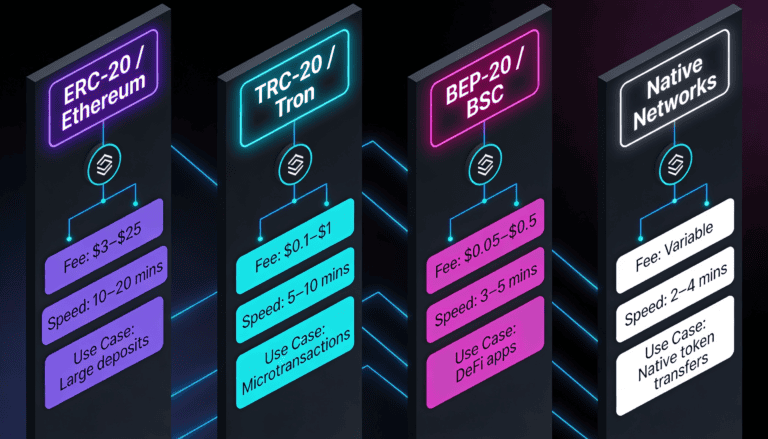
ERC-20 (Ethereum Network)
Good for: Large deposits ($500+) where you’re willing to pay once. Avoid if: You’re depositing under $100—the $3–$25 fee will eat into your bankroll. Ethereum is the most decentralized and secure, but congestion can spike fees during network peaks.
TRC-20 (Tron Network)
Good for: Almost everyone. Tron fees hover under $1, and speeds are lightning-fast (5–10 mins). This is the player’s choice for deposits under $1,000. Tron’s downside: It’s newer, so some conservative players distrust it. Unfounded—Tron is battle-tested.
BEP-20 (Binance Smart Chain)
Good for: A middle ground. Fees are $0.50–$3, faster than Ethereum, slower than Tron. If you’re unsure, this is the safe default. BSC has strong adoption and liquidity.
Native Networks (Bitcoin, Litecoin, XRP, Dogecoin)
Good for: If you already own these coins. Fees vary wildly depending on network load. Bitcoin can cost $2–$15; Litecoin under $1. No intermediary means maximum security—the coin goes straight from your wallet to Stake.
What to Know: Stake cannot control blockchain network fees. If Ethereum’s network is congested and fees spike to $50, that’s not Stake’s fault—that’s Ethereum’s network state. You pay the current market rate to miners/validators, not to Stake.
Step-by-Step: Depositing Bitcoin to Stake
Bitcoin is the most recognizable crypto. Here’s the exact sequence, from wallet to account credit.
Prerequisites
- A Stake account (created and verified if required for your region)
- Bitcoin in a wallet you control (Coinbase, Kraken, Ledger, MetaMask, etc.)
- A small amount of Bitcoin to cover network fees ($2–$15 depending on network load)
The 5-Step Deposit Process
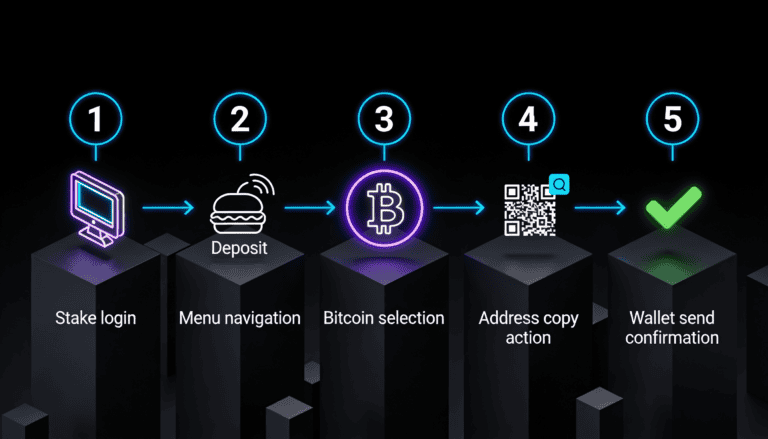
- Log in to Stake. Visit stake.com, enter your credentials, and verify 2FA if enabled.
- Navigate to the Deposit page. Look for “Cashier” or “Deposit” in the main menu. Click it.
- Select Bitcoin. From the list of cryptocurrencies, click “Bitcoin” (or “BTC”). If prompted to choose a network, select your preferred option (most users choose Bitcoin Native).
- Copy your deposit address. Stake generates a unique address for your account. This looks like:
1A1z7agoat2wr3sULS2z8KCuc69SXuhz. Copy it (don’t manually type it—copy/paste eliminates typos). Some wallets also support QR code scanning—even better. - Send Bitcoin from your wallet. Open your wallet app (Coinbase, Ledger, etc.), paste the address you copied, enter the amount you want to deposit, and confirm the transaction. Your wallet will show the network fee before you send—review it, then hit “Send.”
What to Expect After Sending
Your Bitcoin transaction enters the blockchain mempool (a waiting room for transactions). Miners prioritize transactions by fee. Your deposit will show as “Pending” in Stake’s deposit history. This is normal. Don’t panic.
- 5–10 minutes: Your wallet shows “Sent.” Blockchain is processing.
- 10–30 minutes: Stake detects 1 on-chain confirmation. Funds appear in your Stake account.
- 30+ minutes: Network congestion or low fee. More confirmations are stacking up. Still normal.
After the deposit lands, your Bitcoin balance updates in real-time. You can play immediately—no additional waiting, no manual approval needed.
You’ve just successfully deposited—here’s what happens next: Your Bitcoin is now available as “Confirmed” balance in your Stake account. It’s ready for wagering. If you have a deposit bonus active, it will credit to your account (check your Promotions tab). Start playing, manage your bankroll, and remember that all wagers come with House Edge—play within your budget.
Depositing Ethereum (ERC-20) and Other ERC-20 Tokens
Ethereum and stablecoins like USDT (on ERC-20) follow the same process as Bitcoin, but Ethereum is slower and pricier—plan accordingly.
Why Ethereum Costs More
Ethereum’s network is busier. It processes smart contracts (complex transactions), not just simple transfers. This complexity drives up “gas fees”—the cost to execute your transaction. During peak hours (US market open, major events), gas can spike to $20–$50 for a single deposit.
If you’re depositing Ethereum, use a fee estimator (like etherscan.io/gastracker) to see real-time gas prices before you send. High gas? Wait 30 minutes and check again, or use an ERC-20 alternative like USDC or USDT on TRC-20 instead.
The ERC-20 Deposit Steps (Identical to Bitcoin)
- Log in to Stake.
- Go to Deposit → Select Ethereum (or your ERC-20 token).
- Copy the deposit address.
- Send from your wallet (MetaMask, Coinbase Wallet, hardware wallet, etc.).
- Confirm the gas fee, then send.
- Wait 10–20 minutes for confirmation.
Common Mistake: Sending ERC-20 tokens to a Bitcoin address, or Bitcoin to an Ethereum address. They’re incompatible—your funds will be lost permanently. Always double-check the deposit address matches the cryptocurrency and network you’re using. Stake’s UI will guide you correctly if you follow the prompts.
Depositing Stablecoins (USDT, USDC, Dai): The Smart Move
Stablecoins are cryptocurrencies pegged to the US dollar. $1 USDT = $1 USD, always (in theory). They eliminate price volatility during your deposit. You send $100 USDT, you get $100 to play with—not $98 if the market drops.
Which Stablecoin Should You Use?
| Stablecoin | Best Network | Avg. Fee | Speed | Liquidity |
|---|---|---|---|---|
| Tether (USDT) | TRC-20 | $0.50–$1 | 5–10 mins | Highest |
| Tether (USDT) | ERC-20 | $3–$20 | 10–20 mins | Very High |
| USD Coin (USDC) | BEP-20 | $0.50–$2 | 5–15 mins | High |
| Dai (DAI) | ERC-20 | $3–$20 | 10–20 mins | Medium |
Pro Tip: For deposits under $500, always use USDT on TRC-20. The fee is negligible ($0.50), the speed is instant (10 mins), and liquidity is unmatched. You’ll find USDT on every exchange and in every wallet. If your exchange doesn’t offer TRC-20 withdrawal, use BEP-20 USDC instead.
KYC and Account Verification: What You Need to Know
Stake requires Know Your Customer (KYC) verification in most regions (US, UK, CA, AU) before you can deposit. Some regions (select Asian markets) have softer requirements. This isn’t Stake being invasive—it’s international regulation.
What KYC Requires
- Full legal name (must match your ID)
- Date of birth
- Address (they’ll send a verification email)
- A government-issued ID (passport, driver’s license, national ID)
- A photo of you holding your ID (for Tier 2 verification)
- Proof of address (recent utility bill, bank statement, or government letter)
How Long Does KYC Take?
Tier 1 (basic) typically approves in minutes. Tier 2 (full verification with photo) can take 24–48 hours during business days. Weekends and holidays may delay approval.
Once approved, you can deposit immediately. KYC is a one-time process—you won’t need to repeat it for every deposit.
Security Alert: Stake will never ask for your password, private keys, or seed phrases via email or support ticket. If someone claiming to be Stake support asks for these, it’s a scam. Stake’s support team only needs your account email and verification details (which you’ve already submitted).
Read our full guide to Stake KYC verification for regional variations and common rejections.
Deposit Fees Breakdown: What Actually Costs You Money
Stake doesn’t charge a deposit fee. You pay the blockchain network fee—the cost miners or validators charge to process your transaction.
Network Fees by Cryptocurrency (Real-World Examples)
| Cryptocurrency & Network | Low Network Load | High Network Load | Variability |
|---|---|---|---|
| Bitcoin (Native) | $2–$5 | $10–$25 | High (depends on mempool) |
| Ethereum (ERC-20) | $3–$10 | $20–$50+ | Very High (gas spikes) |
| USDT (TRC-20) | $0.50 | $1 | Low (stable) |
| USDT (ERC-20) | $3–$10 | $20–$50+ | Very High (gas spikes) |
| Litecoin (Native) | $0.50–$1 | $2–$5 | Low |
| Tron (TRX Native) | $0.20 | $1 | Very Low (fixed) |
How to Minimize What You Pay
- Deposit during off-peak hours. If Bitcoin is expensive at 3 PM ET on a Monday, wait until 11 PM. Network load drops, fees normalize.
- Avoid Ethereum on ERC-20. Unless you’re moving $5,000+, the fee is punitive. Use TRC-20 USDT instead.
- Use fast networks. TRC-20, BEP-20, and Litecoin all cost under $2 and arrive in 10 mins. No reason not to.
- Check your wallet’s fee estimator. Most wallets show real-time fees before you send. If it’s high, wait.
- Set a custom fee (advanced users). If your wallet allows manual fee adjustment, lower it and wait longer—your transaction will eventually confirm.
What to Know: You don’t pay Stake any fees for depositing. The fees shown in your wallet are blockchain fees, not Stake fees. This means Stake has no control over them and can’t negotiate them down. You’re paying miners or validators, not the platform.
Deposit Limits: How Much Can You Actually Send?
Stake’s deposit limits depend on your account tier (determined by KYC level) and regional regulations.
| Region | KYC Tier | Min. Deposit | Daily Max | Monthly Max |
|---|---|---|---|---|
| US | Tier 1 | $20 | $5,000 | Unlimited* |
| US | Tier 2 | $20 | $50,000 | Unlimited* |
| UK | Tier 1 | £15 | £4,000 | Unlimited* |
| UK | Tier 2 | £15 | £40,000 | Unlimited* |
| Australia | Tier 1 | $30 AUD | $6,000 AUD | Unlimited* |
| Canada | Tier 1 | $25 CAD | $5,000 CAD | Unlimited* |
| India | Tier 1 | ₹1,500 | ₹100,000 | Unlimited* |
*Unlimited monthly deposits, but subject to account review for unusual patterns.
Pro Tip: If you’re a high-roller, completing Tier 2 KYC (with photo verification) instantly raises your limits. This takes 24–48 hours and opens up to $50,000+ daily deposits.
Common Mistake: Trying to deposit below the regional minimum (e.g., $10 instead of $20 in the US). Stake’s system will reject it. Check your region’s minimum before sending.
Common Deposit Errors and How to Fix Them
It’s common for deposits to show as pending for 10–30 minutes. The blockchain is slow, but reliable. However, some errors need your attention.
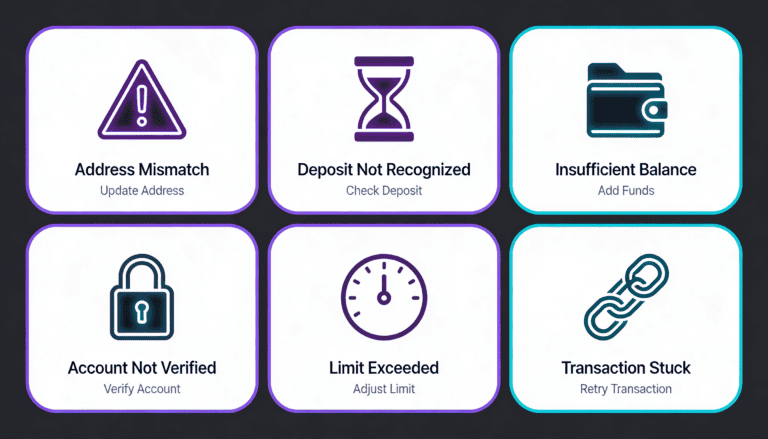
Error: “Address Mismatch” or “Invalid Deposit Address”
What happened: You pasted an address that doesn’t match your selected cryptocurrency or network.
How to fix: Go back to Stake’s Deposit page, re-copy the address (don’t manually type), and paste it directly into your wallet. Do not modify the address.
Error: “Deposit Not Recognized” After 1+ Hour
What happened: Your transaction was sent to the correct address, but blockchain confirms are moving slowly, or your transaction got stuck in the mempool.
How to fix: Check the blockchain explorer (e.g., etherscan.io for Ethereum, blockchain.com for Bitcoin). Paste your transaction ID (from your wallet) into the explorer. If it shows “Pending,” the transaction is stalled—likely due to a very low fee you set. If it shows “Confirmed,” your deposit should land in Stake within minutes. If neither, contact Stake support with your transaction ID.
Error: “Insufficient Balance” When Trying to Send
What happened: Your wallet doesn’t have enough crypto to cover both the deposit amount and the network fee.
Example: You’re trying to send 0.1 Bitcoin (≈ $4,000), but your wallet only holds 0.1 BTC. The wallet needs an extra $5–$10 for network fees, which you don’t have.
How to fix: Send slightly less (e.g., 0.095 BTC instead of 0.1), leaving room for the fee. Your wallet will calculate the exact amount needed—just review before confirming.
Error: “Account Not Verified” or “KYC Required”
What happened: You haven’t completed Know Your Customer (KYC) verification yet, and your region requires it before deposits.
How to fix: Pause the deposit, complete KYC verification (takes 5 mins to 48 hours), then retry. See our KYC guide.
Error: “Deposit Limit Exceeded”
What happened: You’re trying to deposit more than your daily or account limit allows.
How to fix: Split the deposit into two transactions on different days, or complete Tier 2 KYC to increase your limits.
Pro Tip: If your deposit is stuck for over 2 hours, don’t panic. Blockchain transactions are permanent—your crypto is either confirmed or it will eventually confirm. The worst case is a very slow network. Open a support ticket with Stake and include your transaction ID. Stake’s support team can investigate and—if needed—coordinate a manual credit while the blockchain catches up.
Security: Protecting Your Funds During Deposit
Crypto deposits are irreversible. If you send to the wrong address, it’s gone. Stake can’t recover it. This is why verification and double-checking matter.
Security Checklist Before You Deposit
- Enable 2FA on your Stake account. Authenticator app (Google Authenticator, Authy) is stronger than SMS. Set this up before you deposit.
- Verify your Stake account email. Open the confirmation email from Stake and click the link. This ties your email to your account.
- Double-check the deposit address. Copy it from Stake three times. Paste it into your wallet. Before sending, look at the first and last 5 characters of the address in both places. They must match exactly.
- Use a trusted wallet. Download wallets directly from the official source (MetaMask.io, Ledger.com, Coinbase.com), not third-party app stores.
- Never share your seed phrase or private key. Your wallet’s seed phrase is the skeleton key to all your crypto. If someone has it, they own your funds. Stake will never ask for it.
- Check for phishing emails. If you get an email asking you to “verify your account” with a link, verify by logging in directly to stake.com (not clicking the email link). Scammers impersonate Stake.
- Enable IP whitelisting (optional). Some Stake users whitelist the IP addresses they deposit from, blocking logins from unexpected locations. Check Security Settings if your region supports it.
What If You Accidentally Sent to the Wrong Address?
This is the blockchain’s biggest weakness: transactions are permanent. If you sent your deposit to an Ethereum address when you meant to send Bitcoin, that Bitcoin is lost (it was sent to an address that doesn’t exist on the Bitcoin network).
Stake cannot recover it. The blockchain has no “undo” button.
Prevention: Always copy and paste addresses. Never type them manually. If your wallet supports QR scanning, use that instead.
Security Alert: Stake support cannot and will not process “unauthorized deposit reversals.” Every deposit is final. Protect yourself by verifying addresses before sending. Spend 10 extra seconds checking. It’s worth it.
Deposit Bonuses and Promotions: What’s Available?
Stake regularly runs deposit bonuses tied to your Tier status and region. These typically include Reload bonuses (extra funds on certain days) and Rakeback (cashback on losses).
- Welcome Bonus (New Players): Varies by region. US players might get a 200% deposit match on your first deposit (up to certain limits). Terms apply.
- Reload Bonuses: On specific days (e.g., Mondays), Stake matches a percentage of your deposit. This is a time-limited offer.
- Rakeback: A percentage of your net losses are credited back as bonus funds. This is ongoing if you maintain VIP status.
Before depositing, check the Promotions tab in your Stake account to see what bonuses are active for you. Bonuses come with wager requirements (you must play through the bonus a certain number of times before withdrawing). See our guide to Stake bonuses and wager terms.
What to Know: Bonuses are optional. If you don’t want to play through wager requirements, you can deposit and play without claiming a bonus. Some players prefer this for simplicity.
What Happens After Your Deposit Lands?
Your deposit is confirmed and shows in your account as “Available Balance.” Now what?
Immediate Actions
- Claim any active bonus. Go to Promotions and click “Claim” on the bonus tied to your deposit. It will be added to your balance (in a separate “Bonus Balance” until wager is complete).
- Choose your game. Stake offers Sports betting, Casino games (slots, table games, crash games), Live dealer games, and more. Pick a game and set a session budget.
- Manage your bankroll. Your deposit is your session budget. All games have a House Edge—you’re playing against mathematical odds. Set loss limits and walk away if you hit them.
Next Steps: Withdrawal and Ongoing Play
You can withdraw your winnings anytime (subject to wager requirements if you claimed a bonus). See our guide to Stake withdrawals. Withdrawals use the same crypto methods and typically take 5–30 minutes to reach your wallet.
If you play regularly, consider learning about Rakeback and VIP tiers, which reward consistent play with cashback and perks.
Regional Deposit Restrictions and Workarounds
Stake is available globally, but some regions have restricted access due to regulation.
United States
Available in all states. No VPN required. KYC is mandatory. Deposits are unlimited (post-KYC).
United Kingdom
Available with full UK Gambling Commission compliance. KYC and age verification (18+) are mandatory. Deposit limits are enforced per UK regulations.
Canada
Available federally and in most provinces (Quebec has stricter rules but Stake operates). No VPN needed. Deposits are straightforward.
Australia
Available. Operators are compliant with ILGA and local laws. KYC is required.
India
Technically available, but legally gray. Some states have questioned crypto gambling. If you’re in India, check local law before depositing. Stake doesn’t block Indian players, but local authorities may have restrictions.
Restricted Jurisdictions (China, Iran, North Korea, etc.)
Stake’s system blocks users from sanctioned jurisdictions. VPNs may mask your location, but Stake explicitly prohibits VPN use in their Terms of Service. If you’re in a restricted region and use a VPN to access Stake, your account can be frozen and funds forfeited. Don’t do this—it’s against the rules and risky.
Deposit Cryptocurrency Wallet Recommendations
You need a wallet to send crypto to Stake. Here are the most popular options, segmented by user type.
For Beginners: User-Friendly Wallets
- Coinbase Wallet: Easy onboarding, beginner-friendly UI, supports 500+ cryptocurrencies. App-based (iOS/Android). Fee: Depends on Coinbase exchange rates (slightly marked up, but transparent).
- Trust Wallet: Very simple, non-custodial (you own your keys), supports 70+ blockchains. App-based. Fee: Network only (you control fees).
- MetaMask: Excellent for ERC-20 and BEP-20 tokens. Browser extension + mobile app. Built-in gas fee estimator. Learning curve is moderate.
For Advanced Users: Control & Security
- Ledger Nano S Plus or X: Hardware wallet (cold storage). Your private key never leaves the device. Maximum security. Cost: $79–$149. Setup: ~15 mins.
- Trezor: Open-source hardware wallet. Similar to Ledger. Cost: $99–$249. Setup: ~15 mins.
- Exodus: Desktop + mobile wallet with a sleek UI. Supports 200+ cryptocurrencies. Non-custodial. Good balance of security and ease.
Wallets to Avoid
- Unknown or newly-launched wallets (no track record).
- Wallets with poor reviews or security incidents (check Reddit, Twitter).
- Custodial wallets you can’t control (e.g., buying crypto through a sketchy marketplace and letting them hold it).
Use a reputable, open-source, or well-established wallet. The few extra minutes of setup pay dividends in security. See our full guide to crypto wallets.
Advanced: Multiple Deposits and Wallet Strategies
Once you’re comfortable depositing, you might want to optimize for frequency and convenience.
Multi-Wallet Strategy
Keep a small “hot wallet” (MetaMask on your phone or Coinbase Wallet) for frequent deposits. Keep your main crypto holdings in a “cold wallet” (hardware wallet like Ledger) for maximum security. This way, you’re not carrying your entire net worth on your phone.
Stablecoin Stacking
Instead of holding Bitcoin or Ethereum (which fluctuate), consider converting to stablecoins (USDT, USDC) on your exchange. This gives you stable on-ramps to Stake and eliminates price volatility between deposit and play.
Recurring Deposits for Bankroll Growth
Some players set a schedule: deposit $50 every Sunday evening using the cheapest method (TRC-20 USDT), build their bankroll gradually, and track wins/losses in a spreadsheet. This removes emotional decision-making and lets wager requirements work over time.
Frequently Asked Questions About Stake Deposits
How long does a Stake deposit take?
Most deposits arrive within 10–30 minutes. Bitcoin and Ethereum can take up to 1 hour during network congestion. Tron and other fast networks are usually 5–10 minutes. Speed depends on blockchain confirmation times, not Stake’s processing.
Can I deposit without KYC?
No, not in most regions (US, UK, CA, AU). Some Asian markets may have reduced KYC tiers, but you’ll still need basic info (email, DOB). Stake enforces KYC for regulatory compliance.
What if my deposit doesn’t show up after 2 hours?
Check the blockchain explorer (input your transaction ID). If it shows “Confirmed,” your deposit should land within 30 more minutes. If it shows “Pending,” your transaction is still processing (likely due to low fees). Contact Stake support if it takes over 4 hours.
Can I cancel a deposit after sending it?
No. Once a crypto transaction is sent, it’s irreversible. You can’t recall it. This is why checking the address before sending is critical.
Does Stake charge deposit fees?
No. You only pay blockchain network fees (to miners/validators), which Stake doesn’t control. Stake takes no cut from deposits.
What’s the minimum deposit at Stake?
It depends on your region and cryptocurrency. Typically $20–$30 USD equivalent. Check your region’s minimum in the Deposit page.
Can I deposit from an exchange directly to Stake?
Yes. You can withdraw from Coinbase, Kraken, Binance, or any exchange and send to your Stake deposit address. Use the cheapest network available (TRC-20 if possible). Most exchanges support this.
What if I send the wrong cryptocurrency to my deposit address?
It’s lost. If you send Dogecoin to a Bitcoin deposit address, Dogecoin doesn’t exist on the Bitcoin network—your coin vanishes. Always verify you’re sending the right coin to the right address.
Does Stake accept fiat deposits (USD, GBP, EUR)?
No. Stake is crypto-only. To play at Stake, you must first buy crypto on an exchange, then transfer it to Stake.
Can I deposit from someone else’s wallet?
Technically, yes—the blockchain doesn’t care who owns the sending wallet. However, Stake’s Terms require that deposits come from accounts you control. Depositing from someone else’s wallet could trigger security reviews or account suspension. Always deposit from your own verified wallet.
What networks does Stake support?
Bitcoin (native), Ethereum (ERC-20), Tron (TRC-20), Binance Smart Chain (BEP-20), Litecoin, Dogecoin, XRP Ledger, and more. Check the Deposit page in your account for the complete, current list.
Is it cheaper to deposit via Bitcoin or Ethereum?
Litecoin and Tron are cheaper than both. Typical costs: Litecoin $0.50–$1, Tron $0.20–$1. Bitcoin $2–$15. Ethereum $3–$50. For deposits under $500, always use Litecoin or Tron.
Can I deposit using a VPN?
Not if you’re in a restricted jurisdiction trying to bypass geo-blocks. Stake prohibits VPN use to access restricted regions. If you’re in an allowed region (US, UK, CA, AU), VPN is unnecessary and explicitly against terms. Don’t use it.
How do I know my deposit address is safe?
It’s a unique address generated by Stake’s system. It’s safe to reuse—you can deposit to the same address multiple times. However, best practice is to generate a new address for each deposit for privacy. Most wallets support this via “Generate new address” buttons.
What if I fat-finger the amount and deposit 10x what I meant?
The transaction is irreversible. However, Stake won’t let it sit uncredited. The deposit will land in your account, and you’ll have a larger balance than planned. You can withdraw the excess anytime (subject to wager requirements if a bonus was claimed). Plan your deposits carefully.
Does Stake offer any deposit insurance?
No. Crypto deposits are held in Stake’s wallet, which is custodial (they control the keys). There’s no FDIC-style insurance. This is inherent to crypto platforms. Your security depends on Stake’s operational security and reputation (which is solid, but always assess risk).
Can I use a debit card to deposit?
Not directly. Stake only accepts crypto. To use a debit card, you must: (1) Use your debit card on an exchange (Coinbase, Kraken) to buy crypto. (2) Withdraw that crypto to Stake. It adds a step, but it’s the only path.
What’s the difference between “Available Balance” and “Bonus Balance”?
Available Balance is your real crypto—you can play or withdraw anytime. Bonus Balance is credited when you claim a deposit bonus and is locked until you complete the wager requirement. After wagering, bonus balance converts to available balance.
Do I pay tax on deposits?
No. Deposits are not taxable events—they’re transfers of your own funds. However, gains from gambling may be taxable (varies by country). Consult a tax professional in your jurisdiction.
Conclusion: Your Stake Deposit Roadmap
Depositing to Stake is straightforward once you understand the fundamentals. You need a wallet, some crypto, a Stake account, and a few minutes. The cheapest route for most players is Litecoin or Tron (TRC-20 USDT)—costs under $1 and lands in 10 minutes.
Security is your job: verify addresses, enable 2FA, never share private keys, and use a reputable wallet. Stake’s part is processing your deposit reliably, which they do.
If you’re new to crypto, spend an extra 20 minutes setting up your wallet and understanding blockchain networks. It demystifies the process and keeps you safe. If you’re returning to Stake after time away, deposit limits and bonus terms may have changed—check your Promotions tab before funding your account.
Questions? Contact Stake support. Stuck on a technical issue? Check the troubleshooting section above or ask in the community.
Once your deposit lands, set a session budget, pick your game, and play within your limits. Responsible gambling means knowing your bankroll and walking away at your loss limit. Good luck.

Secod has streamed and tested games on Stake extensively, giving him direct insight into the platform’s bonuses, features and gameplay conditions. His experience ensures every Stake review reflects real usage rather than surface level analysis.
Other Stake Deposit
How to Deposit on Stake: Crypto, Credit Card & MoonPay Guide 2024
February 6, 2026
Why Your MoonPay Deposit Failed: Fixes & Next Steps
February 2, 2026
How to Deposit on Stake: Methods, Steps & Requirements
February 2, 2026
Stake Deposit Methods & Payment Issues: Complete Guide
December 11, 2025
How to Deposit on Stake with Crypto (Step-by-Step 2025)
November 3, 2025