
How to Deposit on Stake: Methods, Steps & Requirements
Stake offers four primary deposit methods: crypto, credit/debit card, e-wallet, and bank transfer. Each has different trade-offs in speed, cost, and ease. The best choice depends on what you already have access to and how much you prioritize speed versus cost.
Written by Secod on 02-02-2026


Which deposit method should I use?
Stake offers four primary deposit methods: crypto, credit/debit card, e-wallet, and bank transfer. Each has different trade-offs in speed, cost, and ease. The best choice depends on what you already have access to and how much you prioritize speed versus cost.
Crypto deposits (Bitcoin, Ethereum, USDT, others)
Crypto deposits are the fastest and cheapest if you already own cryptocurrency. Funds typically arrive in 10–30 minutes after blockchain confirmation. There are no platform fees; you only pay network fees from your wallet (e.g., Bitcoin miner fees, Ethereum gas).
Pros: No platform fees. Instant crediting after blockchain confirmations. Supports 10+ cryptocurrencies.
Cons: Requires an external wallet. Network fees apply and vary by chain congestion. Confirmation time depends on blockchain activity.
Best for: Users already holding crypto, cost-conscious depositors, frequent traders.
Credit or debit card
Cards are the most intuitive method for users without crypto. Funds typically arrive within 1–3 hours. Platform fees are higher (3–5% of your deposit), and daily/monthly limits are lower than other methods.
Pros: Intuitive process. Works without external tools. Funds arrive quickly.
Cons: Higher fees (3–5%). Lower daily and monthly limits. Card may be declined if your issuer blocks crypto/gambling sites.
Best for: First-time depositors, small deposits, users without crypto wallets.
E-wallets (PayPal, Skrill, Neteller)
E-wallets offer a middle ground between cost and convenience. Processing typically takes 1–3 hours with fees of 1–3%. Availability varies by region and e-wallet provider.
Pros: Moderate fees (1–3%). Account-based; no card required. Familiar interface for most users.
Cons: Limited availability in some regions. Varying processing times. Account verification required through the e-wallet provider.
Best for: Users in regions with good e-wallet support, moderate deposits.
Bank transfer
Bank transfers have the lowest fees but are the slowest method (1–3 business days). They work best for large deposits where the time trade-off justifies the cost savings.
Pros: Lowest fees (usually none). High transaction limits. Secure and traceable.
Cons: Slowest method (1–3 business days). Requires routing details. Weekends and holidays delay processing.
Best for: Large deposits, users with time to wait, cost-conscious players.
Step-by-step: How to make a deposit
All deposit methods follow a common workflow: verify your account is ready, select your method, confirm details, and submit funds. Specific steps vary slightly by method.
Before you deposit: requirements checklist
Before attempting a deposit, confirm you meet these prerequisites:
- Account created and email verified: Required to create your account.
- Identity verification (KYC) completed: Required for large deposits or any withdrawal. May take 1–3 business days.
- Your country/region allows deposits on Stake: Some regions have restrictions. Check your account settings for available methods.
- Deposit method chosen: Decide whether you’ll use crypto, card, e-wallet, or bank transfer.
- Minimum amount ready: Most methods require a minimum deposit (typically $10 USD equivalent, though crypto minimums may be lower).
Universal deposit steps
Follow these steps for any deposit method:
- Log into your Stake account and navigate to your Wallet or Deposit section.
- Select your deposit method (Crypto, Card, E-wallet, or Bank Transfer).
- Confirm the currency and deposit amount. The system displays any applicable fees and your net credit.
- Follow the method-specific instructions below (generate address, enter card details, authorize transfer, etc.).
- Complete the transaction on your end (send funds from your wallet, authorize card payment, confirm bank transfer).
- Monitor your deposit status in Deposit History. Timing depends on the method; see Processing Times section below.
How to deposit crypto (Bitcoin, Ethereum, USDT, others)
- In the Deposit section, select Crypto and choose your coin (Bitcoin, Ethereum, USDT, Litecoin, etc.).
- Stake generates a unique deposit address for that coin. Do not reuse this address for a different coin.
- Copy the address or scan the QR code using your external wallet (Coinbase, Binance, MetaMask, Trust Wallet, hardware wallet, etc.).
- In your wallet, initiate a send/withdraw and paste Stake’s address as the recipient.
- Enter your deposit amount and verify the network/chain matches the coin. For example: send Bitcoin on the Bitcoin network, Ethereum on the Ethereum network, USDT on Ethereum/Tron/Polygon.
- Review the transaction and confirm. Network fees apply (e.g., Bitcoin miner fees, Ethereum gas) and are deducted from your wallet, not Stake.
- Wait for blockchain confirmations. This typically takes 1–6 confirmations depending on the coin. Once complete, funds credit instantly to your Stake wallet.
See the dedicated Crypto Deposit Guide for detailed per-coin steps, confirmation times, and network fees.
How to deposit via card (credit/debit)
- In the Deposit section, select Card and choose Credit or Debit.
- Enter your deposit amount (in USD, EUR, GBP, CAD, or your account currency).
- Enter your card details: number, expiration date, CVV, and billing address.
- Review the fee (typically 3–5% of your deposit) and total amount to be charged to your card.
- Submit. Your payment processor verifies the card; you may be asked to authorize 3D Secure or complete additional verification.
- If approved, funds appear in your Stake wallet within 1–3 hours.
- If declined, contact your card issuer (some block transactions to crypto/gambling sites) or try a different card or deposit method.
How to deposit via e-wallet (PayPal, Skrill, Neteller, etc.)
- In the Deposit section, select E-wallet and choose your provider (PayPal, Skrill, Neteller, Paysafecard, Apple Pay, Google Pay).
- Enter your deposit amount and confirm you have sufficient balance in your e-wallet account.
- Click Continue or Connect. You’ll be redirected to your e-wallet’s login page.
- Log in and authorize the transfer to Stake. Verify that Stake’s recipient details are correct.
- Return to Stake. Funds typically arrive within 1–3 hours.
- If the payment fails, check that your e-wallet account has sufficient balance, your linked bank account is active, and your country is not restricted by the e-wallet provider.
How to deposit via bank transfer
- In the Deposit section, select Bank Transfer.
- Stake generates unique bank details for you: account number, routing/sort code, SWIFT code, and a reference ID. Write down or screenshot the reference ID; you’ll need it to match your payment to your account.
- Copy these details and initiate a transfer from your bank (online banking or in-branch).
- Paste Stake’s account details as the beneficiary and enter your deposit amount.
- Include the reference ID in the transfer memo or note field. This is critical for Stake to match the payment to your account.
- Submit the transfer. Funds typically arrive in 1–3 business days. Weekends and holidays may extend this.
- Once received, funds credit automatically to your Stake wallet.
Deposit limits, minimums & requirements
Minimum deposit
The lowest amount you can deposit in a single transaction is typically $10 USD equivalent. Crypto deposits often have lower minimums ($1–$5) because they don’t require processing fees. Cards and e-wallets typically start at $10–$25. Bank transfers typically require $10–$50. Check your account’s Deposit page for the exact minimum in your region and currency.
Maximum deposit
Per-transaction and daily limits vary by deposit method and your account verification level. Verified accounts typically have higher limits. Examples: $10,000 per day for verified accounts, though limits vary. Check your Account Settings or Deposit page for your specific limits. Contact support if you need to increase your limits; additional verification may be required.
Verification (KYC) requirements
Email verification is required to create your account and is instant.
Basic KYC (identity and address verification) may be required before your first deposit or after you reach $5,000+ total deposited. Enhanced KYC (uploading ID and proof of address documents) is required for large deposits or withdrawals.
Verification typically completes in 1–3 business days. Urgent cases may be expedited upon request. Unverified accounts can deposit small amounts but cannot withdraw; plan ahead if you may want to cash out later.
Country & region restrictions
Most regions globally have access to all deposit methods. Some countries have limited options:
- US: Crypto deposits fully supported. Card and e-wallet availability varies by state.
- UK, EU: Most methods available. Some e-wallets (Skrill, Neteller) may be restricted.
- Australia: Crypto supported. Card and bank transfer available.
- India, Brazil, Philippines: Check Stake’s local terms. Crypto is often the primary method.
Check your Deposit page for available methods in your region. If a method is unavailable, you may be in a restricted location for that payment type.
Deposit processing times & confirmation
Processing times vary significantly by method. Understanding what to expect reduces anxiety and helps you plan.
Typical processing times by method
- Crypto (Bitcoin, Ethereum, USDT, others): 10–30 minutes typical. Requires 1–6 blockchain confirmations. Can extend to 1–3 hours during network congestion.
- Credit/debit card: 1–3 hours typical. Payment processor verification may extend to 24 hours if declined or flagged.
- E-wallet (PayPal, Skrill, etc.): 1–3 hours typical. Varies by provider and account status.
- Bank transfer: 1–3 business days typical. Longer if weekend or holiday involved. International transfers may take longer.
What affects processing time?
Blockchain congestion: High network traffic slows crypto confirmations (especially Bitcoin and Ethereum during peak hours).
Payment processor queue: Card and e-wallet providers delay during high-volume periods.
Weekend/holiday delays: Bank transfers stall over weekends; international transfers skip holidays.
KYC verification pending: If your identity is not yet verified, your deposit may hold until KYC completes.
Declined payment: If your card issuer rejects the transaction, you’ll need to retry or use a different payment method.
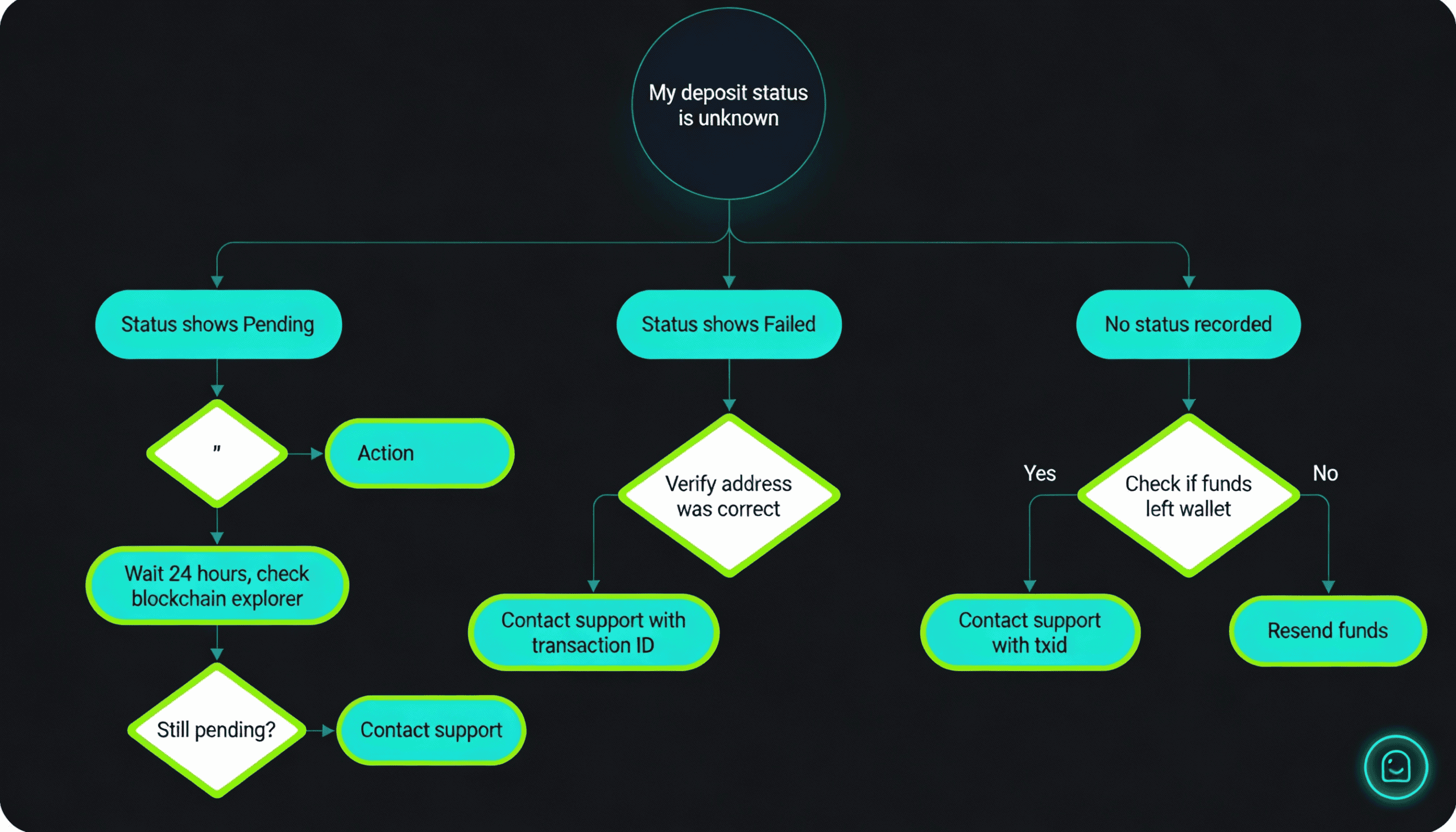
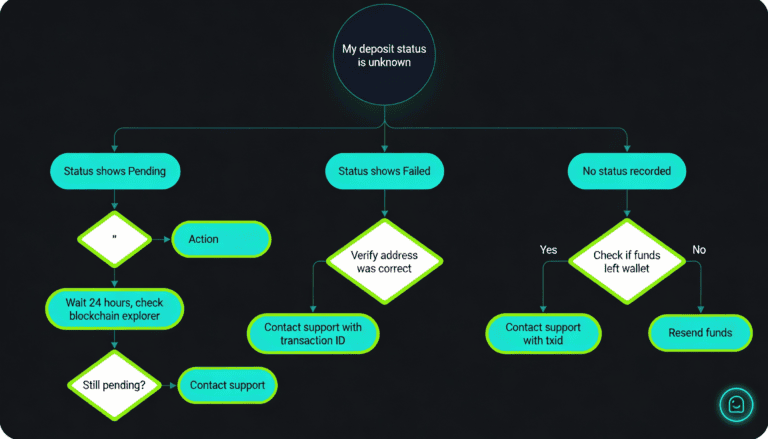
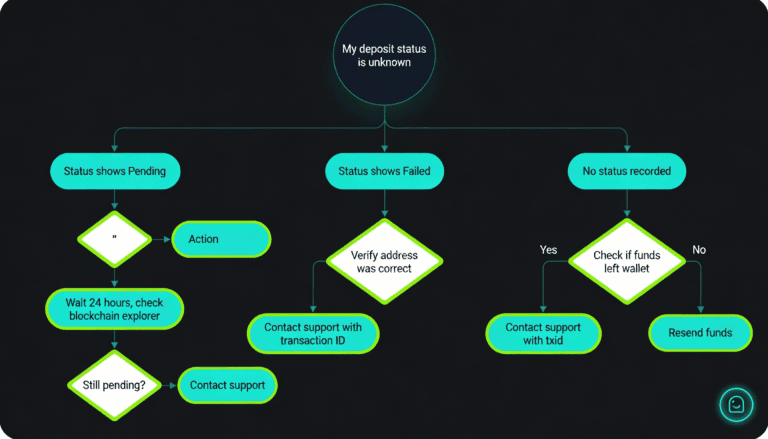
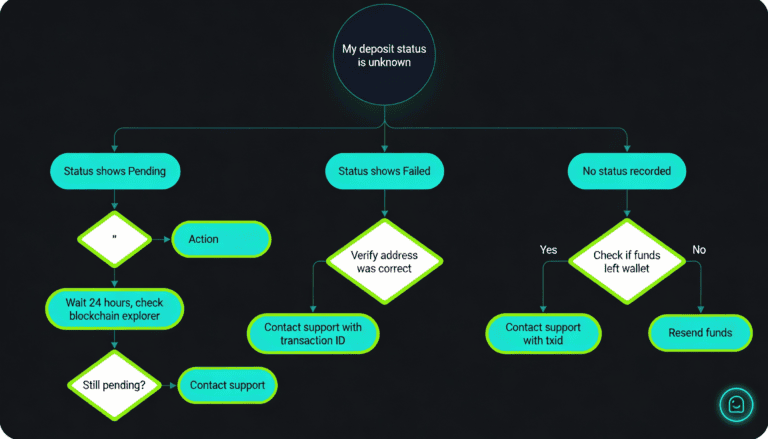
How to check deposit status
Go to your Wallet menu and select Deposit History or Transaction History. Find your recent deposit by amount and date.
Pending: Funds are on the way. Check back in 30 minutes to 24 hours depending on method.
Confirmed: Funds have arrived in your Stake wallet and are ready to use.
Failed: Payment did not go through. See the Troubleshooting section below.
For crypto deposits, click on the deposit to see the blockchain confirmation count and transaction ID (txid). You can verify progress on a blockchain explorer (e.g., blockchair.com for Bitcoin, etherscan.io for Ethereum).
Deposit fees & costs
Do I pay fees to deposit?
Stake’s fee structure varies by method:
- Crypto: No Stake platform fee. Network/blockchain fees apply (paid from your wallet, not your deposit). Bitcoin miner fees and Ethereum gas vary, typically $1–$30.
- Credit/debit card: 3–5% platform fee plus payment processor fees (total ~4–6% of your deposit).
- E-wallet: 1–3% platform fee (varies by provider).
- Bank transfer: No Stake platform fee. Your bank may charge for outgoing wire/ACH.
Check your account’s Deposit page for current fee schedule per method and currency.
Cheapest deposit method
If you own cryptocurrency, crypto deposits have effectively zero platform fees; you only pay blockchain network fees (usually $1–$30 for Bitcoin or Ethereum, depending on network congestion).
If you don’t own crypto, bank transfers are the cheapest fiat option (no Stake fee, though larger deposits and can take 1–3 days). E-wallets offer a middle ground (1–3% fee, 1–3 hours). Cards have the highest cost (4–6% total) but are the fastest fiat option.
What if my deposit fails or is stuck?
Deposits sometimes face delays or errors. This section helps you diagnose and resolve common issues.
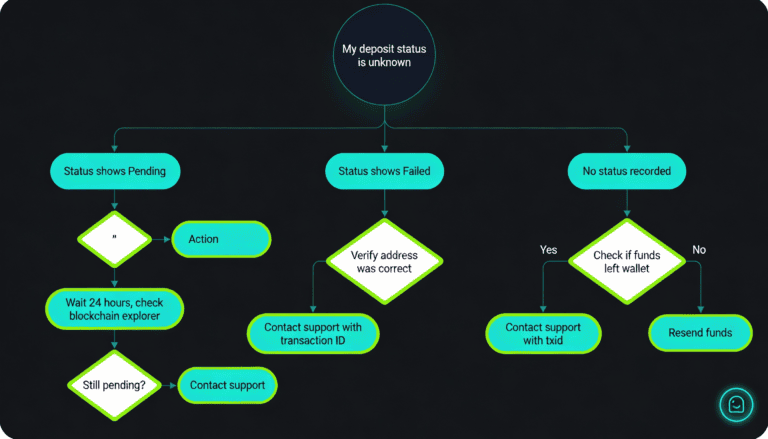
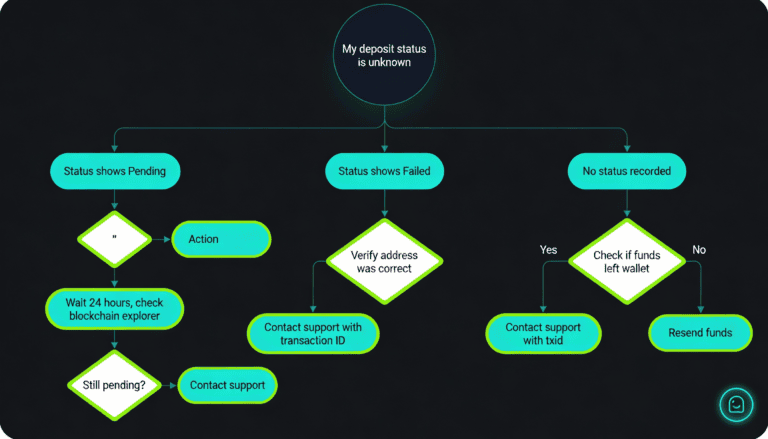
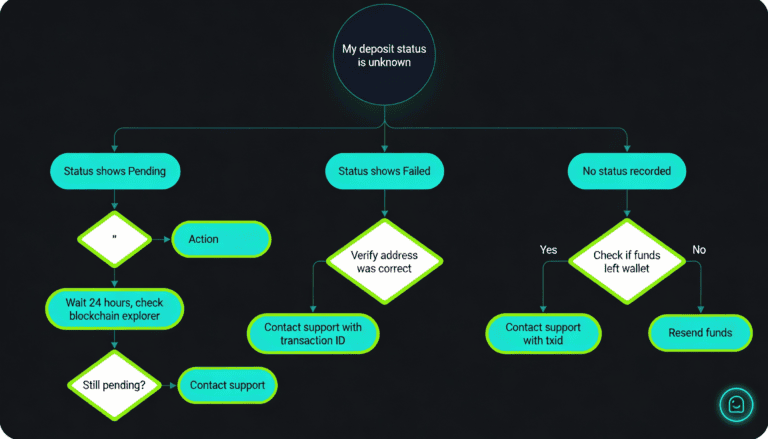
My deposit is still pending (longer than expected)
Check your deposit status in Wallet > Deposit History. If it shows “Pending,” funds are processing.
For crypto deposits, click on the deposit to see the transaction ID (txid). Paste this ID into a blockchain explorer (e.g., blockchair.com for Bitcoin, etherscan.io for Ethereum) to verify confirmations. If you see 0–1 confirmations, the network is congested; wait. If you see 6+ confirmations and Stake still shows “Pending,” proceed to contact support.
For card or e-wallet deposits pending over 3 hours, the payment processor may be delayed. Wait up to 24 hours before contacting support.
For bank transfers pending over 3 business days, contact support with your transfer reference ID to check if funds were received.
My deposit failed or was declined
Card declined: Your card issuer may have rejected the transaction (some issuers block crypto or gambling sites). Contact your card issuer to ask why. Try again with a different card or switch to an alternative deposit method (e-wallet, crypto, bank transfer).
Crypto rejected: This is rare. Verify that the deposit address you sent to was correct by checking it in your Stake Deposit History. If the address doesn’t match, funds may have been sent to an unintended address. Contact support immediately with your transaction ID (txid).
E-wallet failed: Verify that your e-wallet account has sufficient balance and is not locked or restricted. Try again or use a different payment method.
Bank transfer rejected: Verify that you entered Stake’s recipient details correctly (account number, routing code, SWIFT code). Contact your bank to confirm they processed the transfer correctly.
Funds sent but not showing in my Stake wallet
First, confirm funds actually left your account. Check your bank statement or wallet transaction history to verify the payment went through.
If funds left your account: Your deposit is in transit. Check your Stake Deposit History for the status. For crypto, verify the transaction on the blockchain using the txid; if visible but showing low confirmations, wait for more. For card or e-wallet, if confirmed on your bank/provider side but not in Stake, contact Stake support with your transaction details.
If funds did not leave your account: Your deposit was cancelled on your end (e.g., you cancelled the payment, the form timed out, or your bank blocked it). Retry with sufficient balance and a stable connection.
I sent to the wrong address or wrong network
Critical: Funds sent to an incorrect address or wrong blockchain network (e.g., Bitcoin sent to an Ethereum address) are typically non-recoverable.
If this happens, contact Stake support immediately with your transaction ID (txid) and a screenshot from the blockchain explorer showing the transaction. Recovery may be possible if the recipient address belongs to a known service or if Stake can assist, but success is not guaranteed.
Prevention: Always verify the deposit address (check the first 6 and last 6 characters match what Stake shows). Confirm you’ve selected the correct network/chain before sending. Consider sending a small test amount first to verify the address works.
Contact support for unresolved issues
Reach out to Stake support if your deposit:
- Is pending longer than 24 hours for crypto, 3 hours for card/e-wallet, or 3 business days for bank transfer.
- Shows “Failed” and retrying didn’t resolve it.
- Left your account but isn’t showing in Stake (possible system error or payment processor issue).
- Was sent to an unintended address or network (possible recovery assistance).
When contacting support, provide: deposit amount, date and time, payment method, transaction ID (txid), and a screenshot of your bank/wallet confirmation.
Deposit bonuses & promotions
Stake offers bonuses tied to deposits. Bonuses are optional and secondary to your main deposit; check current availability and terms before deciding whether they align with your goals.
Welcome bonus (first deposit)
New accounts typically qualify for a first-deposit bonus, such as a deposit match or free play credit (e.g., 100% match up to $100).
Requirements: Your full deposit amount must clear. Your account must be verified (email + basic KYC). You must meet the minimum deposit (typically $10–$25). The bonus may be automatic or require an opt-in code; check the Promotions section for current terms.
Important: Welcome bonuses usually have a playthrough (wagering) requirement, meaning you must play the bonus amount a certain number of times (e.g., 10–50x) before you can withdraw the bonus as cash. Read the Bonus Terms carefully.
Ongoing deposit bonuses (reload, second deposit, VIP)
Stake offers recurring bonuses after your first deposit: reload bonuses on specific days (e.g., Wednesday), second-deposit bonuses, and VIP/loyalty bonuses tied to your account level or total deposits. Seasonal promotions also appear during events.
Check your Promotions page for current active bonuses, eligible deposit amounts, and dates. Terms and conditions vary per promotion.
How to claim a deposit bonus
- Open your Stake account and navigate to the Promotions section.
- Review available bonuses and their terms (eligibility, minimum deposit, bonus code if required, playthrough requirement).
- Confirm you meet the eligibility criteria (country, account age, minimum deposit).
- If a bonus code is required, enter it in the Deposit section or Promotions page before or after depositing.
- Complete your deposit. If the bonus is automatic, it appears in your account after the deposit clears.
- Verify the bonus credit in your Account > Bonuses or Wallet section.
- Begin wagering. Your bonus credit is locked until you meet the playthrough requirement.
Bonus terms & restrictions
Wagering requirement (playthrough): Most bonuses require you to bet (wager) the bonus amount a set number of times (e.g., 10x playthrough = bet $100 if bonus is $100) before you can withdraw it.
Game restrictions: Some bonuses apply only to slots, table games, or sports betting. Games excluded from the bonus may not count toward your playthrough.
Time limit: Bonuses expire if not claimed or wagered within a set period (typically 7–30 days).
Max withdrawal: Some bonuses cap your maximum winnings (e.g., max $500 from a $100 bonus).
No stacking: You cannot claim multiple bonuses on the same deposit.
Read the full Bonus Terms before depositing. Understanding playthrough, restrictions, and expiration prevents frustration later.
Deposit security & privacy
Is it safe to deposit on Stake?
Stake uses industry-standard security measures: HTTPS/SSL encryption for all data in transit and PCI-DSS compliance from payment processors. Enable two-factor authentication (2FA) in your account settings to protect against unauthorized access.
Use trusted payment methods (recognized card networks, e-wallet services, crypto wallets you control). Verify you’re on the official Stake website before depositing. Use a strong, unique password and never share your account credentials or 2FA codes with anyone, including Stake support staff.
Regulatory context: Stake operates under gaming licenses. Your deposit data is protected by Stake’s terms of service and applicable law. However, treat Stake as an active gaming account, not a savings account; deposit only funds you can afford to lose.
Privacy & KYC verification
KYC (Know Your Customer): Required to prevent fraud, money laundering, and identity theft. Stake collects your name, address, and identity documents (ID, proof of residence).
Data protection: Personal information is stored securely and used only for account verification and regulatory compliance.
Do not share: Never share identity documents, passwords, or 2FA codes with Stake support or third parties. Official Stake staff will never ask for this information.
Review Stake’s Privacy Policy for full details on data handling, retention, and your rights.
Deposit insurance or guarantees
Crypto deposits are not insured. Once funds arrive in your Stake wallet, they are your responsibility. Stake is not a bank and does not offer FDIC-style insurance.
Fiat deposits (card, e-wallet, bank) may have limited consumer protections depending on your jurisdiction and local regulation. Verify your account region’s protections with your payment provider.
If Stake experiences a security breach or platform failure, there is no guarantee of fund recovery. Use only funds you’re comfortable risking on the platform.
FAQ
What is the minimum deposit on Stake?
The typical minimum deposit is $10 USD equivalent. Crypto deposits often have lower minimums ($1–$5) due to no processing fees. Cards and e-wallets typically start at $10–$25. Bank transfers typically require $10–$50. Check your account’s Deposit page for the exact minimum in your region and currency.
Which deposit method is fastest?
Crypto is fastest (10–30 minutes) if you already own cryptocurrency. If you’re depositing fiat currency (traditional money), credit/debit card is fastest (1–3 hours). Bank transfer is slowest (1–3 business days). See the Deposit Methods Comparison table above.
Which deposit method is cheapest?
Crypto has the lowest cost if you already own it (you pay only blockchain network fees, typically $1–$30, not platform fees). If depositing fiat, bank transfer has no platform fee but takes 1–3 days. E-wallets cost 1–3%. Cards are most expensive (4–6% total).
Do I need to verify my identity (KYC) before depositing?
Small deposits may not require full KYC. However, identity verification is required for large deposits and all withdrawals. Email verification is instant. Basic KYC may take 1–3 business days. Enhanced KYC is required for very large deposits or withdrawals. See the Deposit Requirements section for details.
How long does a crypto deposit take to arrive?
Typically 10–30 minutes after blockchain confirmation. Confirmation time depends on network activity; Bitcoin and Ethereum can take longer during peak congestion. See the Processing Times section for factors that affect speed.
My deposit has been pending for hours. What should I do?
Check your Deposit History for status. For crypto, verify the transaction on the blockchain using the transaction ID (txid); if confirmations are low, wait. For card or e-wallet pending over 3 hours, wait up to 24 hours. For bank transfer pending over 3 business days, contact support. See the Troubleshooting section for detailed guidance.
Can I deposit from a friend’s wallet or account?
Not recommended. Deposit sources must match your verified identity (KYC requires your name to match the sender). Deposits from other accounts may be rejected or frozen. Use your own wallet or account, or ask your friend to transfer funds to you first, then deposit from your own account.
Is there a welcome bonus for deposits?
Yes. New accounts typically qualify for a first-deposit bonus (e.g., deposit match or free play). See the Deposit Bonuses section for current offers, eligibility, and terms. Bonuses have playthrough requirements; read the terms before claiming.
What do I do if I sent funds to the wrong address?
Funds sent to an incorrect address are typically non-recoverable. Contact Stake support immediately with your transaction ID (txid) and a blockchain explorer screenshot. Recovery may be possible in rare cases, but is not guaranteed. See the Troubleshooting section for prevention tips.
Can I deposit in a currency other than USD?
Yes. Most methods support EUR, GBP, CAD, AUD, INR, BRL, and other currencies depending on your region. Your account currency is typically set by your region. Check your Deposit page or account settings for available currencies and methods in your location.

Secod has streamed and tested games on Stake extensively, giving him direct insight into the platform’s bonuses, features and gameplay conditions. His experience ensures every Stake review reflects real usage rather than surface level analysis.
Other Stake Deposit
Stake Deposit Methods & Payment Issues: Complete Guide
December 11, 2025
How to Deposit on Stake with Crypto (Step-by-Step 2025)
November 3, 2025
How to Deposit with Credit Card on Stake (2025 Guide)
September 15, 2025
Binance to Stake Casino Safe and Easy Deposit Guide
August 12, 2025
Coinbase to Stake Casino: Secure Deposit Guide
August 12, 2025