
Why Your MoonPay Deposit Failed: Fixes & Next Steps
Every failed MoonPay deposit traces back to one of five categories: payment method, balance, wallet, verification, or blockchain. Identify which one affected you, then move to the fix section.
Written by Secod on 02-02-2026


Why Deposits Fail: The 5 Root Causes
Every failed MoonPay deposit traces back to one of five categories: payment method, balance, wallet, verification, or blockchain. Identify which one affected you, then move to the fix section.
Payment Method Declined (Card, Bank Transfer, or Digital Wallet)
Your card was rejected, your bank blocked the transfer, or your digital wallet payment didn’t process. This is the most common failure point and usually has a simple cause.
Card declined by your bank (fraud block, insufficient available funds, expired card, or merchant not supported)
Your card issuer rejected the transaction instantly. Reasons include a fraud protection block, available balance below the deposit amount, an expired or deactivated card, or MoonPay being flagged as a high-risk merchant. Contact your card issuer to ask why it was declined and request they whitelist MoonPay for future attempts.
Bank transfer failed (wrong account number, name mismatch, account closed, or insufficient balance in bank account)
If you used a bank transfer (ACH in the US, SEPA in Europe), the transfer failed at your bank’s end. Common reasons: account number or routing number incorrect, your name on file doesn’t match the account name, the account has been closed, or your available balance is insufficient. Verify the details with your bank before retrying.
3D Secure authentication failed (incorrect password, timeout, or device mismatch)
Some card issuers require 3D Secure (an additional verification step) for online purchases. You may have entered the wrong verification code, the verification window expired, or the device you’re using doesn’t match the one your bank registered. Retry and watch for the 3D Secure prompt; complete it within the time limit.
Apple Pay or Google Pay rejected (card not registered, device limit reached, or payment network issue)
Digital wallets have their own approval rules. Your card may not be registered with Apple Pay or Google Pay, you may have hit the transaction limit for that device, or the payment network is temporarily unavailable. Verify the payment method is active in your wallet app, then retry.
Insufficient Balance or Insufficient Funds Error
MoonPay approved the deposit, but your bank or card rejected it because your available balance was too low. Note: your available balance may be less than your total balance (holds, pending transactions, overdraft limits).
Check your bank account’s AVAILABLE balance, not total balance (available excludes pending transactions and holds)
Log into your bank account and look for “Available Balance” (not “Total Balance”). The available balance is what you can spend right now. The rest may be on hold due to pending deposits, transfers, or other temporary locks. MoonPay checks available balance, not total.
Ensure your available balance ≥ deposit amount + any fees
MoonPay shows you the fee before you confirm the deposit (usually 2–5% depending on payment method). Add that fee to your desired deposit amount, then verify your available balance is at least that total. If not, either wait for pending transactions to clear or reduce the deposit amount.
Wait 1–2 business days for previous transactions to clear, then retry
Pending transactions typically clear within 24–48 hours. Once cleared, your available balance increases and you can retry the deposit. Don’t retry before the hold lifts; it will fail again.
Contact your bank to ask if there are holds or fraud blocks on your account
If your available balance looks correct but the deposit still fails, ask your bank directly if there’s a fraud hold or block on your account. Some banks apply holds you can’t see in the app. The bank can lift them immediately or explain the reason.
Wallet Address Error or Mismatch
You entered or copied an incorrect wallet address. Blockchain transactions are final and irreversible—funds sent to the wrong address cannot be recovered.
Double-check your wallet address character-by-character before confirming (even one character wrong is fatal)
Blockchain transactions cannot be undone. Once the transaction is confirmed, funds sent to the wrong address are lost permanently. Before you confirm the deposit, compare your wallet address as it appears in MoonPay against your wallet app, character by character. Check the first 6 and last 6 characters at minimum; if they match, the address is likely correct.
Copy-paste the address directly from your wallet app, don’t type it manually
Open your crypto wallet app (MetaMask, Trust Wallet, Ledger Live, etc.), tap “Receive” or “Copy Address,” and paste it directly into MoonPay. Do not type the address manually or edit it. Copy-paste eliminates typos.
Verify the address format matches your wallet type (Bitcoin addresses look different from Ethereum addresses)
Bitcoin addresses (starting with 1, 3, or bc1) are incompatible with Ethereum. Ethereum addresses (starting with 0x) are incompatible with Bitcoin. If you paste a Bitcoin address into an Ethereum deposit field (or vice versa), the funds will be lost. Before you confirm, verify the address format matches the cryptocurrency you’re depositing and the network (Bitcoin, Ethereum, Polygon, etc.).
If you already sent to a wrong address: contact MoonPay support immediately with the transaction ID, but understand that blockchain transactions cannot be reversed
If you’ve already confirmed a deposit to the wrong address, contact MoonPay support immediately with your transaction ID. While blockchain transactions cannot be reversed, MoonPay may be able to investigate the receiving address or explore other limited options. Set realistic expectations: recovery is extremely unlikely, but reaching out quickly gives you the best chance.
Verification or KYC Failure
MoonPay or a regulatory requirement blocked your deposit. Common reasons: expired ID, address mismatch, face verification failed, or UK travel rule recipient not verified.
Check your MoonPay account for a message explaining which verification step failed
Log into MoonPay and look for a notification, message, or email explaining what was rejected. It will typically say something like “ID verification failed: document expired” or “Face verification unclear.” This tells you exactly what to resubmit or fix.
Ensure your ID is valid and not expired
MoonPay requires a valid photo ID (passport, driver’s license, or national ID card). If your ID has expired, it will be rejected. Renew it with your government agency before resubmitting.
Confirm your address on file matches your ID exactly (apartment number, street spelling, etc.)
Your registered address in MoonPay must match your ID exactly—same apartment number, same street spelling, no abbreviations. If your ID says “Suite 200” but you entered “Ste 200,” it will fail. Update your MoonPay address to match your ID word-for-word, then resubmit.
Retake face verification in good lighting and with both eyes visible
Face verification (“liveness check”) requires a clear photo of your face in good lighting, both eyes visible, and ideally without glasses. If your first attempt was rejected, retake it in daylight and without obstructions. Avoid shadows, hats, or heavily tinted glasses.
For UK travel rule: ensure your receiving wallet is verified or belongs to a service that complies with UK FCA rules
If you’re a UK user, the UK Financial Conduct Authority (FCA) travel rule may apply. This rule requires deposits to be sent only to verified wallets or to regulated exchanges and custodians. If your receiving wallet is a personal wallet (MetaMask, Trust Wallet, etc.), verify it in your MoonPay account in advance, or deposit to a verified exchange instead (Coinbase, Kraken, etc.).
Blockchain Network Issue or Congestion
Your deposit reached MoonPay’s system and was approved, but the blockchain network is slow, congested, or experiencing high fees. This is external and temporary.
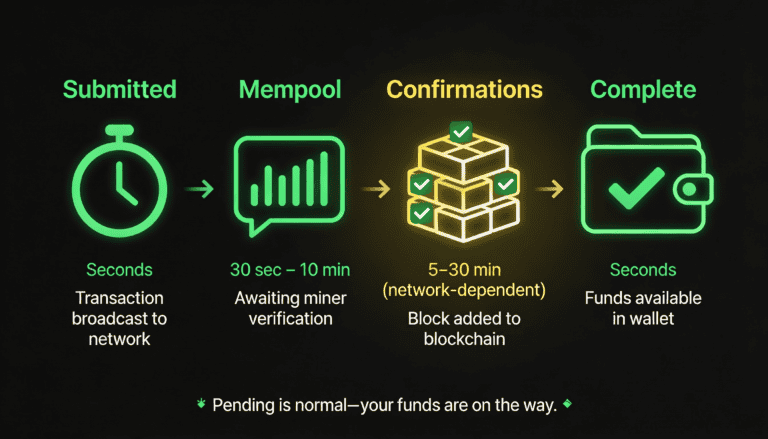
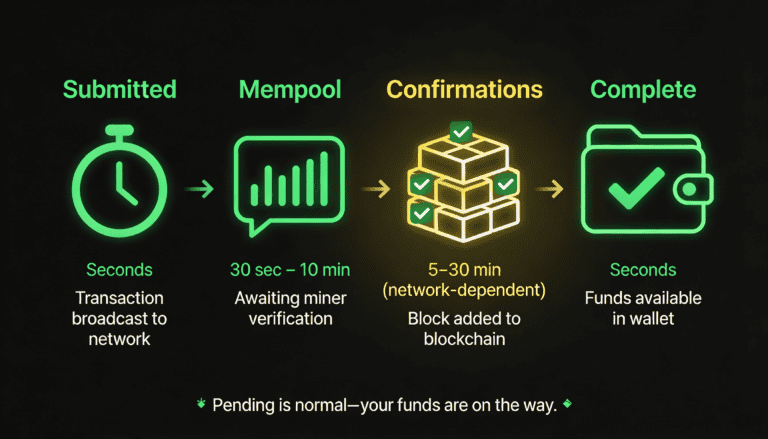
Your transaction is valid but waiting in a queue (mempool) to be confirmed
After MoonPay submits your transaction, the blockchain network queues it (the “mempool”) before confirming it. During this wait, the transaction is valid and will eventually be confirmed—it’s not failed.
Network confirmation typically takes 5–30 minutes, but may be longer during peak traffic
Blockchain confirmation times vary by network and traffic. Bitcoin typically takes 10–30 minutes; Ethereum can be faster but depends on network congestion. During peak hours (roughly 8am–8pm UTC), expect longer waits. This is normal and not a problem.
High network fees (especially Ethereum) may have caused MoonPay to lower the transaction priority or retry logic
When blockchain network fees spike, MoonPay may submit your transaction with lower priority to save on costs, which can increase confirmation time. This is a trade-off between cost and speed—your transaction will still arrive, just more slowly.
This is not a failure—your deposit will likely arrive, just delayed
A “pending” status is not a failure. It means the blockchain is doing its job. Your funds are on the way. Wait 30 minutes to 2 hours depending on network congestion; if it’s still pending after 2 hours, check your transaction ID in a blockchain explorer (Etherscan for Ethereum, Blockchain.com for Bitcoin) to confirm it’s still in the queue.
What to Do Now: Step-by-Step Troubleshooting
Follow these steps in order to diagnose and resolve your failed deposit. Stop when you find the match.
Step 1: Check Your MoonPay Account for an Error Message
MoonPay usually displays the reason for failure. Log in, find your failed transaction, and read the error code or message carefully.
If the message says ‘Payment Method Declined’—go to ‘Payment Method Failures’ section (above) and contact your bank or card issuer
Your payment method was rejected by your bank or card issuer. Review the payment method section above for specific reasons and next steps, then contact your bank to resolve the block.
If the message says ‘Insufficient Funds’—verify your available balance and wait for clears if needed
Your available balance (not total balance) is below the deposit amount. Check your bank account for the available balance, wait 1–2 business days for pending transactions to clear, then retry.
If the message says ‘Address Invalid’ or ‘Wallet Mismatch’—see ‘Wallet Address’ section above; if already sent, contact MoonPay support with transaction ID
You entered an invalid wallet address. If you haven’t confirmed yet, fix the address and retry. If you’ve already sent to the wrong address, contact MoonPay support immediately with your transaction ID.
If the message says ‘Verification Failed’—go to ‘Verification & KYC’ section and resubmit documents or face verification
Your ID, address, or face verification was rejected. Review the verification section above, fix the issue (renew ID, update address, retake face verification), and resubmit. Wait 24–72 hours for MoonPay’s compliance team to review.
If no message or ‘Pending’ status—your transaction may still be processing (blockchain confirmation); wait 24–48 hours before escalating
A pending status is normal. The blockchain is confirming your transaction. Wait 24–48 hours; if it’s still pending or has disappeared, contact MoonPay support with your transaction ID.
Step 2: Verify Your Wallet Address (Before Retrying)
If you’re about to retry a deposit, triple-check that the wallet address is correct. This is non-negotiable.
Log into your crypto wallet app (MetaMask, Trust Wallet, Ledger, etc.)
Open the wallet where you want to receive the crypto. This could be a browser extension (MetaMask), mobile app (Trust Wallet), hardware wallet interface (Ledger Live), or any other wallet you control.
Copy the receiving address directly from the app—do not type it manually
Look for a “Receive” button or a copy icon next to your address. Tap it to copy the full address to your clipboard. Do not manually type the address; copy-paste eliminates typos.
Paste it into MoonPay’s address field
Go to MoonPay, navigate to the deposit screen, and paste the address into the wallet address field.
Compare the first 6 and last 6 characters on screen: they must match exactly
Look at your wallet app and MoonPay side-by-side. Check that the first 6 characters and the last 6 characters of the address match. If they do, the address is almost certainly correct. If any character differs, do not proceed.
If retrying with a different wallet, repeat this check for the new address
If you’re switching to a new wallet, repeat all the steps above with the new wallet’s address. Do not assume you remember the address or that it’s the same as before.
Step 3: Confirm Your Payment Method Is Active
Before retrying, ensure your payment method (card, bank account, or digital wallet) is active and unblocked.
Log into your bank or card issuer’s app and confirm the account is active (not frozen, not suspended)
Check if your account is in good standing. Look for any notices about frozen accounts, suspended services, or security locks. If you see any warnings, contact your bank before retrying.
Check if there are any fraud alerts or holds on your account; contact your bank if needed
Some banks apply temporary holds you may not see in the app. Call your bank and ask if there are any holds, fraud blocks, or restrictions on your account. If there are, ask them to lift the holds.
For cards: verify expiration date, CVV, and that the card is not expired or reported lost
Check your card details: expiration date (month/year), CVV (three digits on back), and card status. If the card is expired, reported lost, or deactivated, you’ll need a different card.
For bank transfers: confirm the account number and routing number (if in the US) are correct; contact your bank if they show a recent failed transfer
Verify the account details you provided to MoonPay. If your bank shows a recent failed transfer, ask them why it failed (wrong account number, name mismatch, account closed, etc.) and fix the issue before retrying.
For Apple/Google Pay: ensure the payment method is registered and has not been removed from the wallet
Open Apple Wallet or Google Wallet and verify the card or account you want to use is still registered. If it’s missing, re-add it before retrying the deposit.
Step 4: Check Your Available Balance
Ensure you have enough available funds (not just total balance) to cover the deposit amount plus any fees.
Log into your bank account and look for ‘Available Balance’ (different from ‘Total Balance’)
Find the section showing your account balances. There should be two: total balance (all your money) and available balance (money you can spend right now). Focus on available balance.
Subtract any holds or pending transactions from your total; the result is your available
If you see pending transactions or holds listed, subtract their amounts from your total balance. The remaining amount is your available balance, which is what MoonPay checks.
Ensure available ≥ deposit amount + estimated MoonPay fee (MoonPay shows fees before you confirm)
Add your desired deposit amount to the fee MoonPay quoted (shown on the confirmation screen). This total must be less than or equal to your available balance. If it’s not, either wait for pending transactions to clear or reduce the deposit amount.
If balance is low, wait 1–2 business days for pending transactions to clear, then retry
Pending transactions typically clear within 24–48 hours. Once cleared, your available balance will increase. Then you can retry the deposit.
Step 5: Retry or Escalate to MoonPay Support
If the above steps didn’t resolve the issue, either retry the deposit or contact support.
If you’re confident the wallet address is correct and your payment method is active: retry the deposit
You’ve verified the address, confirmed your payment method is active, and checked your available balance. You’re ready to retry. Follow the same deposit flow as before, but this time it should succeed.
During retry, MoonPay may show a revised fee or new error; read it carefully
Network fees and availability can change between attempts. Review the fee and any new error messages before confirming.
If the deposit fails again with the same error: screenshot the error message and contact MoonPay support with your transaction ID and error code
Multiple failures with the same error indicate a deeper issue that requires support investigation. Screenshot the error and note your transaction ID (found in your MoonPay transaction history). Contact support with all this information.
MoonPay support typically responds within 24–48 hours; provide as much detail as possible (error code, payment method used, wallet address, amount)
When you contact support, include: the exact error message or code, the payment method you used (card, bank transfer, etc.), your wallet address (first 6 and last 6 characters, masked for security), the deposit amount, and when you attempted the deposit. The more detail you provide, the faster support can help.
What to Expect: Timelines & What’s Normal vs. Red Flags
Failed deposits follow predictable patterns. Know what normal looks like so you don’t panic or waste time.
Payment Declined: Happens Instantly, But Resolution Takes Time
The failure is immediate, but fixing it depends on your bank or card.
Decline reason appears within seconds of your attempt
As soon as you click “Confirm” on MoonPay, your bank evaluates the transaction and either approves or declines it. A decline appears within seconds.
Contact your bank or card issuer (may take 1–2 hours to 1 business day to reach someone)
Call your bank’s customer service line or use their app’s live chat. Explain that a deposit was declined and ask why. If it’s after hours, you may need to wait until the next business day.
Bank may need 24–48 hours to investigate and unblock your account
If the decline was due to a fraud block or suspicious activity flag, the bank may need to investigate before unblocking you. This can take 24–48 hours.
Once cleared, you can retry MoonPay immediately
Once your bank has unblocked the charge or resolved the issue, retry the deposit on MoonPay. It should go through.
Insufficient Funds: Usually Clears in 1–2 Business Days
Your bank denied the deposit, but this is temporary if it’s caused by pending transactions or holds.
Error appears immediately after your attempt
You’ll see the insufficient funds error right after you try to deposit, because MoonPay checks your available balance before submitting the request.
Pending transactions typically clear within 1 business day (24–48 hours)
Holds and pending transactions are temporary. Most clear within 24–48 hours. Check your bank account after this time.
Once cleared, retry the deposit—it will likely succeed
After pending transactions clear, your available balance will increase. Retry the deposit; it should succeed this time.
If it fails again, contact your bank; there may be a hold you’re not seeing
If you’ve waited for pending transactions to clear and the deposit still fails, ask your bank if there are any holds or blocks you’re not seeing in the app. They can often lift these immediately.
Verification Failed: Resubmission Takes 24–72 Hours
After you resubmit documents, MoonPay’s compliance team reviews them.
You’ll receive an email explaining what failed (e.g., ‘ID expired’, ‘Face verification unclear’)
MoonPay will notify you via email when your verification fails, explaining the specific reason. This email will tell you exactly what to fix or resubmit.
Resubmit corrected documents or retake face verification immediately
Once you understand what failed, fix it and resubmit right away. Renew your ID if expired, update your address if it doesn’t match, or retake face verification in better lighting. Don’t wait.
MoonPay reviews resubmissions within 24–72 hours
After you resubmit, their compliance team will review within 1–3 business days. You’ll receive another email with the result.
Once approved, retry your deposit; it should succeed if other details (wallet address, payment method) are correct
Once verification is approved, the block is lifted. Retry the deposit with the same wallet address and payment method, and it should go through.
Blockchain Pending: Patience, Not Panic
If your transaction is “pending” in MoonPay’s system, the blockchain is doing its job.
Pending = transaction is in the blockchain’s queue, not failed
Pending status means MoonPay submitted the transaction to the blockchain and it’s waiting to be confirmed. This is normal and expected. It’s not a failure.
Typical wait: 5–30 minutes depending on network congestion and gas fees
On most networks, confirmation takes 5–30 minutes. Bitcoin is usually on the slower end (10–30 minutes); Ethereum can be faster (5–15 minutes) when network is not congested.
During peak hours (roughly 8am–8pm UTC), expect 30+ minute delays
When the blockchain is busy, waits are longer. Don’t deposit during peak hours if you need the funds urgently, or accept that confirmation may take 1–2 hours.
If pending for >2 hours without an update, contact MoonPay support (rare, but it happens)
If your transaction is still pending after 2 hours, check a blockchain explorer (Etherscan for Ethereum, Blockchain.com for Bitcoin) to see if the transaction is visible on-chain. If it’s not visible after 2 hours, contact MoonPay support with your transaction ID.
Red Flags: When to Escalate to Support
Some scenarios require MoonPay or bank support; don’t waste time troubleshooting.
Same error after 3+ attempts with the same payment method = contact MoonPay support
If you’ve retried 3+ times and the same error appears each time, there’s a deeper issue. Contact support instead of retrying again.
Error message you don’t recognize or can’t find in MoonPay’s FAQ = contact support
If MoonPay shows an error code or message that doesn’t match anything in this article or MoonPay’s help center, contact support. You may need assistance decoding it.
Transaction disappeared from your MoonPay account history without explanation = contact support immediately
If a transaction you initiated is no longer visible in your history, contact support right away. It may have been canceled or rolled back, and you need to know the status.
Deposit status stuck on ‘pending’ for >24 hours = contact support with transaction ID
Pending should resolve in 24 hours max. If it doesn’t, contact support with your transaction ID and a screenshot of the pending status.
Money was deducted from your bank but never arrived in your wallet = potential duplicate charge; contact both MoonPay and your bank
If your bank shows the money was transferred but your wallet doesn’t show the crypto, contact MoonPay immediately with your transaction ID. Also contact your bank to document the discrepancy. Do not retry; you may end up charged twice.
How to Prevent Future Deposit Failures
Most failures are preventable. Adopt these habits before your next deposit.
Verify Wallet Address Once, Copy It Three Times
Address errors are irreversible. This is the single most important prevention step.
Open your wallet app on your phone or browser
Use the wallet app you’ll actually deposit to, not a different one. Consistency is critical.
Tap ‘Receive’ or ‘Copy Address’—do not manually type the address
Always use the copy function. Do not type the address by hand.
Paste it into a blank note or email on your device
Open a blank note or email and paste the address. This gives you a copy to reference.
Compare the pasted version against what’s in your wallet app (character by character, or use a diff tool if it’s very long)
Look at both versions (your wallet and the pasted copy). Check the first 6 and last 6 characters at minimum. They must match exactly.
Only then paste it into MoonPay; do not edit or shorten it
Once verified, paste the full address into MoonPay. Do not edit it or remove characters.
Start with a Small Deposit First
Test your entire flow (payment method, wallet, verification) with a small amount before depositing larger sums.
Make your first deposit $10–$25, not $1,000
A small test deposit lets you catch problems (wrong wallet, declined card, slow network) without significant risk.
Use the same wallet address and payment method you’ll use for larger deposits
Test with the exact setup you plan to use. This confirms everything works together.
If it succeeds, you’ve confirmed the setup works
A successful small deposit proves your wallet address is correct, your payment method works, and your verification is approved. You’re ready for larger deposits.
If it fails, you lose a small amount and can troubleshoot without panic
A small failed deposit is a cheap learning experience. You’ll know exactly what’s broken before risking more money.
Know Your Payment Method’s Limits & Fees Before Depositing
Limits, fees, and timelines vary by payment method. Check before you deposit.
Log into MoonPay and navigate to ‘Deposit’ before entering an amount
Don’t skip ahead to the confirmation page. Start from the beginning and review all available options.
MoonPay displays the available payment methods, limits (min/max), and fees for your location
You’ll see a list of payment methods available to you, each with a minimum and maximum deposit limit and a fee. Write these down or screenshot them.
Note the fee as a percentage (e.g., ‘3% + $0.50’) so you can calculate the total cost
Multiply your deposit amount by the fee percentage, then add the flat fee. This is the total you’ll be charged. Make sure your available balance covers the deposit + fee.
Choose the payment method with the lowest fee, not the fastest (unless time-sensitive)
Card deposits are fast but expensive (usually 3–5% fee). Bank transfers are cheaper (1–3% fee) but slower (1–3 days). Choose based on your needs and budget.
Verify Your Bank Account and Wallet Address Match Your Identity
Name mismatches are a common cause of payment method and verification failures.
Check that your MoonPay account name matches your bank account name exactly (including middle initials or suffixes if your bank uses them)
Log into MoonPay and check your profile name. Then check your bank account. They must match exactly—same first name, middle initial (if any), and last name. No nicknames or shortened versions.
Check that your wallet address is registered to your account in MoonPay (you can usually see this in settings)
MoonPay may allow you to register multiple wallet addresses. Confirm that the address you’re using for this deposit is already registered, or register it before depositing.
If you’ve recently changed your name, address, or bank account, update your MoonPay profile before depositing
Life changes (marriage, move, bank switch) require profile updates. Do this before depositing; it prevents verification and payment method failures.
For UK users: if you’re using the UK travel rule, ensure your receiving wallet is registered or verified in advance
Don’t wait until the deposit fails to verify your wallet. Do it now, before you deposit.
Monitor Your First Deposit Through Completion
Don’t hit “send” and disappear. Watch for the first confirmation.
Immediately after MoonPay confirms the deposit, check your wallet app (if it’s a blockchain deposit) to see the transaction in pending
Once MoonPay says the deposit is sent, open your wallet app. You should see a pending transaction (it may not show the final amount or may show as “receiving,” depending on your wallet). This confirms the transaction is on the blockchain.
Wait 5–10 minutes for your wallet to show it confirmed; note the time
Confirmations usually take 5–10 minutes on faster networks (Polygon, Arbitrum) and up to 30 minutes on congested ones (Ethereum, Bitcoin). Note when you initiated the deposit so you know if it’s taking abnormally long.
If it doesn’t show in your wallet after 30 minutes, check your MoonPay account for status
If your wallet still doesn’t show the transaction after 30 minutes, log into MoonPay and check the deposit status. It should say “completed” or show a final amount. If it says “pending” or shows an error, note it.
Knowing typical timelines for your setup helps you spot real problems faster
By monitoring the first deposit, you learn what normal looks like for your wallet, payment method, and network. You’ll immediately recognize if something is wrong on the next deposit.
Contact MoonPay Support: When & How
You’ve troubleshot, but the deposit still hasn’t worked. Here’s how to get help, what to provide, and what to expect.
When to Contact Support
Escalate after these conditions are met (don’t waste support’s time before).
You’ve verified your wallet address is correct and the payment method is active
Before contacting support, confirm that you’ve checked your wallet address (first 6 and last 6 characters match) and that your payment method is active (card not expired, bank account not frozen, etc.).
You’ve retried the deposit at least once and received the same error
One failure might be a fluke. Two failures with the same error indicate a real problem worth escalating.
You’ve waited at least 24 hours for a pending transaction without update
Pending transactions can take 24+ hours on congested networks. Wait before escalating.
You’ve confirmed your available balance is sufficient
Confirm your bank account shows an available balance at least equal to the deposit amount + fee.
The error message is unclear or doesn’t match any scenario in this article
If you’ve exhausted the troubleshooting steps above and still don’t understand the error, contact support. They have access to more detailed logs.
How to Contact MoonPay Support
MoonPay offers support via in-app chat and email; in-app is usually faster.
Open the MoonPay app or web page and look for a ‘Help’ or ‘Support’ icon (usually a question mark or chat bubble)
On the MoonPay app or website, find the support icon (often in the top right or bottom menu). It’s usually labeled “Help,” “Support,” or represented by a chat bubble or question mark.
Click it to start an in-app chat (typical wait: 1–4 hours during business hours)
Start a live chat if available. Response time is usually 1–4 hours during business hours (Monday–Friday, 9am–6pm GMT).
If you prefer email, navigate to help.moonpay.com or in-app support menu and select ‘Email Support’
Email support is also available through MoonPay’s help portal. Email typically takes 24 hours for a first response.
MoonPay support is typically available Monday–Friday, 9am–6pm GMT; response times may be longer on weekends
Weekends and after-hours support is slower. If your issue is urgent, prioritize weekday contact or use in-app chat.
What Information to Provide
Give support everything they need to help you immediately.
Your MoonPay transaction ID (found in your transaction history or the error message)
Every MoonPay transaction has a unique ID. Find it in your transaction history or in the error message you received. This is the most important detail.
The exact error code or error message you received (screenshot it)
Provide the word-for-word error. A screenshot is ideal so support sees exactly what you saw.
The payment method you used (card, bank transfer, etc.)
Tell support whether you used a debit card, credit card, bank transfer, Apple Pay, Google Pay, etc. Don’t include card numbers or bank details—just the type.
The crypto and amount you were depositing
Example: “Depositing $100 in Ethereum” or “Depositing 0.5 Bitcoin.” Be specific.
Your wallet address (first 6 + last 6 characters, masked for security)
Don’t provide your full wallet address (security risk), but do provide the first 6 and last 6 characters so support can verify you’re using the right wallet. Example: “bc1qw5…z4n5s”
When you attempted the deposit and how many times
Example: “Attempted on Monday, November 18 at 3pm UTC. Retried twice, same error.”
Any steps you’ve already taken to troubleshoot
Example: “Verified my wallet address, confirmed my card is active, checked my available balance, retried the deposit.” This helps support avoid repeating steps you’ve already done.
What to Expect from Support
Know the typical timeline so you’re not left wondering.
In-app chat: first response within 1–4 hours; resolution or escalation within 24 hours
If you use in-app chat, expect a first response during business hours (1–4 hours) and a resolution or clarification within 24 hours.
Email support: first response within 24 hours; resolution within 1–3 business days
Email is slower; plan for 24 hours for a response and 1–3 business days for resolution.
If escalated to compliance (verification issues): 1–5 business days
If your issue involves KYC or verification, support may escalate to the compliance team. This adds 1–5 business days.
Support can investigate payment method failures and blockchain delays, but cannot reverse blockchain transactions
MoonPay support can help troubleshoot why a payment method failed, check on pending blockchain transactions, and investigate other issues. However, they cannot reverse transactions that have already been confirmed on the blockchain. Set realistic expectations about what they can and cannot do.
FAQ
Can I recover funds if I sent them to the wrong wallet address?
Short answer: No, blockchain transactions are final and irreversible.
Explanation: Once a transaction is confirmed on the blockchain, it cannot be undone, reversed, or redirected. If you sent to a wrong address, that wallet’s owner (if unknown) now holds your funds, and there is no technical or legal mechanism to recover them. Contact MoonPay support immediately if this happens, but set expectations accordingly. This is why wallet address verification is critical before sending.
How long does a failed MoonPay deposit usually take to refund to my bank account?
Short answer: If MoonPay failed (payment declined, verification failed), there’s no refund—the transaction never left your bank. If your bank processed the transfer but blockchain failed, refund is 1–5 business days.
Explanation: If your payment method was declined, MoonPay never charged you; check your bank to confirm no charge posted. If your bank transferred the funds (e.g., bank wire) but the blockchain deposit failed, MoonPay initiates a refund, which the bank typically processes in 1–5 business days. You’ll see the refund in your bank account, not MoonPay.
Why does my deposit say ‘pending’ but I don’t see it in my wallet?
Short answer: ‘Pending’ means the blockchain is still confirming the transaction; it’s normal and will arrive.
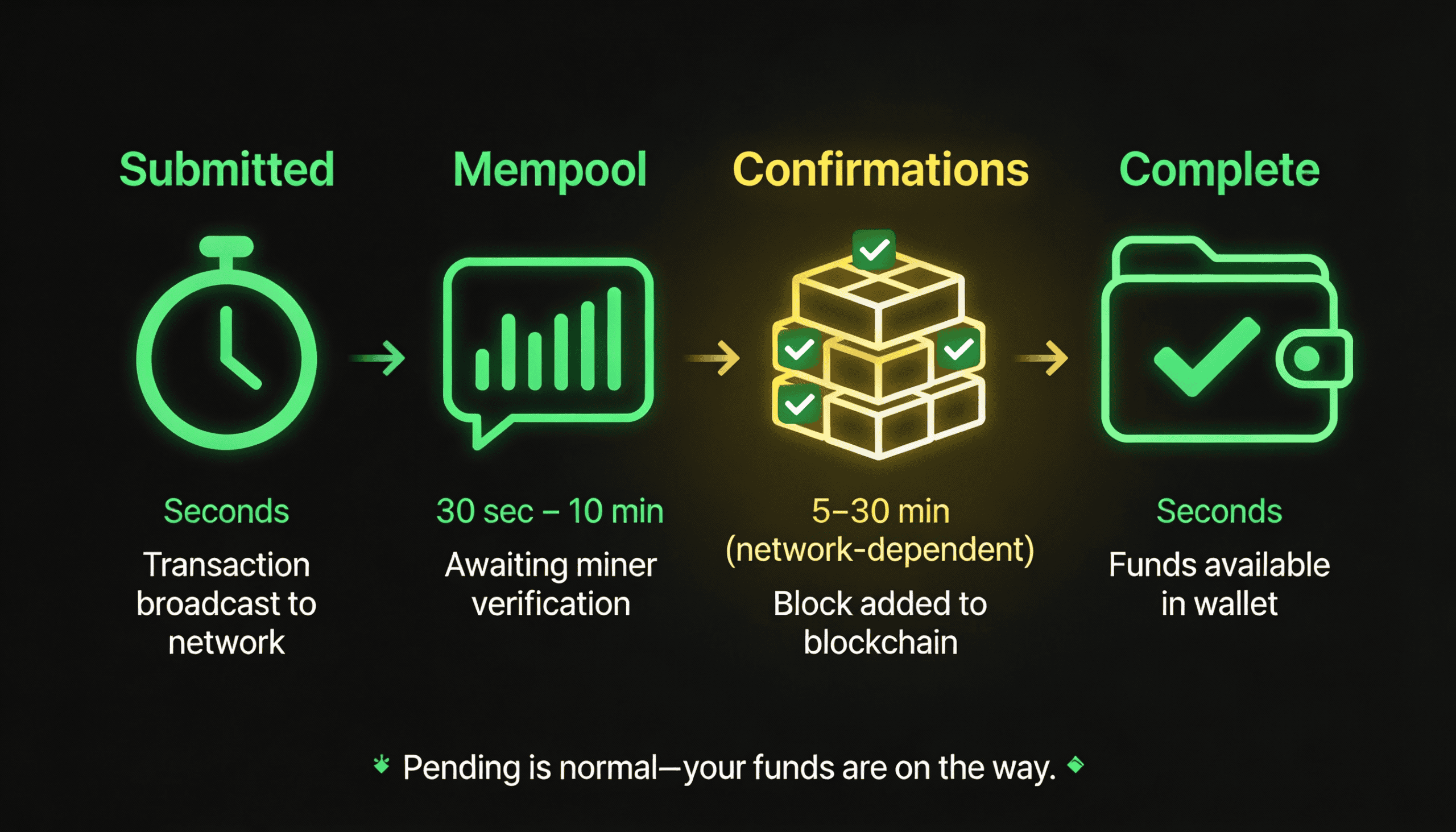
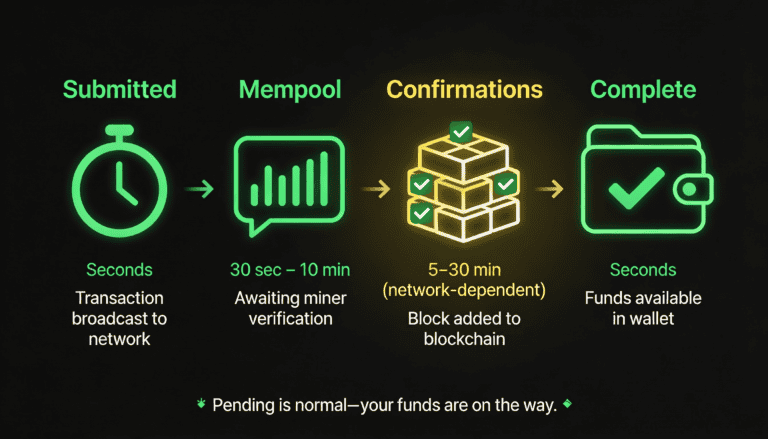
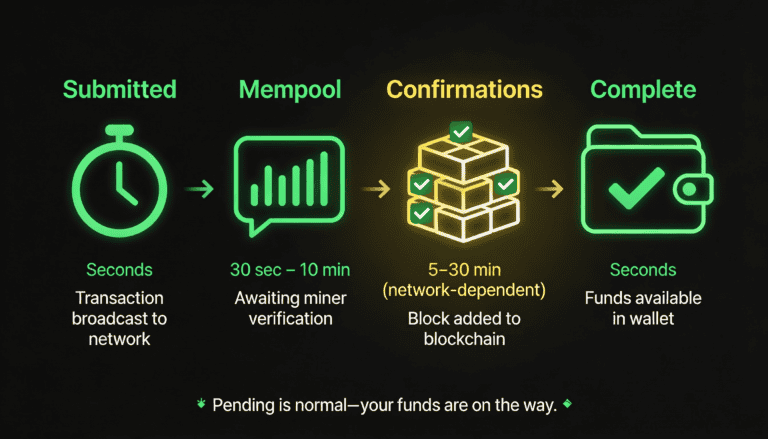
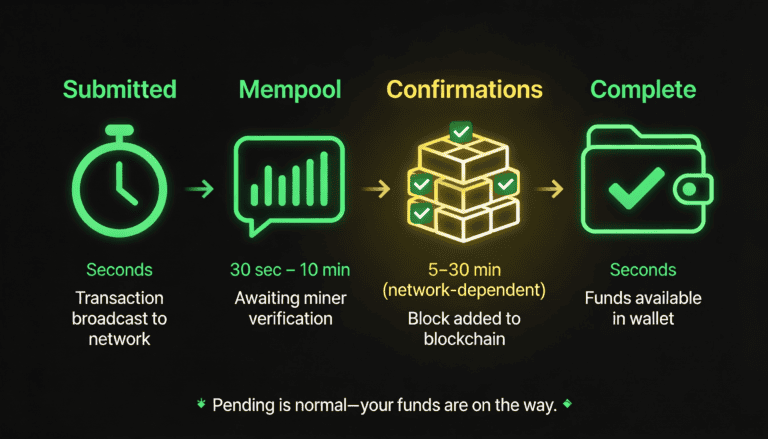
Explanation: Blockchain transactions go through stages: submitted → mempool (queue) → confirmations (blocks adding the transaction to the chain) → final. During this 5–30 minute window (or longer during network congestion), the transaction shows ‘pending’ in MoonPay but won’t appear in your wallet until it’s confirmed. Wait 30 minutes, then check again. If it’s still pending after 2+ hours, contact MoonPay support with your transaction ID.
My card was declined by MoonPay. Can I retry immediately, or do I need to wait?
Short answer: You can retry immediately, but only if you’ve resolved the underlying issue (e.g., contact your bank to unblock it).
Explanation: If your card was declined due to fraud protection or a temporary block from your bank, retrying right away will fail again. Contact your card issuer or bank first to understand why it was declined (fraud alert, insufficient funds, card expired, etc.), resolve the issue, then retry. If the decline was due to MoonPay being an unrecognized merchant, your bank may process the second attempt without issue. Don’t retry more than 3 times in quick succession; multiple failures can trigger additional blocks.
Does MoonPay charge a fee if my deposit fails?
Short answer: No, if MoonPay or your payment method declines the deposit, you are not charged.
Explanation: MoonPay only charges a fee if the deposit goes through successfully. If your payment is declined before or during processing, the transaction is canceled and no fee is applied. However, your bank may charge a fee for a declined transaction (rare, but some banks do); contact your bank to confirm. If your bank charged you a fee incorrectly, dispute it with your bank.
What’s the difference between ‘insufficient funds’ and ‘insufficient balance’?
Short answer: They mean the same thing, but ‘available balance’ (what MoonPay checks) is different from ‘total balance’ (what you see in your account summary).
Explanation: Your bank account has a ‘total balance’ (all your money) and an ‘available balance’ (money you can spend right now). The difference is holds on pending transactions, recent deposits not yet cleared, overdraft limits, etc. MoonPay checks your available balance, not total. If you have $500 total but only $200 available (due to a pending $300 transaction), MoonPay will decline a $300+ deposit, even though your account shows $500. Wait 1–2 business days for the pending transaction to clear, then retry.
Is my wallet address format important? Can I use any address format for any deposit?
Short answer: Yes, address format is critical. Bitcoin addresses look completely different from Ethereum addresses; using the wrong format for the wrong blockchain is a common, irreversible mistake.
Explanation: If you’re depositing Bitcoin, use a Bitcoin address. If you’re depositing Ethereum, use an Ethereum address. If you paste a Bitcoin address into MoonPay’s Ethereum deposit field (or vice versa), the funds will be sent to a wallet format that doesn’t support the blockchain, and your funds will be permanently lost. MoonPay tries to prevent this (it often validates address format), but user copy-paste errors still happen. Always verify that the address format matches the cryptocurrency you’re depositing and your wallet’s blockchain network.
Why is my KYC verification failing repeatedly? What documents do I actually need?
Short answer: Common reasons: expired ID, face doesn’t match ID, address doesn’t match ID, or poor photo quality.
Explanation: MoonPay (and regulators) require ID, address verification, and sometimes face verification. For ID: ensure it’s not expired and clearly visible. For address: ensure it matches your ID exactly (apartment number, spelling, etc.) and your account on file matches both. For face verification: take it in good lighting, show both eyes clearly, and no glasses if possible. Resubmit and wait 24–72 hours. If it fails again, contact MoonPay support with a screenshot of the rejection reason; they can clarify what’s wrong (e.g., ‘address doesn’t match’ means your submitted address doesn’t match what’s on your ID).
What is the UK travel rule, and why is it blocking my deposit?
Short answer: The UK travel rule requires deposits to wallets outside of regulated exchanges to include verifiable information about who owns the receiving wallet; if it’s unverified or anonymous, MoonPay may block it.
Explanation: This is a UK Financial Conduct Authority (FCA) compliance requirement, not a MoonPay choice. If your receiving wallet is on a personal or unverified service (like MetaMask), MoonPay may require you to verify that wallet or confirm the wallet owner’s identity before allowing the deposit. If you’re depositing to your own verified Coinbase or Kraken account, you’re typically fine. If you’re depositing to a personal wallet, verify it in advance or check with MoonPay support about whether your specific wallet is covered under the travel rule exception.

Secod has streamed and tested games on Stake extensively, giving him direct insight into the platform’s bonuses, features and gameplay conditions. His experience ensures every Stake review reflects real usage rather than surface level analysis.
Other Stake Deposit
How to Deposit on Stake: Methods, Steps & Requirements
February 2, 2026
Stake Deposit Methods & Payment Issues: Complete Guide
December 11, 2025
How to Deposit on Stake with Crypto (Step-by-Step 2025)
November 3, 2025
How to Deposit with Credit Card on Stake (2025 Guide)
September 15, 2025
Binance to Stake Casino Safe and Easy Deposit Guide
August 12, 2025