






+18 - Check if the casino you want to register with is eligible in your country.

Stake.com officially supports 22 cryptocurrencies for deposits and withdrawals, spanning major coins, stablecoins, altcoins, and meme coins. The complete list includes Bitcoin, Ethereum, Litecoin, Dogecoin, Bitcoin Cash, XRP, EOS, Tron, Binance Coin, Solana, and others. Availability may vary slightly by region, so always verify the current list directly in your Stake wallet before depositing.
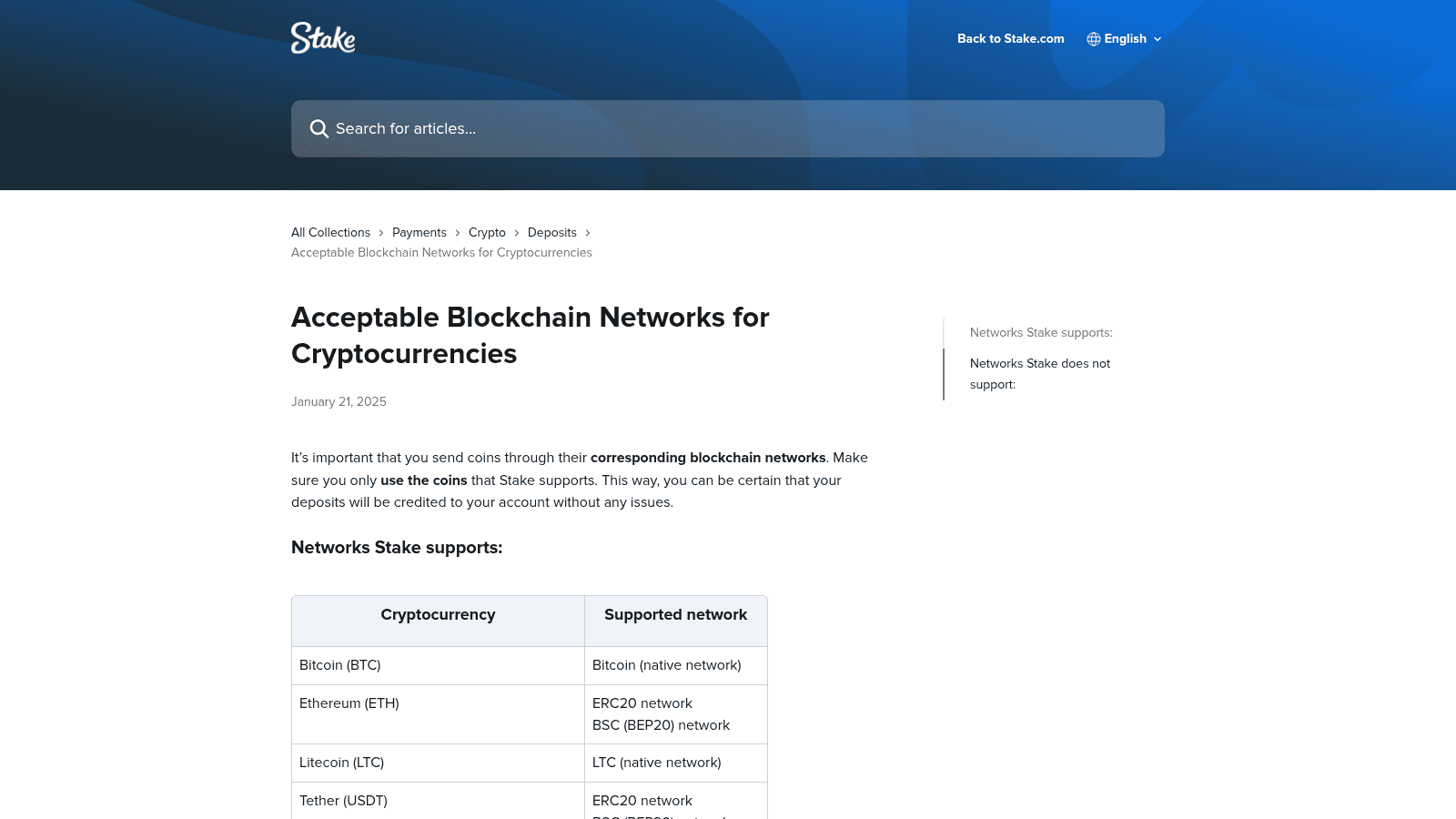
The major cryptocurrencies on Stake.com are Bitcoin, Ethereum, Litecoin, Dogecoin, Bitcoin Cash, and Ripple. These coins represent the most widely used and recognized digital assets on the platform. Bitcoin and Ethereum dominate by market cap and user adoption. Litecoin offers faster block times than Bitcoin, making it attractive for frequent deposits. Dogecoin, despite its meme origins, maintains a large user base. Bitcoin Cash and Ripple serve niche use cases but remain supported for players who hold them.
Three stablecoins are supported on Stake.com: Tether (USDT), USD Coin (USDC), and Dai (DAI). All three are pegged to the US Dollar, eliminating price volatility concerns during deposits and withdrawals. USDT is the most widely adopted and offers the most network flexibility. USDC is managed by Centre, a consortium including Coinbase and Circle. DAI is a decentralized stablecoin backed by crypto collateral, offering an alternative for users who prefer non-custodial assets.
Stake.com supports a diverse range of altcoins and tokens including Binance Coin (BNB), Tron (TRX), Solana (SOL), ApeCoin (APE), Chainlink (LINK), The Sandbox (SAND), Shiba Inu (SHIB), Uniswap (UNI), Polygon (MATIC), Cronos (CRO), and TrumpCoin (TRUMP). These assets appeal to players with specific portfolio preferences or those seeking exposure to emerging blockchain ecosystems. Tron and Solana are particularly popular for their low transaction fees and fast confirmation times.
Each cryptocurrency on Stake.com is tied to one or more specific blockchain networks. Sending on the wrong network will cause your deposit to fail or be permanently lost. The table below maps each supported cryptocurrency to its accepted blockchain networks. Single-network coins like Bitcoin and Litecoin use only their native networks. Multi-network coins like Ethereum and USDT accept deposits across multiple blockchains, giving players flexibility in choosing their preferred network.
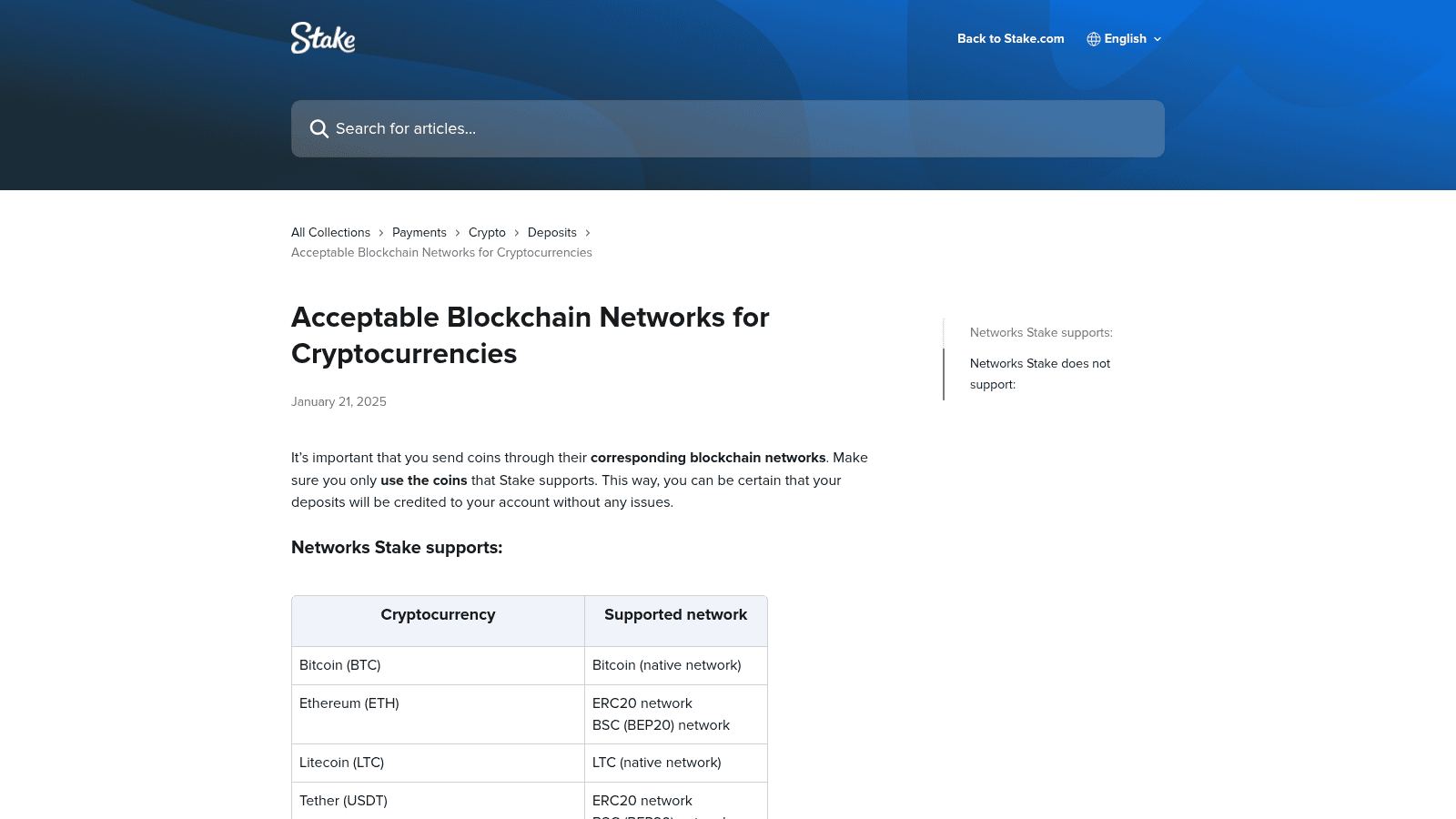
| Cryptocurrency | Supported Networks |
|---|---|
| Bitcoin (BTC) | Bitcoin (native network) |
| Ethereum (ETH) | ERC20, BSC (BEP20) |
| Litecoin (LTC) | LTC (native network) |
| Tether (USDT) | ERC20, BSC (BEP20), Polygon, TRC20 (Tron), Solana |
| Dogecoin (DOGE) | Dogecoin (native network) |
| Bitcoin Cash (BCH) | BCH (native network) |
| Ripple (XRP) | Ripple network |
| EOS (EOS) | EOS network |
| Tron (TRX) | TRC20 network |
| Binance Coin (BNB) | BSC (BEP20) network |
| USD Coin (USDC) | ERC20, BSC (BEP20), Polygon, Solana |
| ApeCoin (APE) | ERC20 network |
| Binance USD (BUSD) | ERC20 network (withdrawals only) |
| Cronos (CRO) | ERC20 network |
| Dai (DAI) | ERC20, BSC (BEP20), Polygon |
| Chainlink (LINK) | ERC20, BSC (BEP20) |
| The Sandbox (SAND) | ERC20 network |
| Shiba Inu (SHIB) | ERC20, BSC (BEP20) |
| Uniswap (UNI) | ERC20, BSC (BEP20) |
| Polygon (MATIC) | ERC20, BSC (BEP20), Polygon network |
| Solana (SOL) | Solana native network |
| TRUMP | Solana network |
Single-network cryptocurrencies use only one blockchain for deposits and withdrawals. Bitcoin, Litecoin, Dogecoin, Bitcoin Cash, Ripple, EOS, Tron, Binance Coin, Solana, and TRUMP all fall into this category. When depositing these coins, you have no network selection to make. Simply copy your Stake deposit address and send the cryptocurrency from your exchange or wallet using the coin’s native network. The transaction will be credited automatically once confirmed on the blockchain.
Multi-network cryptocurrencies can be sent to Stake.com via multiple blockchain networks. Ethereum, Tether, USD Coin, Dai, Chainlink, Shiba Inu, Uniswap, and Polygon all support this flexibility. When depositing a multi-network coin, you must select the correct network in your exchange or wallet before initiating the transfer. Stake’s deposit screen will display all available networks for your chosen cryptocurrency. Selecting the wrong network will result in a failed or non-credited deposit.
Binance USD (BUSD) is available on Stake.com for withdrawals only, not deposits. This restriction means you cannot fund your account using BUSD. If you hold BUSD and want to play on Stake, you must convert it to another supported cryptocurrency first using an exchange or swap service. BUSD withdrawals are processed on the ERC20 network only. This withdrawal-only status reflects Stake’s current operational policy and may not change without notice.
Stake.com explicitly rejects six network types: Cronos native network, Arbitrum, Optimism, Base, and generic ERC20 or BEP20 token transfers. Sending cryptocurrency via any of these networks will result in a failed or unrecoverable deposit. Users who send funds on unsupported networks often lose access to those funds permanently. Always verify the network before confirming a transfer from your exchange or wallet.
Stake.com does not support deposits via the following five blockchain networks: Cronos (note: Cronos coin itself is supported on ERC20 only), Arbitrum, Optimism, and Base. Also, Stake.com does not accept generic ERC20 token transfers or generic BEP20 token transfers. These networks and transfer methods are explicitly listed in Stake’s official help documentation as unsupported. Sending any cryptocurrency through these networks will not be credited to your account and cannot be recovered by Stake support.
A frequent error occurs when players attempt to send Cronos (CRO) via the Cronos network instead of the ERC20 network. Although Cronos is a supported cryptocurrency on Stake.com, it is only accepted on ERC20. Sending CRO via the native Cronos network will fail. Similarly, some players mistakenly attempt to use Arbitrum or Optimism for coins that Stake supports on other networks. Always cross-reference the coin name with the network list before sending.
If you send crypto to Stake.com via an unsupported network, the deposit will not be credited automatically. You must contact Stake live support immediately with your transaction hash and the network you used. Stake support may attempt to recover your funds, but recovery is not guaranteed. The longer you wait to report the issue, the lower the chances of successful recovery. Prevention through verification before sending is always the best approach.
To contact Stake support about a failed deposit, access the live chat feature in your account or visit the help center at help.stake.com. Have your transaction hash ready, which you can find on the blockchain explorer for the network you used. Provide the cryptocurrency name, the amount sent, the network used, and the timestamp of the transaction. Support will investigate and attempt to assist, but outcomes vary based on the specific network and circumstances.
Recovery of funds sent to unsupported networks is not guaranteed. Stake’s official help documentation states that users should contact support for assistance, but it does not promise recovery. Funds sent to blocked networks may be permanently inaccessible. This is why verification before sending is critical. Once a transaction is confirmed on an unsupported network, reversing it is technically difficult or impossible, even with support intervention.
Stake.com supports three stablecoins pegged to the US Dollar: USDT, USDC, and DAI. USDT is the most flexible, accepted on five different networks including TRC20 and Solana. USDC is available on four networks. DAI is available on three networks. All three stablecoins eliminate price volatility, making them ideal for players who want stable account balances. Stablecoins are also popular for their lower withdrawal fees compared to volatile cryptocurrencies.
Tether (USDT) can be deposited to Stake.com via five blockchain networks: ERC20 (Ethereum), BEP20 (Binance Smart Chain), Polygon, TRC20 (Tron), and Solana. This flexibility allows players to choose the network that offers the lowest fees or fastest confirmation times. Tron (TRC20) is often the cheapest option for USDT transfers. Solana offers fast confirmation times. ERC20 and Polygon are widely supported by exchanges and wallets.
USD Coin (USDC) is accepted on four networks: ERC20, BEP20, Polygon, and Solana. USDC is managed by Centre and is considered a more regulated stablecoin alternative to USDT. The four supported networks provide good coverage for most players. Solana offers the fastest confirmation times. Polygon offers low fees. ERC20 and BEP20 are the most widely available on exchanges.
Dai (DAI) is supported on three networks: ERC20, BEP20, and Polygon. DAI is a decentralized stablecoin backed by crypto collateral, appealing to players who prefer non-custodial assets. The three supported networks cover most major exchanges and wallets. Polygon offers the lowest fees for DAI transfers. ERC20 is the original network for DAI.
Always match the network selected in your exchange wallet to the network shown in Stake’s deposit screen. For coins with only one network (BTC, LTC, DOGE), use the native network, no selection is needed. For multi-network coins, verify the network dropdown in Stake’s wallet before copying your deposit address. Once you have confirmed the network, copy the address and paste it into your exchange or wallet as the withdrawal destination. Do not send until both the coin and network match exactly.
Step 1: Log into your Stake account and navigate to Wallet. Step 2: Click Deposit and select the cryptocurrency you want to send. Step 3: If a network dropdown appears, select the network that matches your exchange or wallet. Step 4: Copy the deposit address displayed on screen. Step 5: Log into your exchange or wallet and initiate a withdrawal. Step 6: Paste the Stake address as the destination and confirm the network matches the one you selected in Stake. Step 7: Review all details one final time before confirming the transfer.
For stablecoins like USDT, Tron (TRC20) typically offers the lowest fees and fast confirmation times. Solana is also fast and cheap for USDC and USDT. For Ethereum-based coins, Polygon is cheaper than ERC20 but may have slightly longer confirmation times. Bitcoin and Litecoin have fixed fees determined by network congestion. Check current network fees on your exchange before choosing, as conditions vary.
Every cryptocurrency on Stake.com has a different minimum withdrawal amount and a fixed fee deducted from your balance. There is no maximum withdrawal limit on any supported coin. Minimum withdrawal amounts and fees vary by cryptocurrency. Fees are displayed in your wallet before you confirm a withdrawal. Always check the minimum and fee before initiating a withdrawal to avoid failed transactions.
| Cryptocurrency | Minimum Withdrawal | Withdrawal Fee |
|---|---|---|
| Bitcoin (BTC) | 0.00002504 | 0.00001571 |
| Ethereum (ETH) | 0.00100000 | 0.00067447 |
| Litecoin (LTC) | 0.01857329 | 0.00013800 |
| Tether (USDT) | 2.50000000 | 1.00000000 |
| Dogecoin (DOGE) | 5.49925970 | 0.52151198 |
| Bitcoin Cash (BCH) | 0.00405806 | 0.00004000 |
| Ripple (XRP) | 1.00000000 | 0.00010000 |
| EOS (EOS) | 1.87644594 | 0.10788480 |
| Tron (TRX) | 7.82408913 | 0.07336170 |
| Binance Coin (BNB) | 0.00335730 | 0.00002542 |
| USD Coin (USDC) | 2.50000000 | 1.00000000 |
| ApeCoin (APE) | 1.33849659 | 0.15500000 |
| Cronos (CRO) | 12.38101982 | 6.28000000 |
| Dai (DAI) | 2.50000000 | 0.80000000 |
| Chainlink (LINK) | 0.09825748 | 0.05296495 |
| The Sandbox (SAND) | 2.75329187 | 0.74800000 |
| Shiba Inu (SHIB) | 78,795.08659000 | 23,941.65317000 |
| Uniswap (UNI) | 0.13873145 | 0.00077163 |
| Polygon (MATIC) | 3.56742532 | 0.97322515 |
| Solana (SOL) | 0.01050998 | 0.00000500 |
| TRUMP | 0.10000000 | 0.02500000 |
Stake.com imposes no maximum withdrawal limit on any supported cryptocurrency. This means you can withdraw your entire account balance in a single transaction if you choose. The only constraints are the minimum withdrawal amount and the network fee for your chosen cryptocurrency. This unlimited withdrawal policy is one of Stake’s key advantages over traditional online casinos, which often cap withdrawal amounts.
During registration at Stake.com, you will see a field for a promo code. After verifying your email and identity, the bonus will be credited to your account. Some bonuses require a minimum deposit to activate. Check your account promotions page to confirm the bonus has been applied and to review the specific terms.
Bonus terms vary by region and promotion. Typical requirements include a minimum deposit amount, a wagering multiplier (e.g., 40x), and an expiration date. Most bonuses are available on all supported cryptocurrencies. Some promotions may exclude certain games or bet types. Always read the full terms before claiming to understand your obligations and ensure the bonus aligns with your play style.
Stake.com’s acceptable blockchain networks page was last updated on January 21, 2025, and lists TRUMP as supported on the Sol – Solana network. Always verify the current list directly in your Stake wallet before depositing, as new coins may be added or existing ones removed without notice. The official Stake help center is the authoritative source for the most current cryptocurrency and network support information.
TRUMP coin is supported on Stake.com on the Solana network. This meme coin reflects Stake’s willingness to support emerging and community-driven cryptocurrencies. Network support for existing coins may also change, such as new Layer 2 solutions being added or deprecated networks being removed. Check the official Stake blog and help center for announcements about new coins or network changes.
The official list of supported cryptocurrencies and networks is available at help.stake.com/en/articles/7980790-acceptable-blockchain-networks-for-cryptocurrencies. You can also view the current list directly in your Stake account by navigating to Wallet and clicking Deposit. Select any cryptocurrency to see its supported networks. This in-app list is always current and reflects real-time support status.
Stake.com accepts 22 cryptocurrencies: Bitcoin, Ethereum, Litecoin, Dogecoin, Bitcoin Cash, XRP, EOS, Tron, Binance Coin, Solana, Tether, USD Coin, Dai, ApeCoin, Chainlink, The Sandbox, Shiba Inu, Uniswap, Polygon, Cronos, Binance USD (withdrawals only), and TRUMP coin. All can be used for deposits and withdrawals except BUSD, which is withdrawal-only.
Yes, USDT is fully supported on Stake.com across five networks: ERC20, BEP20, Polygon, TRC20 (Tron), and Solana. Choose the network that offers the lowest fees or fastest confirmation times for your needs. Tron typically has the lowest fees.
Yes, Bitcoin Cash is supported on Stake.com via its native BCH network. You can deposit and withdraw BCH with a minimum withdrawal of 0.00405806 BCH and a fee of 0.00004000 BCH.
Tether is supported on five networks: ERC20 (Ethereum), BEP20 (Binance Smart Chain), Polygon, TRC20 (Tron), and Solana. Verify which network your exchange offers before initiating a transfer.
Yes, Solana is fully supported on Stake.com via the Solana native network. The minimum withdrawal is 0.01050998 SOL with a fee of 0.00000500 SOL, making it one of the cheapest cryptocurrencies to withdraw.
If you send cryptocurrency via an unsupported network, the deposit will not be credited to your account. Contact Stake support immediately with your transaction hash and network details. Recovery is not guaranteed, which is why verification before sending is critical.
No, BUSD is available for withdrawals only on Stake.com. You cannot deposit BUSD. If you hold BUSD, convert it to another supported cryptocurrency using an exchange before depositing to Stake.
No, Stake.com explicitly does not support Arbitrum or Optimism networks. Sending any cryptocurrency via these networks will result in a failed or non-credited deposit. Always verify the network before sending.
Solana (SOL) has the lowest withdrawal fee at 0.00000500 SOL. Bitcoin has a low fee of 0.00001571 BTC. Stablecoins like USDT and USDC have fixed fees of 1.00 each, which may be lower in USD value depending on the coin’s price.
Log into your Stake account and navigate to Wallet > Deposit. Select the cryptocurrency you want to send. If a network dropdown appears, note the supported networks displayed. Then log into Binance, initiate a withdrawal, and select the same network from Binance’s dropdown. Verify both match before confirming the transfer.

Secod has streamed and tested games on Stake extensively, giving him direct insight into the platform’s bonuses, features and gameplay conditions. His experience ensures every Stake review reflects real usage rather than surface level analysis.

© 2018-2026 bonustiime.com







Casiibro is currently offline.
Learn more about them on their channel!
▶ Visit Casiibro's channelOr head to the Stream Hub.