







+18 - Check if the casino you want to register with is eligible in your country.
Stake.com supports 22 cryptocurrencies including Bitcoin, Ethereum, Litecoin, Dogecoin, stablecoins (USDT, USDC, DAI), altcoins, and meme coins like SHIB and TRUMP, all usable for deposits, wagering, and withdrawals. According to Stake.com’s official documentation, every supported coin can be used across the full betting lifecycle. The platform groups these assets into four functional categories based on speed, stability, and network fees, allowing players to choose based on their priorities.
Stake.com supports 22 cryptocurrencies: Bitcoin (BTC), Ethereum (ETH), Litecoin (LTC), Dogecoin (DOGE), Bitcoin Cash (BCH), Tron (TRX), EOS, Tether (USDT), Binance Coin (BNB), Cronos (CRO), USD Coin (USDC), ApeCoin (APE), Dai (DAI), Chainlink (LINK), The Sandbox (SAND), Shiba Inu (SHIB), Uniswap (UNI), Polygon (MATIC), Solana (SOL), XRP, Binance USD (BUSD, withdrawals only), and TrumpCoin (TRUMP).
Stake.com is a crypto-first platform, meaning all account balances are held in cryptocurrency rather than fiat currency. When you deposit using any supported coin, your balance reflects that asset’s value and is used directly for betting and gameplay. Players can switch between supported cryptocurrencies within their account using Stake’s built-in swap tools, allowing you to manage volatility or move to faster networks when needed. Each coin maintains its own minimum withdrawal amount and network fee, displayed in the wallet section before you confirm any transaction.
Stake.com groups its supported cryptocurrencies into four categories: major coins (BTC, ETH, LTC, DOGE, BCH), stablecoins (USDT, USDC, DAI), fast low-fee coins (TRX, SOL, MATIC, EOS), and altcoins plus meme coins. This categorization helps players select based on familiarity, transaction speed, price stability, or network fees. Understanding these groupings prevents deposit errors and helps you choose the coin that aligns with your betting style.
The five major cryptocurrencies on Stake are the most widely recognized and used. Bitcoin (BTC) is the largest by market cap and the default option for most new players. Ethereum (ETH) is the second-largest and supports smart contracts on its blockchain. Litecoin (LTC) processes transactions faster than Bitcoin, with block times around 2.5 minutes versus Bitcoin’s 10 minutes. Dogecoin (DOGE) has a large circulating supply, making individual coins cheaper per unit. Bitcoin Cash (BCH) is a Bitcoin fork designed for faster, cheaper transactions. All five are suitable for beginners and experienced players alike.
Stablecoins are pegged to the US Dollar or other assets, eliminating price volatility during gameplay. Tether (USDT) is the most widely used stablecoin globally and the most flexible on Stake, accepted on five networks. USD Coin (USDC) is managed by Centre, a consortium including Coinbase, and offers an alternative to Tether. Dai (DAI) is a decentralized stablecoin backed by crypto collateral and managed by the Maker protocol. Players who want to avoid overnight value swings often choose stablecoins, as winnings remain pegged to the dollar regardless of broader crypto market movements.
These four cryptocurrencies prioritize transaction speed and low network fees. Tron (TRX) operates on the TRC20 network and is known for near-instant confirmations and minimal fees. Solana (SOL) uses a unique Proof-of-History consensus mechanism, enabling high throughput and low costs. Polygon (MATIC) is a Layer 2 scaling solution for Ethereum, offering fast transactions at a fraction of Ethereum’s gas fees. EOS uses a delegated proof-of-stake model with fast block times. Players making frequent deposits or withdrawals often prefer these coins to minimize network costs.
Stake also supports a range of altcoins and meme coins for players who already hold these assets or want exposure to alternative tokens. Binance Coin (BNB) is the native token of the Binance exchange. Cronos (CRO) is the native coin of the Cronos blockchain. Chainlink (LINK) provides oracle services for smart contracts. ApeCoin (APE) is tied to the Bored Ape Yacht Club ecosystem. The Sandbox (SAND) is used within a virtual world platform. Shiba Inu (SHIB) and TrumpCoin (TRUMP) are meme coins with large communities. These coins tend to be more volatile and are generally better suited to experienced crypto users.
Each cryptocurrency on Stake.com is tied to one or more specific blockchain networks. For example, USDT is accepted via ERC20, BEP20, Polygon, TRC20, and Solana, but sending on the wrong network will result in a lost deposit. This is the most critical detail for Stake players: sending funds via an unsupported or incorrect network causes permanent loss with no recovery option. Stake.com’s help documentation explicitly warns users to verify the network before confirming any transfer.
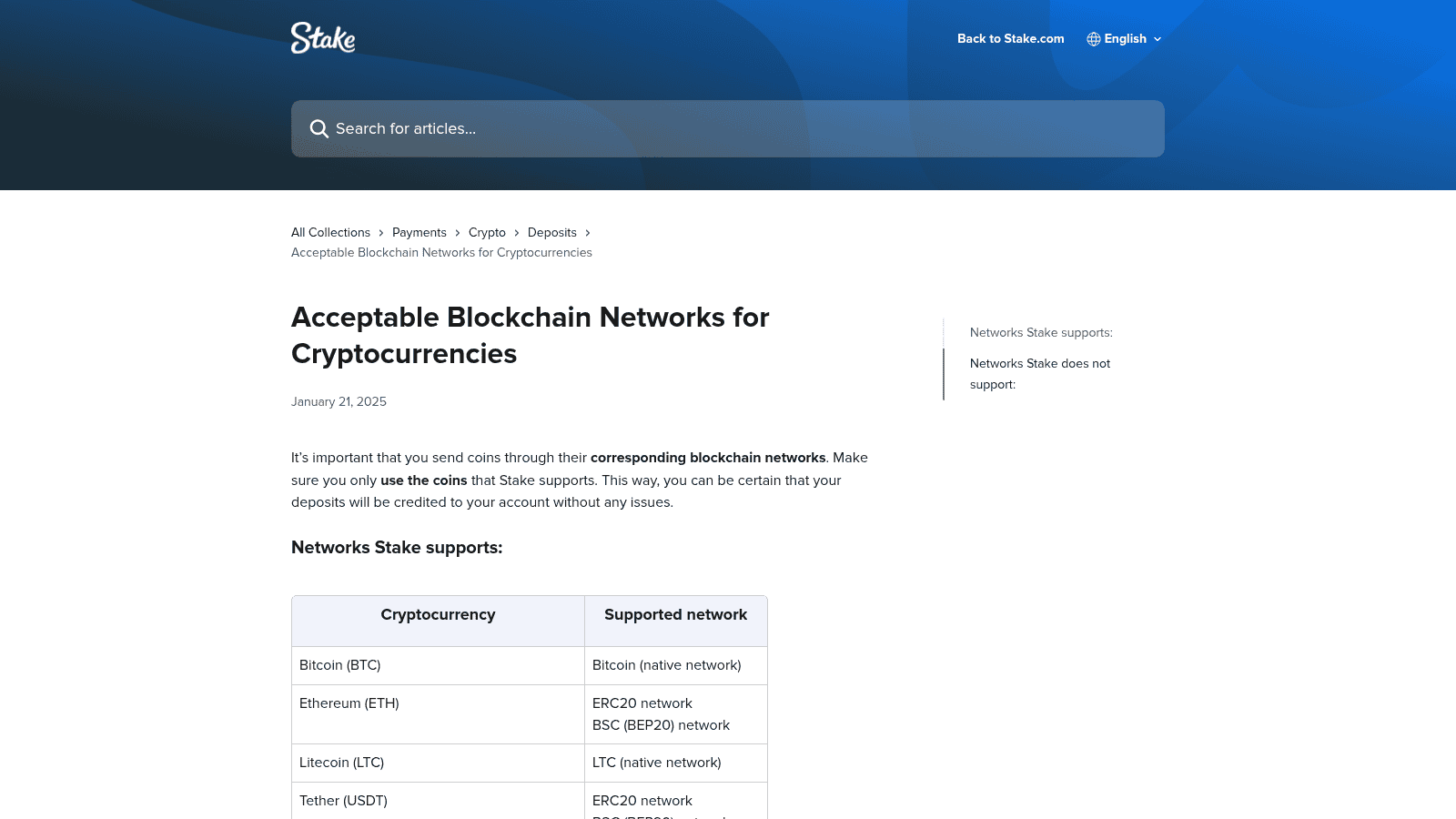
| Cryptocurrency | Supported Networks |
|---|---|
| Bitcoin (BTC) | Bitcoin (native network) |
| Ethereum (ETH) | ERC20, BSC (BEP20) |
| Litecoin (LTC) | LTC (native network) |
| Tether (USDT) | ERC20, BEP20, Polygon, TRC20, Solana |
| Dogecoin (DOGE) | Dogecoin (native network) |
| Bitcoin Cash (BCH) | BCH (native network) |
| Ripple (XRP) | Ripple network |
| EOS | EOS network |
| Tron (TRX) | TRC20 network |
| Binance Coin (BNB) | BSC (BEP20) |
| USD Coin (USDC) | ERC20, BEP20, Polygon, Solana |
| ApeCoin (APE) | ERC20 |
| Cronos (CRO) | ERC20 |
| Dai (DAI) | ERC20, BEP20, Polygon |
| Chainlink (LINK) | ERC20, BEP20 |
| The Sandbox (SAND) | ERC20 |
| Shiba Inu (SHIB) | ERC20, BEP20 |
| Uniswap (UNI) | ERC20, BEP20 |
| Polygon (MATIC) | ERC20, BEP20, Polygon |
| Solana (SOL) | Solana (native network) |
| Binance USD (BUSD) | ERC20 (withdrawals only) |
| TrumpCoin (TRUMP) | Solana |
Seven cryptocurrencies on Stake accept deposits via multiple blockchain networks. USDT is the most flexible, accepting five networks: ERC20, BEP20, Polygon, TRC20, and Solana. USDC accepts four: ERC20, BEP20, Polygon, and Solana. Dai accepts three: ERC20, BEP20, and Polygon. Ethereum accepts ERC20 and BEP20. Chainlink, Shiba Inu, Uniswap, and Polygon each accept two or three networks. This flexibility allows players to choose the network with the lowest fees or fastest confirmation times at the moment of deposit.
Nine cryptocurrencies operate on a single native network only. Bitcoin uses only the Bitcoin network. Litecoin uses the LTC network. Dogecoin uses the Dogecoin network. Bitcoin Cash uses the BCH network. Ripple uses the Ripple network. EOS uses the EOS network. Tron uses the TRC20 network. Solana uses the Solana network. TrumpCoin uses the Solana network. For these coins, there is no choice of network at deposit time, simplifying the process but leaving no room for error.
Stake.com explicitly rejects deposits sent via Arbitrum, Optimism, Base, and the Cronos native network. Sending funds on any of these unsupported networks will result in the deposit failing or the funds being lost. This is a critical safeguard: users who accidentally send crypto via one of these networks will not receive their funds, and Stake.com cannot recover them. Always verify the network in your external wallet or exchange before confirming the transfer.
The six networks Stake.com does not support are: Arbitrum, Optimism, Base, Cronos (native network, not ERC20), and generic ERC20 or BEP20 tokens that are not explicitly listed as supported coins. Arbitrum is a Layer 2 solution for Ethereum. Optimism is another Layer 2 scaling solution. Base is a newer Layer 2 network built on Ethereum. Cronos native network is distinct from CRO tokens on ERC20. Sending any cryptocurrency via these networks to a Stake.com deposit address will fail or result in permanent loss. The platform’s help documentation lists these explicitly to prevent user errors.
If you accidentally sent cryptocurrency to Stake.com via an unsupported network, contact Stake.com’s live support team immediately with your transaction hash and the network you used. While Stake.com cannot recover funds sent on unsupported networks, the support team may be able to provide guidance or document the error for your records. Prevention is far more effective than recovery: always double-check the network selector in your external wallet or exchange before confirming any transfer to Stake.com.
Stake.com accepts USDT on five networks (ERC20, BEP20, Polygon, TRC20, Solana), USDC on four (ERC20, BEP20, Polygon, Solana), and DAI on three (ERC20, BEP20, Polygon). Stablecoins are ideal for players avoiding price volatility. Each stablecoin is pegged to the US Dollar, meaning their value remains stable regardless of broader crypto market swings. This makes them popular with players who want the speed and low fees of cryptocurrency without the price risk of volatile assets.
Tether (USDT) is the most widely used stablecoin globally and the most flexible option on Stake, accepting five separate blockchain networks. ERC20 is the Ethereum network, the original and most common route for USDT. BEP20 is the Binance Smart Chain network, offering lower fees than ERC20. Polygon is a Layer 2 scaling solution for Ethereum with very low transaction costs. TRC20 is the Tron network, known for fast confirmations and minimal fees. Solana is a high-speed blockchain with low costs. Players can choose based on current network congestion and fees at the time of deposit.
USD Coin (USDC) accepts four networks: ERC20, BEP20, Polygon, and Solana. USDC is managed by Centre, a consortium including Coinbase and other major institutions, and is considered a more regulated alternative to Tether. Dai (DAI) accepts three networks: ERC20, BEP20, and Polygon. DAI is a decentralized stablecoin backed by crypto collateral and managed by the Maker protocol, making it fully on-chain and censorship-resistant. Both USDC and DAI offer stability comparable to USDT but with different governance models and backing mechanisms.
Every cryptocurrency on Stake.com has its own minimum withdrawal amount and a fixed network fee. For example, BTC minimum is 0.00002504 BTC with a 0.00001571 BTC fee; USDT minimum is 2.50 with a 1.00 fee. These minimums and fees are determined by blockchain network conditions and are displayed in the wallet section before you confirm any withdrawal. There is no maximum withdrawal limit on Stake.com, and no minimum deposit requirement, giving players full control over their funds.
| Cryptocurrency | Minimum Withdrawal | Withdrawal Fee |
|---|---|---|
| Bitcoin (BTC) | 0.00002504 | 0.00001571 |
| Ethereum (ETH) | 0.00100000 | 0.00067447 |
| Litecoin (LTC) | 0.01857329 | 0.00013800 |
| Tether (USDT) | 2.50 | 1.00 |
| Dogecoin (DOGE) | 5.49925970 | 0.52151198 |
| Bitcoin Cash (BCH) | 0.00405806 | 0.00004000 |
| Ripple (XRP) | 1.00 | 0.00010000 |
| EOS | 1.87644594 | 0.10788480 |
| Tron (TRX) | 7.82408913 | 0.07336170 |
| Binance Coin (BNB) | 0.00335730 | 0.00002542 |
| USD Coin (USDC) | 2.50 | 1.00 |
| ApeCoin (APE) | 1.33849659 | 0.15500000 |
| Cronos (CRO) | 12.38101982 | 6.28000000 |
| Dai (DAI) | 2.50 | 0.80 |
| Chainlink (LINK) | 0.09825748 | 0.05296495 |
| The Sandbox (SAND) | 2.75329187 | 0.74800000 |
| Shiba Inu (SHIB) | 78795.08659000 | 23941.65317000 |
| Uniswap (UNI) | 0.13873145 | 0.00077163 |
| Polygon (MATIC) | 3.56742532 | 0.97322515 |
| Solana (SOL) | 0.01050998 | 0.00000500 |
| Binance USD (BUSD) | 2.50 | 1.00 |
| TrumpCoin (TRUMP) | 0.10 | 0.02500000 |
Stake.com imposes no minimum deposit requirement, meaning you can technically deposit any amount down to a fraction of a coin. However, blockchain network fees mean that very small deposits may not be practical. There is also no maximum withdrawal limit, allowing you to cash out your entire balance at any time subject only to the minimum withdrawal amount for each coin. This flexibility distinguishes Stake from traditional online casinos, which often impose deposit caps or withdrawal limits.
To deposit crypto on Stake.com, go to Wallet > Deposit, select your cryptocurrency, copy the wallet address, choose the correct network in your external wallet or exchange, and send the funds. The process is straightforward but requires careful attention to the network selection step. Rushing through this step is the primary cause of lost deposits.
After selecting your cryptocurrency in Stake’s deposit screen, you will see a list of supported networks for that coin. Your external wallet or exchange will also have a network selector. These must match exactly. For example, if you are depositing USDT and Stake shows ERC20, BEP20, Polygon, TRC20, and Solana as options, you must select one of these five in your external wallet. Selecting Arbitrum, Optimism, or any other network will result in lost funds. Take 10 seconds to verify the network name matches before confirming the transfer.
How to Verify the Network Before Confirming a TransferBefore clicking the final “Send” or “Withdraw” button in your external wallet or exchange, compare the network name displayed in your wallet to the network shown in Stake’s deposit screen. Write down or screenshot the network name from Stake to avoid confusion. If your wallet shows a network name you do not recognize or that does not appear in Stake’s list, do not proceed. Contact Stake’s support team or your wallet provider to clarify before sending any funds.
If you do not own any cryptocurrency, Stake offers a built-in option to purchase crypto directly using MoonPay, a third-party payment processor. Go to Wallet > Buy Crypto, select your preferred cryptocurrency and amount, and follow MoonPay’s prompts. You can fund the purchase using credit cards, debit cards, Apple Pay, or Google Pay. The purchased crypto will appear in your Stake wallet immediately after the transaction clears. This eliminates the need to set up an external wallet or exchange account, making it ideal for beginners.
For beginners, Bitcoin or USDT are the safest choices. For fast, cheap transactions, use Litecoin, Tron, or Solana. For price stability, choose USDT or USDC. The best coin depends on your priorities. There is no universally “best” cryptocurrency for Stake; the right choice depends on your experience level, desired transaction speed, and tolerance for price volatility.
Bitcoin (BTC) is the most recognizable cryptocurrency and the easiest to understand. It is also relatively stable compared to altcoins. Tether (USDT) is another excellent choice for beginners because it is pegged to the US Dollar, eliminating price volatility concerns. Both are widely available on exchanges and have low minimum withdrawal amounts on Stake. Starting with one of these two coins allows you to learn the deposit and withdrawal process without worrying about sudden price swings.
Litecoin (LTC) processes transactions in approximately 2.5 minutes, roughly four times faster than Bitcoin. Tron (TRX) offers near-instant confirmations and minimal fees. Solana (SOL) combines high speed with very low transaction costs. If you plan to make frequent deposits or withdrawals, these three coins minimize both waiting time and network fees. Polygon (MATIC) is also a strong option for low-cost transactions on Stake.
New players on Stake.com can claim a welcome bonus by entering a promo code at registration. The bonus applies to your first deposit regardless of which supported cryptocurrency you use. Stake offers promotional bonuses to new players, and the bonus is credited to your account after you complete your first deposit in any supported cryptocurrency. The specific bonus amount and wagering requirements vary by region and change periodically, so check Stake’s promotions page for current offers.
All Stake.com bonuses come with wagering requirements, meaning you must wager the bonus amount a certain number of times before you can withdraw it. The exact requirements depend on the promotion and your region. All 22 supported cryptocurrencies are eligible for bonus claims, so you can use whichever coin you prefer. Check the bonus terms on Stake.com or contact support to confirm the specific wagering requirement for your bonus before depositing.
Stake.com supports 22 cryptocurrencies: Bitcoin, Ethereum, Litecoin, Dogecoin, Bitcoin Cash, Tron, EOS, Tether, Binance Coin, Cronos, USD Coin, ApeCoin, Dai, Chainlink, The Sandbox, Shiba Inu, Uniswap, Polygon, Solana, XRP, Binance USD (withdrawals only), and TrumpCoin. All can be used for deposits, wagering, and withdrawals.
Yes. Bitcoin (BTC) is fully supported on Stake.com and can be used for deposits, wagering, and withdrawals. Bitcoin operates on its native network only, so there is no choice of blockchain network at deposit time. The minimum withdrawal is 0.00002504 BTC with a 0.00001571 BTC fee.
Yes. Both Tether (USDT) and USD Coin (USDC) are supported on Stake.com. USDT is accepted on five networks (ERC20, BEP20, Polygon, TRC20, Solana), while USDC is accepted on four (ERC20, BEP20, Polygon, Solana). Both are stablecoins pegged to the US Dollar, making them ideal for players who want to avoid price volatility.
Yes. Shiba Inu (SHIB) and TrumpCoin (TRUMP) are both supported on Stake.com. SHIB is accepted on ERC20 and BEP20 networks, while TRUMP operates on the Solana network only. Both are volatile assets and are generally better suited to experienced crypto users.
Each cryptocurrency on Stake.com accepts one or more specific blockchain networks. Bitcoin, Litecoin, Dogecoin, Bitcoin Cash, XRP, EOS, Solana, and TrumpCoin each operate on a single native network. USDT is the most flexible, accepting five networks: ERC20, BEP20, Polygon, TRC20, and Solana. See the full network-per-coin reference table in the article above for all 22 cryptocurrencies.
Sending cryptocurrency to Stake.com via an unsupported network (such as Arbitrum, Optimism, Base, or Cronos native network) will result in the deposit failing or the funds being permanently lost. Stake.com cannot recover funds sent on unsupported networks. Always verify the network in your external wallet or exchange matches one of the networks listed in Stake’s deposit screen before confirming the transfer.
No. Stake.com imposes no minimum deposit requirement. You can technically deposit any amount, even a fraction of a coin. However, blockchain network fees mean that very small deposits may not be practical. There is also no maximum deposit limit.
Yes. Stake.com allows players to swap between supported cryptocurrencies within their account using the platform’s built-in swap tools. This allows you to manage volatility or switch to a faster network when needed without withdrawing to an external wallet.
Yes. Every cryptocurrency on Stake.com has a fixed withdrawal fee that varies by coin and is deducted from your balance. For example, Bitcoin’s fee is 0.00001571 BTC, while USDT’s fee is 1.00. Fees are displayed in the wallet section before you confirm any withdrawal.
Yes. If you do not own any cryptocurrency, you can purchase crypto directly on Stake using MoonPay. Go to Wallet > Buy Crypto, select your preferred cryptocurrency and amount, and complete the purchase using a credit card, debit card, Apple Pay, or Google Pay. The crypto will appear in your Stake wallet immediately after the transaction clears.

Secod has streamed and tested games on Stake extensively, giving him direct insight into the platform’s bonuses, features and gameplay conditions. His experience ensures every Stake review reflects real usage rather than surface level analysis.

© 2018-2026 bonustiime.com








Casiibro is currently offline.
Learn more about them on their channel!
▶ Visit Casiibro's channelOr head to the Stream Hub.