







+18 - Check if the casino you want to register with is eligible in your country.

Stake.com currently accepts 21+ cryptocurrencies including Bitcoin, Ethereum, Litecoin, Tether, Solana, and TrumpCoin. Every coin must be sent via a specific supported blockchain network. Using the wrong network can result in permanent loss of funds. Selecting the incorrect blockchain network for cryptocurrency deposits is one of the most common costly mistakes on the platform.
The platform supports both major cryptocurrencies and newer altcoins, giving players flexibility in how they fund their accounts. Whether you hold Bitcoin or prefer stablecoins like USDT, Stake.com has options. The key is matching your coin to the correct blockchain network before initiating any deposit.
Stake.com’s supported cryptocurrencies span five categories: major coins, stablecoins, fast and low-fee options, altcoins, and meme coins. The complete list includes Bitcoin (BTC), Ethereum (ETH), Litecoin (LTC), Dogecoin (DOGE), Bitcoin Cash (BCH), Tron (TRX), EOS, Tether (USDT), Binance Coin (BNB), Cronos (CRO), USD Coin (USDC), ApeCoin (APE), Dai (DAI), Chainlink (LINK), The Sandbox (SAND), Shiba Inu (SHIB), Uniswap (UNI), Polygon (POL), Solana (SOL), XRP, and TrumpCoin (TRUMP).
Blockchain networks are the infrastructure through which cryptocurrencies travel. Bitcoin exists only on the Bitcoin network, but Ethereum can move across ERC20, BEP20, Polygon, and other networks. Stablecoins like USDT are particularly flexible, running on multiple networks simultaneously. If you send USDT via the Arbitrum network to a Stake.com wallet that only accepts ERC20 or Solana, your funds will not arrive and cannot be recovered. This is not a Stake.com limitation but a fundamental property of blockchain technology: once a transaction is confirmed on an unsupported network, it is irreversible.
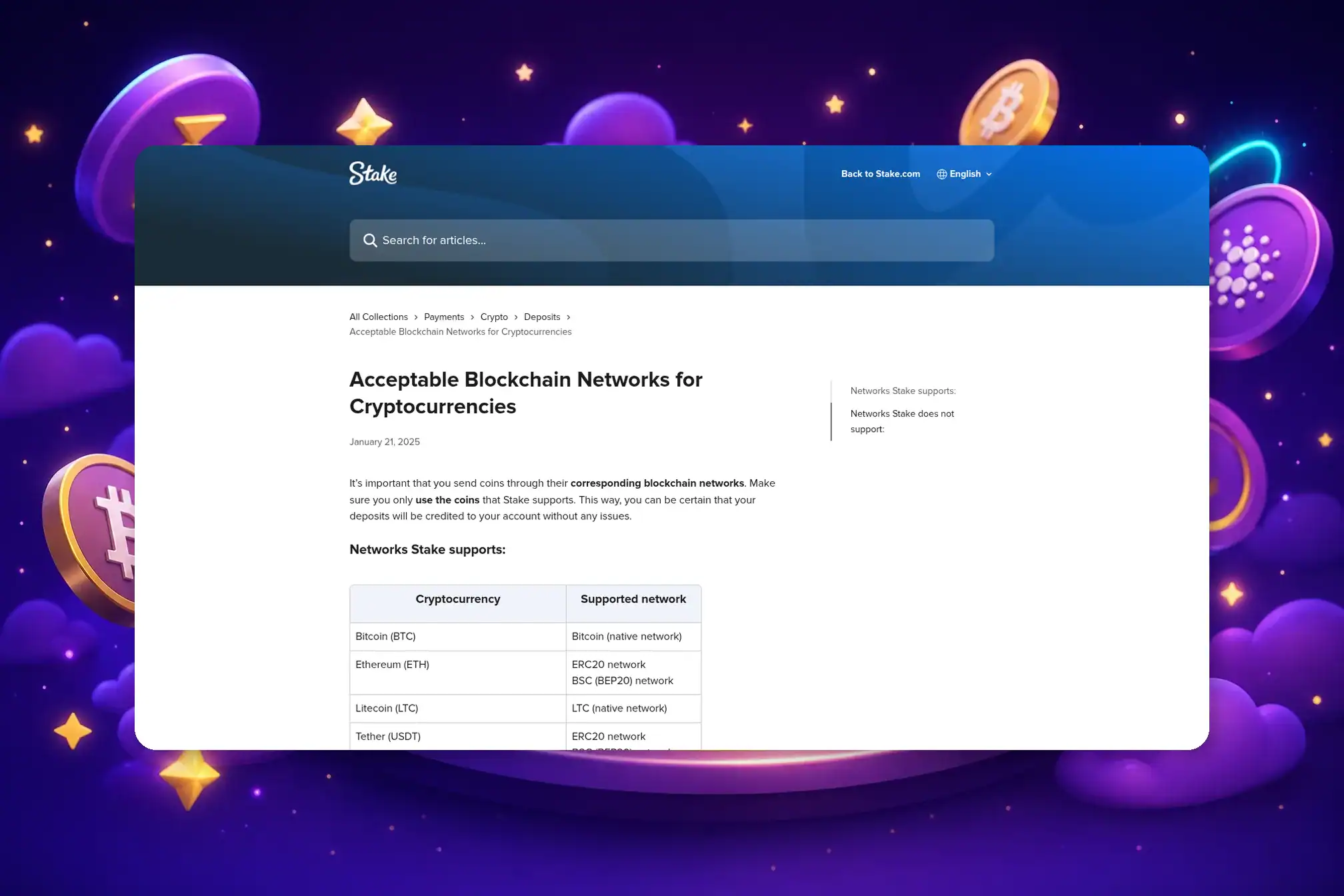
Each cryptocurrency on Stake.com is tied to one or more accepted blockchain networks. Bitcoin uses only its native network; USDT is accepted on five networks including ERC20, TRC20, BEP20, Polygon, and Solana. Understanding this mapping is essential before depositing.
| Cryptocurrency | Supported Blockchain Networks |
|---|---|
| Bitcoin (BTC) | Bitcoin (native network) |
| Ethereum (ETH) | ERC20, BSC (BEP20) |
| Litecoin (LTC) | LTC (native network) |
| Tether (USDT) | ERC20, BSC (BEP20), Polygon, TRC20 (Tron), Solana |
| Dogecoin (DOGE) | Dogecoin (native network) |
| Bitcoin Cash (BCH) | BCH (native network) |
| Ripple (XRP) | Ripple network |
| EOS | EOS network |
| Tron (TRX) | TRC20 network |
| Binance Coin (BNB) | BSC (BEP20) |
| USD Coin (USDC) | ERC20, BSC (BEP20), Polygon, Solana |
| ApeCoin (APE) | ERC20 |
| Binance USD (BUSD) | ERC20 (withdrawals only) |
| Cronos (CRO) | ERC20 |
| Dai (DAI) | ERC20, BSC (BEP20), Polygon |
| Chainlink (LINK) | ERC20, BSC (BEP20) |
| The Sandbox (SAND) | ERC20 |
| Shiba Inu (SHIB) | ERC20, BSC (BEP20) |
| Uniswap (UNI) | ERC20, BSC (BEP20) |
| Polygon (POL) | ERC20, BSC (BEP20), Polygon |
| Solana (SOL) | Solana (native network) |
| TrumpCoin (TRUMP) | Solana |
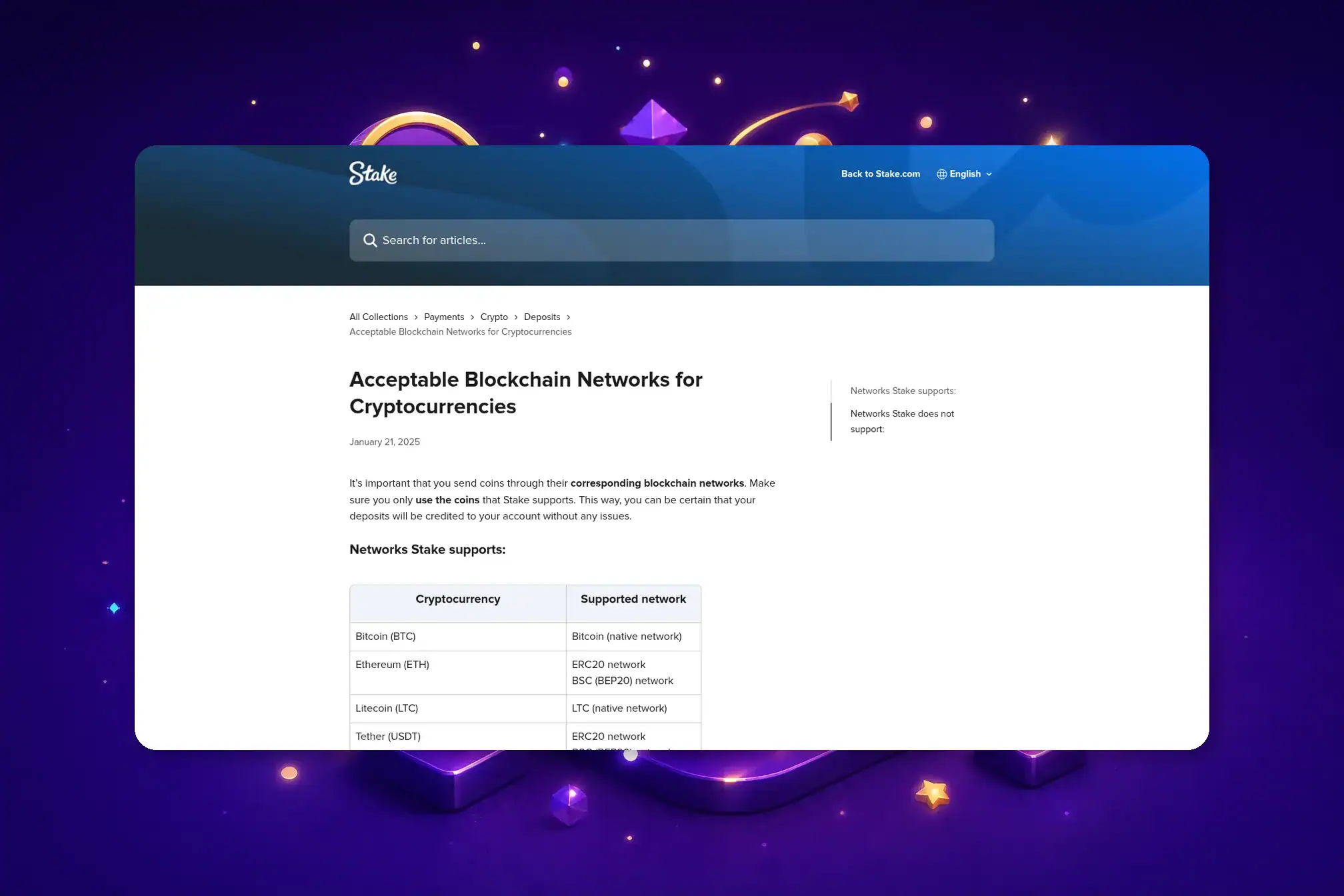
Bitcoin deposits must use the Bitcoin blockchain. There is no alternative network for BTC on Stake.com. If you attempt to send Bitcoin via any other network, the transaction will fail or be lost.
Ethereum (ETH), ERC20 and BEP20Ethereum can be deposited via two networks: ERC20 (the Ethereum mainnet) or BEP20 (Binance Smart Chain). Both are supported. ERC20 is the original Ethereum network; BEP20 is a parallel network operated by Binance with lower fees but slightly longer confirmation times.
Litecoin (LTC), Native Network OnlyLitecoin uses only its native blockchain. Litecoin transactions typically confirm faster than Bitcoin, making it a popular choice for players who prioritize speed over brand recognition.
Tether (USDT), 5 Accepted NetworksTether is the most flexible cryptocurrency on Stake.com, accepted on five separate blockchains: ERC20, BEP20, Polygon, Tron (TRC20), and Solana. This flexibility makes USDT ideal for players who want to minimize network fees. Tron and Solana typically offer the lowest transaction costs.
USD Coin (USDC), 4 Accepted NetworksUSDC is accepted on ERC20, BEP20, Polygon, and Solana networks. Like USDT, USDC is pegged to the US Dollar, eliminating price volatility during gameplay. USDC is managed by Centre, a consortium including Coinbase and Circle.
DAI, ERC20, BEP20, and PolygonDAI is a decentralized stablecoin accepted on three networks. Unlike USDT and USDC, DAI is not issued by a central entity but is instead crypto-collateralized through the Maker protocol.
TRUMP (TrumpCoin), Solana Network OnlyTrumpCoin is the most recently confirmed addition to Stake.com’s supported cryptocurrency list. It runs exclusively on the Solana network. Solana transactions are typically fast and inexpensive, making TRUMP deposits quick to process.
BNB, CRO, SHIB, UNI, LINK, APE, SAND, ERC20 and BEP20 VariantsMost altcoins on Stake.com are supported on either ERC20 or BEP20 networks, or both. Binance Coin (BNB) runs on BEP20 only. Chainlink (LINK), Shiba Inu (SHIB), and Uniswap (UNI) are available on both ERC20 and BEP20. ApeCoin (APE) and The Sandbox (SAND) are ERC20 only. Cronos (CRO) is also ERC20 only on Stake.com.
Stake.com does not support Arbitrum, Optimism, Base, or the Cronos native network. Sending any cryptocurrency via these networks will not credit your account and may result in irreversible loss of funds. This is a critical distinction: Cronos (CRO) is supported on ERC20, but the Cronos blockchain itself is not.
The following blockchain networks are explicitly unsupported on Stake.com:
If you send cryptocurrency to Stake.com via an unsupported network, the transaction will not be credited to your account. Blockchain transactions are immutable once confirmed. Your funds will remain on that network at the Stake.com wallet address, but Stake.com cannot access or return them. This is not a technical error or a temporary hold; it is a permanent consequence of the network mismatch. Contacting Stake.com support may provide guidance, but recovery is not guaranteed and depends on whether the funds can be retrieved from the wallet address on that network.
Each cryptocurrency on Stake.com has its own minimum withdrawal amount and fixed network fee. No maximum withdrawal limit applies. Stablecoins (USDT, USDC) require a 2.50 unit minimum. Bitcoin’s withdrawal fee is 0.00001571 BTC; Solana’s is just 0.000005 SOL. Fees vary widely across assets.
| Cryptocurrency | Minimum Withdrawal | Withdrawal Fee |
|---|---|---|
| Bitcoin (BTC) | 0.00002504 | 0.00001571 |
| Ethereum (ETH) | 0.00100000 | 0.00067447 |
| Litecoin (LTC) | 0.01857329 | 0.00013800 |
| Tether (USDT) | 2.50000000 | 1.00000000 |
| Dogecoin (DOGE) | 5.49925970 | 0.52151198 |
| Bitcoin Cash (BCH) | 0.00405806 | 0.00004000 |
| Ripple (XRP) | 1.00000000 | 0.00010000 |
| EOS | 1.87644594 | 0.10788480 |
| Tron (TRX) | 7.82408913 | 0.07336170 |
| Binance Coin (BNB) | 0.00335730 | 0.00002542 |
| USD Coin (USDC) | 2.50000000 | 1.00000000 |
| ApeCoin (APE) | 1.33849659 | 0.15500000 |
| Cronos (CRO) | 12.38101982 | 6.28000000 |
| Dai (DAI) | 2.50000000 | 0.80000000 |
| Chainlink (LINK) | 0.09825748 | 0.05296495 |
| The Sandbox (SAND) | 2.75329187 | 0.74800000 |
| Shiba Inu (SHIB) | 78795.08659000 | 23941.65317000 |
| Uniswap (UNI) | 0.13873145 | 0.00077163 |
| Polygon (POL) | 3.56742532 | 0.97322515 |
| Solana (SOL) | 0.01050998 | 0.00000500 |
| TrumpCoin (TRUMP) | 0.10000000 | 0.02500000 |
The table above reflects current withdrawal minimums and fees as of January 2026. These values are subject to change based on network conditions and Stake.com’s operational decisions. Always verify the exact amounts on Stake.com before initiating a withdrawal. Fees are deducted directly from your balance, so a withdrawal of 0.001 BTC with a 0.00001571 BTC fee will result in a net transfer of 0.00098429 BTC.
Stake.com does not enforce a minimum deposit amount. Theoretically, you can deposit any amount, even a fraction of a cent. However, blockchain network fees may make very small deposits impractical. For example, depositing 0.00001 BTC would cost more in network fees than the deposit itself. Stablecoins like USDT and USDC are more practical for small deposits due to lower per-transaction fees.
For beginners, Bitcoin or USDT offer the best balance of familiarity and stability. For fast, low-fee transactions, Litecoin, Tron, and Solana are the top choices. Stablecoins eliminate price volatility risk during gameplay. Your choice depends on what you prioritize: brand recognition, transaction speed, fee minimization, or price stability.
Bitcoin is the most recognizable cryptocurrency and the easiest entry point for newcomers. Its network is the most established and secure. Ethereum is the second most familiar option. For players who want to avoid price swings, USDT or USDC are ideal because they maintain a $1 value. These stablecoins let you focus on gameplay without worrying that your balance will fluctuate overnight.
Litecoin offers faster transaction processing than Bitcoin. Tron and Solana are among the fastest options available, with confirmation times under one minute. Solana’s withdrawal fee is the lowest on the platform at 0.000005 SOL. Tron fees are also minimal. If speed and cost are your priorities, these three coins are the optimal choices.
EU and French players benefit from stablecoins like USDT and USDC because they eliminate currency conversion friction. Deposits and withdrawals in stablecoins avoid the need to convert between euros and volatile cryptocurrencies. Litecoin and Solana are also practical for EU players seeking fast, low-cost transactions without the volatility of major coins.
TrumpCoin (TRUMP) is the most recently confirmed addition to Stake.com’s supported cryptocurrency list, running exclusively on the Solana network. Stake.com periodically updates its supported coin list. Always verify in your wallet before depositing to ensure the coin you intend to use is currently supported.
TrumpCoin operates as a meme coin on the Solana blockchain. On Stake.com, TRUMP can only be deposited and withdrawn via Solana. Solana’s fast transaction times make TRUMP deposits quick to process, typically confirming within seconds.
The most reliable way to check for newly supported cryptocurrencies is to visit your Stake.com wallet and click the Deposit tab. The dropdown menu displays all currently supported coins. Stake.com’s official blog also announces new cryptocurrency additions. If you are considering depositing a coin not listed in your wallet, contact Stake.com support to confirm whether it is supported before attempting a deposit.
To deposit crypto on Stake.com, go to your Wallet, click Deposit, select your cryptocurrency, choose the correct blockchain network, then copy the wallet address and send from your exchange or wallet. The process takes fewer than five minutes once you have verified your email and account.
Without existing cryptocurrency, Stake.com offers a partnership with MoonPay, a third-party service that allows you to purchase crypto using credit cards, debit cards, Apple Pay, or Google Pay. To use MoonPay, click the Buy Crypto option in your Wallet, select MoonPay, enter the amount you wish to purchase, and complete the payment process. The purchased crypto is automatically deposited into your Stake.com wallet.
The welcome bonus typically applies to all supported cryptocurrencies on Stake.com. However, bonus terms and eligible coins may vary by region and change over time. After entering the promo code and making your deposit, review the bonus terms displayed in your account to confirm eligibility and any wagering requirements that may apply.
Stake.com accepts 21+ cryptocurrencies including Bitcoin, Ethereum, Litecoin, Dogecoin, Bitcoin Cash, Tron, EOS, Tether, Binance Coin, Cronos, USD Coin, ApeCoin, Dai, Chainlink, The Sandbox, Shiba Inu, Uniswap, Polygon, Solana, XRP, and TrumpCoin. The complete list is available in your Stake.com wallet under the Deposit tab.
Yes. Both Solana (SOL) and Tron (TRX) are fully supported on Stake.com. Solana uses its native blockchain; Tron uses the TRC20 network. Both are known for fast transaction times and low fees, making them popular choices for frequent deposits and withdrawals.
Stake.com does not charge a deposit fee. However, the blockchain network itself may charge a transaction fee (gas fee) to process your deposit. This fee is paid to the network, not to Stake.com, and varies depending on network congestion and the cryptocurrency you are depositing. Withdrawal fees are deducted from your balance and are listed in the withdrawal tab before you confirm.
Verify which network your exchange or wallet is sending from before initiating the transfer.
If you send cryptocurrency via an unsupported network such as Arbitrum, Optimism, or Base, the transaction will not be credited to your Stake.com account. The funds will remain on that network at the wallet address but will be inaccessible. This is a permanent loss unless the funds can be retrieved directly from the wallet address on that network, which is typically not possible for end users. Always verify the supported network before sending.
Stake.com does not enforce a minimum deposit amount. You can deposit any amount, even fractions of a coin. However, blockchain network fees may make very small deposits impractical. For example, a deposit of 0.00001 BTC could cost more in network fees than the deposit itself.
Yes. Stake.com allows you to swap between supported cryptocurrencies within your account using the platform’s built-in swap feature. This lets you convert one coin to another without withdrawing to an external exchange, though a small fee applies to swaps.
Yes. TrumpCoin (TRUMP) is supported on Stake.com exclusively on the Solana network. It is one of the most recently added cryptocurrencies to the platform.
Solana (SOL) and Litecoin (LTC) offer the fastest withdrawal times on Stake.com. Both have low withdrawal fees relative to their transaction speed, making them ideal for players who prioritize quick access to their funds.

Secod has streamed and tested games on Stake extensively, giving him direct insight into the platform’s bonuses, features and gameplay conditions. His experience ensures every Stake review reflects real usage rather than surface level analysis.

© 2018-2026 bonustiime.com








Casiibro is currently offline.
Learn more about them on their channel!
▶ Visit Casiibro's channelOr head to the Stream Hub.